You are currently working on UAT 

"Object reference not set to an instance of an object" 에러 메시지

안녕하세요.

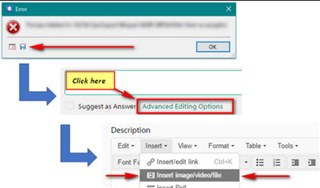
Trados 2019 SR2를 설치하고 처음 파일을 열었을 때 "Object reference not set to an instance of an object" 에러 메시지가 떴습니다. 그래도 파일은 열렸고 세그먼트에 타이핑은 됐는데 컨펌이 되지 않았어요.

SDL 측으로부터 아래 링크에 나와 있는 정보를 참조해보라는 조언을 듣고 따라했습니다. 그랬더니 에러 메시지가 뜨지 않는 거예요. 일단 그렇게 해서 첫 번째 프로젝트는 넘겼습니다.

https://gateway.rws.com/csm?id=kb_article_view&sysparm_article=KB0039395

그런데 두 번째 프로젝트부터 같은 현상이 나타나기 시작하고 이번에는 위의 링크에 나와 있는 정보도 더 이상 통하지 않습니다. SDL 측에 문의했는데 설치 관련 오류가 아니라 도와줄 수 없다며 유저 포럼을 이용해보라고 했습니다.

영어로 문의 글을 남겼으나 제대로 된 답변을 듣지 못해 한글로 다시 남겨봅니다. 다른 분 질문에 SDL Korea 측에서 답변하시는 것 같던데 저도 꼭 문제를 해결했으면 좋겠습니다.

Parents Reply Children
  • Thank you so much for your reply.

    First of all, Trados opens without trouble.

    But if I open any file (an Excel file this time), it gives an error message saying "Object reference not set to an instance of an object."

    I use Microsoft Office 365. My OS is Windows 10. I have received the same error message when I opened PDF, Word, Text files.

    Below are the error details given when I opened the excel file:

    <SDLErrorDetails time="11/6/2019 3:05:56 AM">
      <ErrorMessage>Object reference not set to an instance of an object.</ErrorMessage>
      <Exception>
        <Type>System.NullReferenceException, mscorlib, Version=4.0.0.0, Culture=neutral, PublicKeyToken=b77a5c561934e089</Type>
        <HelpLink />
        <Source>Sdl.TranslationStudio.Editor</Source>
        <HResult>-2147467261</HResult>
        <StackTrace><![CDATA[   at Sdl.TranslationStudio.Editor.TranslationMemory.TranslationMemoryViewPart.UpdateIcon()
       at Sdl.TranslationStudio.Editor.TranslationMemory.TranslationMemoryViewPart.UpdateTranslationProvider()
       at Sdl.TranslationStudio.Editor.TranslationMemory.TranslationMemoryViewPart.OnActiveDocumentChanged()
       at Sdl.TranslationStudio.Editor.TranslationMemory.TranslationMemoryViewPart.editorService_ActiveDocumentChanged(IDocument document)
       at Sdl.TranslationStudio.Api.Editor.DocumentEventHandler.Invoke(IDocument document)
       at Sdl.TranslationStudio.Editor.EditorService.set_ActiveDocument(IDocument value)
       at Sdl.TranslationStudio.Editor.EditorView.OnActiveViewPartChanged(IViewPartReference viewPartReference)
       at Sdl.Desktop.Platform.AbstractViewWithParts.Control_ActiveViewPartChanged(IViewWithParts view, IViewPartReference viewPartReference)
       at Sdl.Desktop.Platform.WinForms.DockingViewContentControl.OnActiveViewPartChanged(IViewPartReference viewPartReference)
       at Sdl.Desktop.Platform.WinForms.DockingViewContentControl.InternalActivateViewPart(IViewPartReference viewPartToActivate)
       at Sdl.Desktop.Platform.WinForms.DockingViewContentControl._tabControl_SelectedTabChanged(Object sender, SelectedTabChangedEventArgs e)
       at Infragistics.Win.UltraWinTabControl.UltraTabControlBase.OnSelectedTabChanged(SelectedTabChangedEventArgs e)
       at Infragistics.Win.UltraWinTabControl.UltraTabControlBase.RaiseEvent(UltraTabControlEventId id, EventArgs e)
       at Infragistics.Win.UltraWinTabControl.UltraTabControlBase.OnManagerSelectedTabItemChanged(Object sender, SelectedTabItemChangedEventArgs e)
       at Infragistics.Win.UltraWinTabs.TabManager.set_SelectedTabItem(ITabItem value)
       at Infragistics.Win.UltraWinTabControl.UltraTabControlBase.SetSelectedTab(UltraTab tab)
       at Infragistics.Win.UltraWinTabControl.UltraTabControlBase.set_SelectedTab(UltraTab value)
       at Sdl.Desktop.Platform.WinForms.DockingViewContentControl.AddViewPartTab(IViewPartReference viewPartReference)
       at Sdl.Desktop.Platform.WinForms.DockingViewContentControl.AddViewPart(IViewPartReference viewPartReference)
       at Sdl.Desktop.Platform.WinForms.DockingViewContentControl.NotifyViewPartAdded(IViewPartReference viewPartReference)
       at Sdl.Desktop.Platform.AbstractViewWithParts.AddViewPart(IViewPartReference viewPartReference)
       at Sdl.Desktop.Platform.AbstractDockingView.AddViewPart(IViewPartReference viewPartReference)
       at Sdl.TranslationStudio.Editor.Shared.InternalEditorContext.AddDocumentViewPart(IDocumentViewPart documentViewPart)
       at Sdl.TranslationStudio.Api.Editor.AbstractInternalDocument.AfterLoad(IJob job)]]></StackTrace>
      </Exception>
      <Environment>
        <ProductName>SDL Trados Studio</ProductName>
        <ProductVersion>15.0.0.0</ProductVersion>
        <EntryAssemblyFileVersion>15.2.0.1041</EntryAssemblyFileVersion>
        <OperatingSystem>Microsoft Windows 10 Home</OperatingSystem>
        <ServicePack>NULL</ServicePack>
        <OperatingSystemLanguage>1033</OperatingSystemLanguage>
        <CodePage>1252</CodePage>
        <LoggedOnUser>Jasmine\Jasmine</LoggedOnUser>
        <DotNetFrameWork>4.0.30319.42000</DotNetFrameWork>
        <ComputerName>JASMINE</ComputerName>
        <ConnectedToNetwork>True</ConnectedToNetwork>
        <PhysicalMemory>4096180 MB</PhysicalMemory>
      </Environment>
    </SDLErrorDetails>


    After I click "OK" on the error message, however, the file opens and I can type in segments. But I cannot confirm segments. If I try to confirm a segment, the same error message "Object reference not set to an instance of an object." appears.

    Below are error details given when I try to confirm segments:

    <SDLErrorDetails time="11/6/2019 3:15:49 AM">
      <ErrorMessage>Object reference not set to an instance of an object.</ErrorMessage>
      <Exception>
        <Type>System.NullReferenceException, mscorlib, Version=4.0.0.0, Culture=neutral, PublicKeyToken=b77a5c561934e089</Type>
        <HelpLink />
        <Source>Sdl.TranslationStudio.Editor</Source>
        <HResult>-2147467261</HResult>
        <StackTrace><![CDATA[   at Sdl.TranslationStudio.Editor.TranslationEditor.SegmentVerifier.Verify(ISegmentContainerNode segmentContainerNode, IParagraphUnitContainerNode paragraphContainerNode, IFileContainerNode fileContainerNode)
       at Sdl.TranslationStudio.Editor.TranslationEditor.TranslatableDocument.VerifySegment(ISegmentContainerNode segmentContainerNode, IParagraphUnitContainerNode paragraphContainerNode, IFileContainerNode fileContainerNode)
       at Sdl.TranslationStudio.Editor.TranslationEditor.SideBySideDocumentEditingView.VerifySegment()
       at Sdl.TranslationStudio.Editor.TranslationEditor.Actions.AbstractConfirmSegmentAction.ExecuteActiveSegment()
       at Sdl.TranslationStudio.Editor.TranslationEditor.Actions.AbstractConfirmSegmentAction.Execute()
       at Sdl.Desktop.Platform.Implementation.CommandBars.ActionService.<>c__DisplayClass30_0.<ExecuteAction>b__0()
       at Sdl.Desktop.Logger.Log.Resources(Object message, Action action)
       at Sdl.Desktop.Platform.Implementation.CommandBars.ActionService.ExecuteAction(IAction action, ActionOrigin origin, Boolean allowToggle)
       at Sdl.Desktop.Platform.Implementation.CommandBars.ActionService.ExecuteActionForShortcut(Keys shortcut)
       at Sdl.Desktop.Platform.WinForms.StudioWindowForm.OnKeyDown(KeyEventArgs e)
       at System.Windows.Forms.Control.ProcessKeyEventArgs(Message& m)
       at System.Windows.Forms.Form.ProcessKeyPreview(Message& m)
       at System.Windows.Forms.Control.ProcessKeyPreview(Message& m)
       at System.Windows.Forms.Control.ProcessKeyPreview(Message& m)
       at System.Windows.Forms.Control.ProcessKeyPreview(Message& m)
       at System.Windows.Forms.Control.ProcessKeyPreview(Message& m)
       at System.Windows.Forms.Control.ProcessKeyPreview(Message& m)
       at System.Windows.Forms.Control.ProcessKeyPreview(Message& m)
       at System.Windows.Forms.Control.ProcessKeyPreview(Message& m)
       at System.Windows.Forms.Control.ProcessKeyPreview(Message& m)
       at System.Windows.Forms.Control.ProcessKeyPreview(Message& m)
       at System.Windows.Forms.Control.ProcessKeyPreview(Message& m)
       at System.Windows.Forms.Control.ProcessKeyPreview(Message& m)
       at System.Windows.Forms.Control.ProcessKeyPreview(Message& m)
       at System.Windows.Forms.Control.ProcessKeyPreview(Message& m)
       at System.Windows.Forms.Control.ProcessKeyPreview(Message& m)
       at System.Windows.Forms.Control.ProcessKeyPreview(Message& m)
       at System.Windows.Forms.Control.ProcessKeyPreview(Message& m)
       at System.Windows.Forms.Control.ProcessKeyMessage(Message& m)
       at System.Windows.Forms.Control.WmKeyChar(Message& m)
       at System.Windows.Forms.Control.WndProc(Message& m)
       at System.Windows.Forms.Control.ControlNativeWindow.OnMessage(Message& m)
       at System.Windows.Forms.Control.ControlNativeWindow.WndProc(Message& m)
       at System.Windows.Forms.NativeWindow.Callback(IntPtr hWnd, Int32 msg, IntPtr wparam, IntPtr lparam)]]></StackTrace>
      </Exception>
      <Environment>
        <ProductName>SDL Trados Studio</ProductName>
        <ProductVersion>15.0.0.0</ProductVersion>
        <EntryAssemblyFileVersion>15.2.0.1041</EntryAssemblyFileVersion>
        <OperatingSystem>Microsoft Windows 10 Home</OperatingSystem>
        <ServicePack>NULL</ServicePack>
        <OperatingSystemLanguage>1033</OperatingSystemLanguage>
        <CodePage>1252</CodePage>
        <LoggedOnUser>Jasmine\Jasmine</LoggedOnUser>
        <DotNetFrameWork>4.0.30319.42000</DotNetFrameWork>
        <ComputerName>JASMINE</ComputerName>
        <ConnectedToNetwork>True</ConnectedToNetwork>
        <PhysicalMemory>4096180 MB</PhysicalMemory>
      </Environment>
    </SDLErrorDetails>

    Thank you again. 

  • Hello @ 

    I cannot pinpoint anything specific from th error stacks unfortunately but as this is affecting all file types I would suggest you ensure the system is completely up to date-

    https://community.sdl.com/product-groups/translationproductivity/w/customer-experience/3392/how-to-part-1-trouble-shoot-unexplained-errors-and-unwanted-behaviour-in-studio-multiterm

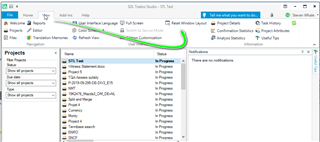
    ...not forgetting to also reset Windows layout-

    Trados Studio screenshot showing the Projects view with a list of files, some marked 'In Progress'. The menu bar highlights the 'Help' tab with an arrow pointing to 'Check for Updates'. No errors visible.

    Then restart your machine and reopen Studio.

    Are the problems resolved?

    Oana Nagy | QA Engineer | RWS Group

    emoji


    Generated Image Alt-Text
    [edited by: Trados AI at 6:59 PM (GMT 0) on 28 Feb 2024]