You are currently working on UAT 

Failed to add window bar extension

Dear All,

After reinstalling Studio 2017, I can't open it and I get the following error message. I have tried the solutions given when possible (I don't see the but nothing seems to work. I have renamed  no '14.0.0' in c:\Users\[USERNAME]\AppData\Roaming\SDL\SDL Trados Studio\14.0.0.0, reinstalled but to no avail.

All help will be appreciated since I have a job in progress.

Best regards

Martha

Parents
  • Hello ,

    As you appear to be having a number of issues- I think it would be worth first ensuring everything is up to date.

    The following SDL Community Wiki's will guide you through this-

    https://community.sdl.com/product-groups/translationproductivity/w/customer-experience/3392/how-to-part-1-trouble-shoot-unexplained-errors-and-unwanted-behaviour-in-studio-multiterm

    Please be advised that you will need to run Windows updates multiple times and restart your machine for the updates to take effect

    Once everything is completely up-to-date- 

    https://gateway.rws.com/csm?id=kb_article_view&sysparm_article=KB0040075

    It might also be worth noting (if this is applicable in your case) that Microsoft is dropping all support for Windows 7 Operating systems in just over two months time (14th January 2020) - which also means SDL will no longer be able to offer any support for Window 7 installations.

    Oana Nagy | QA Engineer | RWS Group

  • Hello Steven,

    I finally found the time to go through your instructions since I had an urgent job to finish (without Studio). I succeeded in reinstalling Studio and although I couldn't create a project  because of the error message below, I could translate a single file until I closed the file. Now when I try to reopen, just a few minutes later, I get the message "This file type is not supported".  Neither the project file or the sdlxliff files seem to work.

    PS: I'm running on Windows 10 With Office 2010

    <SDLErrorDetails time="31/10/2019 22:24:11">
    <ErrorMessage>Unexpected exception when completing task 'Analyser les fichiers': Invalid number of analysis bands.</ErrorMessage>
    <Exception>
    <Type>Sdl.ProjectApi.ProjectApiException, Sdl.ProjectApi, Version=14.0.0.0, Culture=neutral, PublicKeyToken=c28cdb26c445c888</Type>
    <HelpLink />
    <Source>Sdl.ProjectApi.Implementation</Source>
    <HResult>-2146233088</HResult>
    <StackTrace><![CDATA[ à Sdl.ProjectApi.Implementation.TaskExecution.ContentProcessingTaskImplementation.TaskComplete()
    à Sdl.ProjectApi.Implementation.AutomaticTaskExecuter.Execute()]]></StackTrace>
    <InnerException>
    <Type>System.ArgumentException, mscorlib, Version=4.0.0.0, Culture=neutral, PublicKeyToken=b77a5c561934e089</Type>
    <ParamName />
    <HelpLink />
    <Source>Sdl.ProjectApi.AutomaticTasks.Analysis</Source>
    <HResult>-2147024809</HResult>
    <StackTrace><![CDATA[ à Sdl.ProjectApi.AutomaticTasks.Analysis.AnalysisTask.SetAnalysisWordCounts(AnalysisContentProcessorX processor, ITranslatableFile translatableFile, WordCounts newWordCounts)
    à Sdl.ProjectApi.AutomaticTasks.Analysis.AnalysisTask.UpdateFileAnalysisStatistics(AnalysisContentProcessorX processor)
    à Sdl.ProjectApi.AutomaticTasks.Analysis.AnalysisTask.TaskComplete()
    à Sdl.ProjectApi.Implementation.TaskExecution.ContentProcessingTaskImplementation.TaskComplete()]]></StackTrace>
    </InnerException>
    </Exception>
    <Environment>
    <ProductName>SDL Trados Studio</ProductName>
    <ProductVersion>14.0.0.0</ProductVersion>
    <EntryAssemblyFileVersion>14.1.10015.44945</EntryAssemblyFileVersion>
    <OperatingSystem>Microsoft Windows 10 Professionnel</OperatingSystem>
    <ServicePack>NULL</ServicePack>
    <OperatingSystemLanguage>1036</OperatingSystemLanguage>
    <CodePage>1252</CodePage>
    <LoggedOnUser>THINKPAD\Martha</LoggedOnUser>
    <DotNetFrameWork>4.0.30319.42000</DotNetFrameWork>
    <ComputerName>THINKPAD</ComputerName>
    <ConnectedToNetwork>True</ConnectedToNetwork>
    <PhysicalMemory>16639064 MB</PhysicalMemory>
    </Environment>
    </SDLErrorDetails>

Reply
  • Hello Steven,

    I finally found the time to go through your instructions since I had an urgent job to finish (without Studio). I succeeded in reinstalling Studio and although I couldn't create a project  because of the error message below, I could translate a single file until I closed the file. Now when I try to reopen, just a few minutes later, I get the message "This file type is not supported".  Neither the project file or the sdlxliff files seem to work.

    PS: I'm running on Windows 10 With Office 2010

    <SDLErrorDetails time="31/10/2019 22:24:11">
    <ErrorMessage>Unexpected exception when completing task 'Analyser les fichiers': Invalid number of analysis bands.</ErrorMessage>
    <Exception>
    <Type>Sdl.ProjectApi.ProjectApiException, Sdl.ProjectApi, Version=14.0.0.0, Culture=neutral, PublicKeyToken=c28cdb26c445c888</Type>
    <HelpLink />
    <Source>Sdl.ProjectApi.Implementation</Source>
    <HResult>-2146233088</HResult>
    <StackTrace><![CDATA[ à Sdl.ProjectApi.Implementation.TaskExecution.ContentProcessingTaskImplementation.TaskComplete()
    à Sdl.ProjectApi.Implementation.AutomaticTaskExecuter.Execute()]]></StackTrace>
    <InnerException>
    <Type>System.ArgumentException, mscorlib, Version=4.0.0.0, Culture=neutral, PublicKeyToken=b77a5c561934e089</Type>
    <ParamName />
    <HelpLink />
    <Source>Sdl.ProjectApi.AutomaticTasks.Analysis</Source>
    <HResult>-2147024809</HResult>
    <StackTrace><![CDATA[ à Sdl.ProjectApi.AutomaticTasks.Analysis.AnalysisTask.SetAnalysisWordCounts(AnalysisContentProcessorX processor, ITranslatableFile translatableFile, WordCounts newWordCounts)
    à Sdl.ProjectApi.AutomaticTasks.Analysis.AnalysisTask.UpdateFileAnalysisStatistics(AnalysisContentProcessorX processor)
    à Sdl.ProjectApi.AutomaticTasks.Analysis.AnalysisTask.TaskComplete()
    à Sdl.ProjectApi.Implementation.TaskExecution.ContentProcessingTaskImplementation.TaskComplete()]]></StackTrace>
    </InnerException>
    </Exception>
    <Environment>
    <ProductName>SDL Trados Studio</ProductName>
    <ProductVersion>14.0.0.0</ProductVersion>
    <EntryAssemblyFileVersion>14.1.10015.44945</EntryAssemblyFileVersion>
    <OperatingSystem>Microsoft Windows 10 Professionnel</OperatingSystem>
    <ServicePack>NULL</ServicePack>
    <OperatingSystemLanguage>1036</OperatingSystemLanguage>
    <CodePage>1252</CodePage>
    <LoggedOnUser>THINKPAD\Martha</LoggedOnUser>
    <DotNetFrameWork>4.0.30319.42000</DotNetFrameWork>
    <ComputerName>THINKPAD</ComputerName>
    <ConnectedToNetwork>True</ConnectedToNetwork>
    <PhysicalMemory>16639064 MB</PhysicalMemory>
    </Environment>
    </SDLErrorDetails>

Children
  • Hello ,

    I believe the issue is coming from the server based TB- you could try one of two workarounds-

    Deactivate Match Repair before creating the project package

    1. Deactivate Match Repair in
      Project Settings > Language Pairs > All Language Pairs > Match Repair
    2. Create the project package
    3. Reactivate Match Repair

    Deactivate the termbases of the affected project during package creation

    1. Navigate to
      Project Settings > Language Pairs > All Language Pairs > Termbase
    2. Deactivate all server based termbases
    3. Create the project package
    4. Reactivate all the termbases deactivated in step 2

    If you are still having issues, then please log a free licensing and installation ticket via your SDL account and we can look at this in more detail.

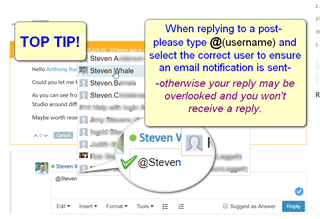
    Screenshot of a tip suggesting to type @username when replying to a post to ensure the user receives an email notification.

    Oana Nagy | QA Engineer | RWS Group

    emoji


    Generated Image Alt-Text
    [edited by: Trados AI at 6:58 PM (GMT 0) on 28 Feb 2024]