You are currently working on UAT 

Problem with batches - Project disappears from project list after renaming

Hi all,

I am working on a very large project with multiple batches and hundreds of files in each package. Unfortunately, the project manager sends each new batch in a project package with the exact same name, so I went to project settings and renamed the project to be able to keep the batches apart. However, after renaming the original project, it disappeared from the project list. When I try to open it with the Open project button, I get the message "This project has already been opened in SDL Trados Studio 2019 and added to the project list". But it is not there. I tried changing the name back to the original name, but still get the same message.

After renaming the original project, I managed to open batch 2 with its own name (project name_batch2), but now I can't remember how I did that. I thought there was an option to browse for a different folder, but now when I go to open package 3, the only option is to Finish, and then all the files end up in the same folder as package 2. Why is this? Do I have to rename each batch before opening the package for the next batch? But then how do I access the previous files again? 

Maybe I could open each package (under a new name) and then take the files from each one and build a new project where each batch is in its own folder but still in the same project? Any other ideas?

Thanks

Erika

Parents
  • Hello

    As for the missing project, is it possible that it is there but the view is filtered somehow?

    Even if you change the project name, and then import another package with the original name, it will still be recognized as part of the first project - it is more than the name itself that Studio uses to match the projects, at least this is what I noticed.

    However - you can still tell the batches apart in Studio, even if you open all packages together and they show up in the same project, together.
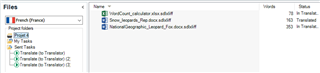
    For example, I have 3 packages coming from the same project, containing 1 file each. I imported all packages together and they appear together in the same project:
    Trados Studio interface showing a project with three files listed under 'Files' with their names, word counts, and 'Translated' status.

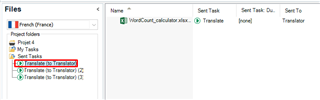
    But as you can see on the side Studio lists the 'tasks', the packages in which I received them. If I click on one of the tasks (package), it will show them the file that came with the package:
    Trados Studio interface with an error message 'DO NOT rename this manually' highlighted in red under 'My Tasks' in a project.

    Could you please try and check this in your Studio?

    Best wishes,
    Greta

    emoji


    Generated Image Alt-Text
    [edited by: Trados AI at 6:37 PM (GMT 0) on 28 Feb 2024]
  • Hi

    Otherwise it is possible to create a new project in your Studio using the files you have received in the packages - but in that case it will not be possible to create a return package to send the files back. Would your customer be okay with that?

    If so, I would suggest extracting the packages as zip packages one by one (they are essentially compressed packages and work the same way as zip files), renaming the target language folder within each to batch 1, batch 2 or similar, and then creating a new project and adding these folders directly to the project.

    If you have further questions please let us know.

    Best wishes,
    Greta

Reply Children