

You are currently working on UAT 

I can't find the segment of an error which the task results window of generate target translations gives me

I want generate target translations but trados gives me an error which I can't find where is it to fix it.

where is the information of related segment?

I press F8 but it does not bring that error, also when i use preview, still it doesn't give the address of related segment. what should I do?
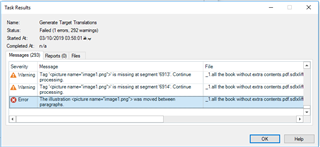
Trados Studio error message window showing three warnings about missing segment images during target translation generation.

I also saved the error file, but I couldn't find relevant information.

I really need your helpHibiscus


Generated Image Alt-Text
[edited by: Trados AI at 6:34 PM (GMT 0) on 28 Feb 2024]

emoji
Parents Reply
  • Hi

    F8 should add the errors to the messages pane in Studio.  Can you confirm you have the messages pane visible?  If not try View -> Reset Window Layout and the try F8 again.

    If you do have the message pane and no messages are in there when you run the verification (F8) then a different approach would be sensible.  I see the source was a PDF from yor error message.  You should find a DOCX file n the same folder as the source PDF as this is created when you open a PDF for translation.

    Copy the DOCX to a new folder somewhere, open it in Word and clean it up a little.  A good tool for this is TransTools (https://appstore.sdl.com/language/app/transtools/543/) and then create a project to translate the DOCX instead of the PDF.  You can pretranslate the file from your Translation memory which should get to pretty close to where you were depending on how much change is caused by the cleanup in Trans-tools.

    In general translating a PDF directly is never a good idea... a better approach is always to convert to DOCX first, clean the DOCX, and then translate the cleaned DOCX instead of the PDF.

    Paul Filkin | RWS

    Design your own training!
    You've done the courses and still need to go a little further, or still not clear? 
    Tell us what you need in our Community Solutions Hub

Children