
 Translate



Hi everyone,
so here's my problem: Say I translate a single file document in Tradost and add new term to the termebase, using a shortcut.
The term shows up immediately in the Termbase viewer, BUT, I can't find a way to simply add subject field to that particular entry. No matter which layout I try (MultiTerm Classic, Full layout, flags layout etc.)
When I click on "Add Subject" in the termbase viewer, I can only choose a label called "general" and can't insert a label of my own:
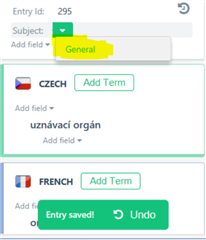
Any ideas on what I'm doing wrong?
Thank you
Vaclav
Generated Image Alt-Text
[edited by: Trados AI at 6:33 PM (GMT 0) on 28 Feb 2024]

