Translate



Hi,
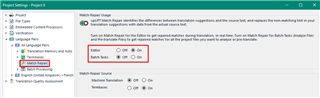
Studio 2019 replaces automatically single words, etc. in a TM match and inserts it into the target segment. This is more a nuisance than a help because in most cases these auto-replaced words are not correct. For example, now I have a long text where only "this device" has been replaced by "the device". And Studio auto-replaces "dieses Gerät" (in the German target) by "der/die/das Gerät". Due to the dashes I can't use double-click and it's much more complicated to replace "dieses" by "das".
I tried unchecking the "variables" in the TM settings and re-indexing the TM but that didn't help. Other than that, is there a global setting where I can disable this feature for ALL future translations, not only for the current project?
Thank you very much,
Markus