 Translate



Good day,
I am working on Trados studio 2019.. Every time I try to export a bilingual file it shows me this kind of file:
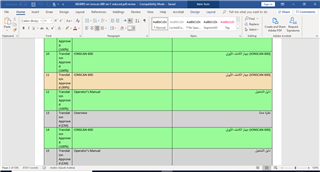
I want the extracted file to look like this:
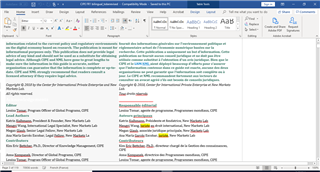
Generated Image Alt-Text
[edited by: Trados AI at 6:35 PM (GMT 0) on 28 Feb 2024]

You are currently working on UAT

Good day,
I am working on Trados studio 2019.. Every time I try to export a bilingual file it shows me this kind of file:
I want the extracted file to look like this:


Every time I try to export a bilingual file it shows me this kind of file:
Yes, that's what this feature is intended to do.
I want the extracted file to look like this
Then you need to develop a plugin for that... or check the AppStore if such plugin already exists.
What is going on here SDL's playground ?
I have made some comments here and there
But, it looks like all of them are conveniently ignored.
Right ?
Hi Ahmed Sa'ad,
There is no app on the SDL AppStore that does this automatically.
There is, however, a way that you can achieve this manually, though the texts won't necessarily be exactly side-by-side because the text length can vary from language to language.
Here is a simple explanation of how:
Create a new Word file. Insert two side-by-side table cells that fill the width of the page.
Open the Source Word file. If you don't have one then with the SDLXLIFF file open in the Editor View, go to File>Advanced Save>Save as Source.
Then, with the SDLXLIFF still open in Editor View, go to File>Save as Target.
Copy the text from the Source file and paste it into the left hand column in your new Word file.
Copy the text from the Target file and paste it into the right hand column in your new Word file.
Now you have a bilingual side-by-side file with nothing but the source and target texts.
You may find it better to use two columns rather than table cells.
The above method keeps the Word formatting, images, etc. but within two columns/cells.
You can add returns to the texts that will bring the two languages into line with each other side by side.
You could keep the text side-by-side in Excel if you don't need the formatting.
To do this, just open Excel then highlight the source text in your SDLXLIFF from the beginning of the text in the first segment down to the end of the text in the last segment.
Then paste this into the first cell of your Excel spreadsheet. Resize the column width to accommodate the text width.
Repeat with the target text, into the first cell of the second column of your Excel spreadsheet.
I doubt this method is of any use to you but thought I'd include it anyway.
All the best,
Alison 
Dear Alison,
Thank you for your explanation. It helped me a lot.
Thank you
Hi Ahmed Sa'ad
great to hear that Ali could help you - that's exactly what this Forum is about. If you mark her answer as "Verify Answer" then other people who look for the answer to the same question can see immediately that in this thread they find an answer to their question. So consider verifying her answer as it helps others to find answers.
Daniel
Hi Ahmed Sa'ad
You're very welcome! I'm glad my workaround helped
All the best,
Ali
Hi Daniel Hug
Thanks for pointing that out, it's helpful!
All the best,
Ali
there is a easy, Very easy way to achieve this goal.
search it.

I have made some comments here and there
But, it looks like all of them are conveniently ignored.
Where? I checked to see if your comments are automatically censored based on the content but could not see any in there either. You have nothing being censored by us either.
Paul Filkin | RWS
Design your own training!
You've done the courses and still need to go a little further, or still not clear?
Tell us what you need in our Community Solutions Hub
nice
you have developed a new kind of cesorship proess
"time lag"
that is very useful
now I wrote a comment
some 3-5 day later you grant it