You are currently working on UAT 

Segmentation exclusion

Hello,

How can I set an exclusion to the Full stop rule to prevent Studio from segmenting after expressions like this:

"(XI.8.)"

See example:
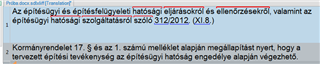
Screenshot of Trados Studio showing a segment split error where the text '(XI.8.)' caused an unintended segmentation after the bracket.

This segment was split after the bracket.

Any help is appreciated.

Sandor


Generated Image Alt-Text
[edited by: Trados AI at 6:29 PM (GMT 0) on 28 Feb 2024]

emoji
Parents
  • Hi 

    As I now know that the answer I've given below is not pertinent to the question you have now asked, I will untick 'suggest as answer' but I'll leave the instructions for what I thought you wanted to know. In case anyone else IS looking for that answer Wink

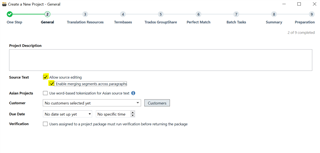
    Unless the text is held within separate containers such as text boxes, you can do this at step two of the Project Creation Wizard:

    Trados Studio Project Creation Wizard with options 'Allow source editing' and 'Enable merging segments across paragraphs' checked.

    So, under 'Create a new project - general', you select first 'Allow source editing' then 'Enable merging segments across paragraphs'

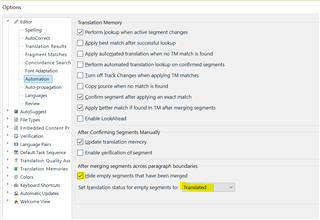
    Also, before that, you can decide what to do with the empty segments, whether to show them or hide them. Here is where you do this via File>Options>Editor>Automation>After merging segments across paragraph boundaries:

    Trados Studio Options menu showing Editor settings with 'After merging segments across paragraph boundaries' options, including hiding empty segments.

    Tick the box to hide them or untick it to keep them visible in the Editor window.

    You will see below that you can choose what status to give to the empty segments also.

    I hope this helps,

    All the best,

    Alison Slight smile

    emoji


    Generated Image Alt-Text
    [edited by: Trados AI at 6:29 PM (GMT 0) on 28 Feb 2024]
Reply
  • Hi 

    As I now know that the answer I've given below is not pertinent to the question you have now asked, I will untick 'suggest as answer' but I'll leave the instructions for what I thought you wanted to know. In case anyone else IS looking for that answer Wink

    Unless the text is held within separate containers such as text boxes, you can do this at step two of the Project Creation Wizard:

    Trados Studio Project Creation Wizard with options 'Allow source editing' and 'Enable merging segments across paragraphs' checked.

    So, under 'Create a new project - general', you select first 'Allow source editing' then 'Enable merging segments across paragraphs'

    Also, before that, you can decide what to do with the empty segments, whether to show them or hide them. Here is where you do this via File>Options>Editor>Automation>After merging segments across paragraph boundaries:

    Trados Studio Options menu showing Editor settings with 'After merging segments across paragraph boundaries' options, including hiding empty segments.

    Tick the box to hide them or untick it to keep them visible in the Editor window.

    You will see below that you can choose what status to give to the empty segments also.

    I hope this helps,

    All the best,

    Alison Slight smile

    emoji


    Generated Image Alt-Text
    [edited by: Trados AI at 6:29 PM (GMT 0) on 28 Feb 2024]
Children