You are currently working on UAT 

Working in batch mode creates merged files!

Hi,

Since I upgraded to Trados Studio 2019, when I open multiple files at the same time in order to work in batch mode, the files show as merged SDLXLIFF files that contain all of the content in a single file rather than separate files. Has anyone else encountered this? It is really weird and is creating problems with my deliveries to clients, as I don't know how to fix these files.

Can anyone please advise? I repaired the installation already.

Thanks in advance,

Rosa

Parents
  • Hi

    If I have understood correctly what you are referring to, this is OK. When you open several SDLXLIFF files together in Studio 2019, they appear to be open as one file. This is what we call a 'virtual merge' and as soon as you save, each of the files is automatically updated as usual. The files have not become one file, they just look that way in the Editor view. Each file is still separate, don't worry.

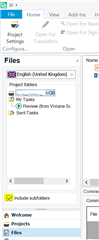
    Another useful feature of Studio 2019 is that a 'virtual merge' can also be achieved even with files that are in separate folders within a project, by ticking the 'include subfolders' box:

    Trados Studio screenshot showing the 'Files' view with multiple SDLXLIFF files listed, and the 'Include subfolders' checkbox ticked under the 'View' tab.

    I hope this helps!

    All the best,

    Alison Slight smile

    emoji


    Generated Image Alt-Text
    [edited by: Trados AI at 6:30 PM (GMT 0) on 28 Feb 2024]
  • Hi Alison,

    Thanks for your reply!

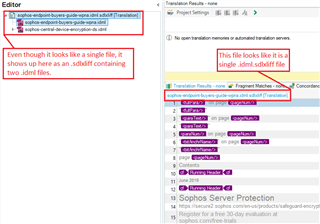
    The "virtual merge" you're describing is the normal scenario. What's happened here is that the merge has been forced into each individual sdlxliff.

    I'm including a marked up screenshot of the corrupted file. Where the file name shows up in the editor, it will typically say "multiple files" when working in the virtual merge. The problem here is that the merge still exists in the single sdlxliff.

    I hope the attached screenshot will help clarifying this:

    Screenshot of Trados Studio editor showing a file name with an error indicating a forced merge into a single sdlxliff instead of a virtual merge.

    Can you provide any info or help on this? I have never encountered this before and I've been using Trados Studio for many years!

    Thanks in advance,

    Rosa

    emoji


    Generated Image Alt-Text
    [edited by: Trados AI at 6:30 PM (GMT 0) on 28 Feb 2024]
Reply
  • Hi Alison,

    Thanks for your reply!

    The "virtual merge" you're describing is the normal scenario. What's happened here is that the merge has been forced into each individual sdlxliff.

    I'm including a marked up screenshot of the corrupted file. Where the file name shows up in the editor, it will typically say "multiple files" when working in the virtual merge. The problem here is that the merge still exists in the single sdlxliff.

    I hope the attached screenshot will help clarifying this:

    Screenshot of Trados Studio editor showing a file name with an error indicating a forced merge into a single sdlxliff instead of a virtual merge.

    Can you provide any info or help on this? I have never encountered this before and I've been using Trados Studio for many years!

    Thanks in advance,

    Rosa

    emoji


    Generated Image Alt-Text
    [edited by: Trados AI at 6:30 PM (GMT 0) on 28 Feb 2024]
Children