
 Translate



Having had problems with SDL Studio 2019 SR2 crashing constantly in Project View, the Problem has now got worse that it crashes every time I create a new Project.
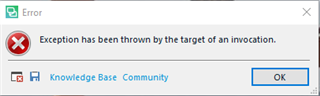
<SDLErrorDetails time="24.09.2019 10:37:05">
<ErrorMessage>Exception has been thrown by the target of an invocation.</ErrorMessage>
<Exception>
<Type>System.Reflection.TargetInvocationException, mscorlib, Version=4.0.0.0, Culture=neutral, PublicKeyToken=b77a5c561934e089</Type>
<HelpLink />
<Source>mscorlib</Source>
<HResult>-2146232828</HResult>
<StackTrace><![CDATA[ at System.RuntimeTypeHandle.CreateInstance(RuntimeType type, Boolean publicOnly, Boolean noCheck, Boolean& canBeCached, RuntimeMethodHandleInternal& ctor, Boolean& bNeedSecurityCheck)
at System.RuntimeType.CreateInstanceSlow(Boolean publicOnly, Boolean skipCheckThis, Boolean fillCache, StackCrawlMark& stackMark)
at System.RuntimeType.CreateInstanceDefaultCtor(Boolean publicOnly, Boolean skipCheckThis, Boolean fillCache, StackCrawlMark& stackMark)
at System.Activator.CreateInstance[T]()
at Sdl.Desktop.Platform.Settings.SettingsPageReference`1.Initialize()
at Sdl.Desktop.Platform.Implementation.Settings.AbstractSettingsHost.EnsurePageInitialized(ISettingsPageReference r)
at Sdl.Desktop.Platform.Implementation.Settings.AbstractSettingsHost.ActivateSettingsPageCategory(String[] path)
at Sdl.TranslationStudio.ProjectManagement.ProjectWizard.TranslationResources.TranslationSourcesWizardPage.SelectTranslationMemorySettingsPage()
at Sdl.TranslationStudio.ProjectManagement.ProjectWizard.TranslationResources.TranslationSourcesWizardPage.GetControl()
at Sdl.Desktop.Platform.WPF.ViewModel.WPFWizardFormViewModel`1.ReloadCurrentPage(IWizardPageReference`1 wizardPageReference, Boolean newIstance)
at Sdl.Desktop.Platform.Wizard.AbstractWizard`1.ReloadCurrentPage(Boolean newInstance)
at Sdl.Desktop.Platform.Wizard.AbstractWizard`1.LoadCurrentPage(Int32 index, IWizardPageReference`1 page)
at Sdl.Desktop.Platform.Wizard.AbstractWizard`1.Next()
at Sdl.Desktop.Platform.Wizard.AbstractWizard`1._form_Next(Object sender, CancelEventArgs e)
at Sdl.Desktop.Platform.WPF.ViewModel.WPFWizardFormViewModel`1.Execute_NextCommand()
at Sdl.Desktop.Platform.MVVM.DelegateCommand.<>c__DisplayClass1_0.<.ctor>b__0(Object x)
at Sdl.Desktop.Platform.MVVM.DelegateCommand`1.Execute(Object parameter)
at MS.Internal.Commands.CommandHelpers.CriticalExecuteCommandSource(ICommandSource commandSource, Boolean userInitiated)
at System.Windows.Controls.Primitives.ButtonBase.OnClick()
at System.Windows.Controls.Button.OnClick()
at System.Windows.Controls.Primitives.ButtonBase.OnMouseLeftButtonUp(MouseButtonEventArgs e)
at System.Windows.UIElement.OnMouseLeftButtonUpThunk(Object sender, MouseButtonEventArgs e)
at System.Windows.Input.MouseButtonEventArgs.InvokeEventHandler(Delegate genericHandler, Object genericTarget)
at System.Windows.RoutedEventArgs.InvokeHandler(Delegate handler, Object target)
at System.Windows.RoutedEventHandlerInfo.InvokeHandler(Object target, RoutedEventArgs routedEventArgs)
at System.Windows.EventRoute.InvokeHandlersImpl(Object source, RoutedEventArgs args, Boolean reRaised)
at System.Windows.UIElement.ReRaiseEventAs(DependencyObject sender, RoutedEventArgs args, RoutedEvent newEvent)
at System.Windows.UIElement.OnMouseUpThunk(Object sender, MouseButtonEventArgs e)
at System.Windows.Input.MouseButtonEventArgs.InvokeEventHandler(Delegate genericHandler, Object genericTarget)
at System.Windows.RoutedEventArgs.InvokeHandler(Delegate handler, Object target)
at System.Windows.RoutedEventHandlerInfo.InvokeHandler(Object target, RoutedEventArgs routedEventArgs)
at System.Windows.EventRoute.InvokeHandlersImpl(Object source, RoutedEventArgs args, Boolean reRaised)
at System.Windows.UIElement.RaiseEventImpl(DependencyObject sender, RoutedEventArgs args)
at System.Windows.UIElement.RaiseTrustedEvent(RoutedEventArgs args)
at System.Windows.Input.InputManager.ProcessStagingArea()
at System.Windows.Input.InputManager.ProcessInput(InputEventArgs input)
at System.Windows.Input.InputProviderSite.ReportInput(InputReport inputReport)
at System.Windows.Interop.HwndMouseInputProvider.ReportInput(IntPtr hwnd, InputMode mode, Int32 timestamp, RawMouseActions actions, Int32 x, Int32 y, Int32 wheel)
at System.Windows.Interop.HwndMouseInputProvider.FilterMessage(IntPtr hwnd, WindowMessage msg, IntPtr wParam, IntPtr lParam, Boolean& handled)
at System.Windows.Interop.HwndSource.InputFilterMessage(IntPtr hwnd, Int32 msg, IntPtr wParam, IntPtr lParam, Boolean& handled)
at MS.Win32.HwndWrapper.WndProc(IntPtr hwnd, Int32 msg, IntPtr wParam, IntPtr lParam, Boolean& handled)
at MS.Win32.HwndSubclass.DispatcherCallbackOperation(Object o)
at System.Windows.Threading.ExceptionWrapper.InternalRealCall(Delegate callback, Object args, Int32 numArgs)
at System.Windows.Threading.ExceptionWrapper.TryCatchWhen(Object source, Delegate callback, Object args, Int32 numArgs, Delegate catchHandler)
at System.Windows.Threading.Dispatcher.LegacyInvokeImpl(DispatcherPriority priority, TimeSpan timeout, Delegate method, Object args, Int32 numArgs)
at MS.Win32.HwndSubclass.SubclassWndProc(IntPtr hwnd, Int32 msg, IntPtr wParam, IntPtr lParam)
at System.Windows.Forms.UnsafeNativeMethods.DispatchMessageW(MSG& msg)
at System.Windows.Forms.Application.ComponentManager.System.Windows.Forms.UnsafeNativeMethods.IMsoComponentManager.FPushMessageLoop(IntPtr dwComponentID, Int32 reason, Int32 pvLoopData)
at System.Windows.Forms.Application.ThreadContext.RunMessageLoopInner(Int32 reason, ApplicationContext context)
at System.Windows.Forms.Application.ThreadContext.RunMessageLoop(Int32 reason, ApplicationContext context)
at Sdl.Desktop.Platform.Implementation.Studio.Run()
at Sdl.TranslationStudio.Application.Launcher.RunApplication()]]></StackTrace>
<InnerException>
<Type>System.InvalidOperationException, mscorlib, Version=4.0.0.0, Culture=neutral, PublicKeyToken=b77a5c561934e089</Type>
<HelpLink />
<Source>System.Core</Source>
<HResult>-2146233079</HResult>
<StackTrace><
at Sdl.TranslationStudio.Common.TranslationMemory.TranslationMemoriesControl..ctor()
at Sdl.TranslationStudio.ProjectManagement.Settings.TranslationMemoriesSettingsPageControl.InitializeComponent()
at Sdl.TranslationStudio.ProjectManagement.Settings.TranslationMemoriesSettingsPageControl..ctor()
at Sdl.TranslationStudio.ProjectManagement.Settings.TranslationMemoriesSettingsPage..ctor()]]></StackTrace>
</InnerException>
</Exception>
<Environment>
<ProductName>SDL Trados Studio</ProductName>
<ProductVersion>15.0.0.0</ProductVersion>
<EntryAssemblyFileVersion>15.2.0.1041</EntryAssemblyFileVersion>
<OperatingSystem>Microsoft Windows 10 Enterprise</OperatingSystem>
<ServicePack>NULL</ServicePack>
<OperatingSystemLanguage>1031</OperatingSystemLanguage>
<CodePage>1252</CodePage>
<LoggedOnUser>FMA\bailey</LoggedOnUser>
<DotNetFrameWork>4.0.30319.42000</DotNetFrameWork>
<ComputerName>N001954</ComputerName>
<ConnectedToNetwork>True</ConnectedToNetwork>
<PhysicalMemory>16633144 MB</PhysicalMemory>
</Environment>
</SDLErrorDetails>
To try to solve this issue, I have:
- renamed the Project Templates folder to "Project Templates Old" to hopefully establish a new Default one.
- Removed all other Projects from Project view
- Tried manually setting the folder names (i.e. not using autofill)
I'm wondering whether I Need to have a reinstall done of Studio 2019 SR2, since it seems to be causing nothing but problems.
I'm using SDL Trados Studio 2019 Professional
and recently upgraded to SR2 15.2.0.1041



