You are currently working on UAT 

Source file/path of TM units not displayed in Studio 2015

Hi all,

I recently transferred my Studio licence to a new computer and was offered a free upgrade from Studio 2014 SP1 to Studio 2015 SR3, which I accepted. Installation worked fine and the existing TMs can be accessed without major problems.

However, the source file/path of the Translation Units (TUs) within the different TMs is no longer displayed, except for files that had been aligned, but not for the TUs that were included in the TM upon translating. The only reference I can see is the date of creation and the source TM (usually my master TM). When working with different versions of the same document, I like to see which previous version the TM proposal is taken from.

The same happens with new TUs that are included in the TM when working with Studio 2015: there is no hint regarding the source document. So the fact that the location of the source files on the new computer has changed can’t be the reason.

The source files are all Word files, by the way.

Any suggestions on how to fix this?


Regards,

Andrés

Parents Reply
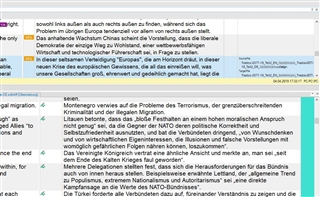
  • Screenshot of Trados Studio showing an additional column on the right of the TM results with a blue background Translation Unit displaying source and target file names for sdlalign files.

    Hello Steven,

    As you can see in this screenshot from the upper right quarter of the screen, there is an additional column on the right of the TM results. For the Translation Unit with the blue blackground you can see the source and target file, for the other segments no information is displayed. The source and target files are now only displayed in case of sdlalign files, but not for the files translated by myself.

    As far as I understand, the name of the source/target file is "stamped" on each Translation Unit. It doesn't make sense to me that the TUs are retrieved, but not the information associated to them.

    My TMs are all stored on the PC, but on a different drive than before (D: instead of C:). Their folder is, as far as I remember,  the default location assigned by Trados upon installing (D:/Users/User/Documents/Studio 2015/Upgrade Translation Memories).

    My OS is Win10, on the old PC with Studio 2014 I used Win7, if this is of any help.

    Regards,

    Andrés

    emoji


    Generated Image Alt-Text
    [edited by: Trados AI at 6:30 PM (GMT 0) on 28 Feb 2024]
Children
  • Hi Alison,

    Thanks a lot for taking care of the previous comment - I usually ignore these.

    Regarding Multiterm, I have never used it, which is why I haven't installed it on the new computer. Do you really think the source path issue might be related to Multiterm?

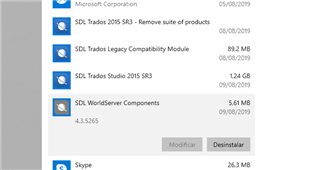
    Unfortunately, the Repair you are suggesting does not work with my version of Windows. For all 4 SDL Apps that were installed by default, the "modify" option (which supposedly leads to a "repair" option) is grayed out and there is no right-click option either:

    Screenshot showing a list of SDL applications installed on a computer, with the 'modify' option grayed out for SDL Trados Studio 2015 SR3 and other SDL apps.

    One day, when I have no jobs in the pipeline, I might consider a complete reinstall of Studio.

    Thanks again for your input!

    All the best,

    Andrés

    emoji


    Generated Image Alt-Text
    [edited by: Trados AI at 6:31 PM (GMT 0) on 28 Feb 2024]
  • Hi 

    I'm sorry, I didn't see your reply. I've been hyper-busy these last few weeks.

    I recommend installing MultiTerm because it is so useful. I don't know whether not having it installed at all would cause issues with Studio 2015.

    However, it is SO useful as it expands the functionality of Studio. Even if your clients don't give you glossaries, you can create your own to ensure better consistency. I always make my own client-dedicated glossaries and find them invaluable. 

    Here is the MultiTerm 2015 online manuel: SDL MultiTerm 2015

    And Studio 2015: SDL Trados Studio 2015 SR2

    Some of the links may not work, this online documentation was set up before the SDL site was redesigned.

    Were you able to resolve your original problem? If not...

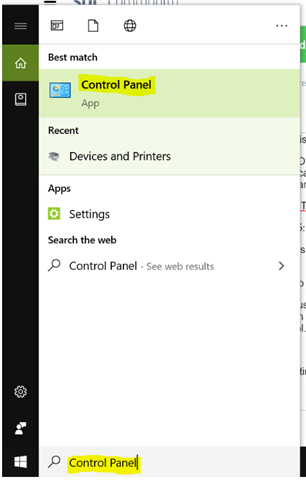
    It is possible to use 'Windows Repair' on the newest version of Windows 10. You just need to type 'Control Panel' in the 'Type here to search' line at the left hand end of your bottom toolbar next to the Windows symbol.

    Windows search bar showing 'Control Panel' as the best match with recent apps and web results below.

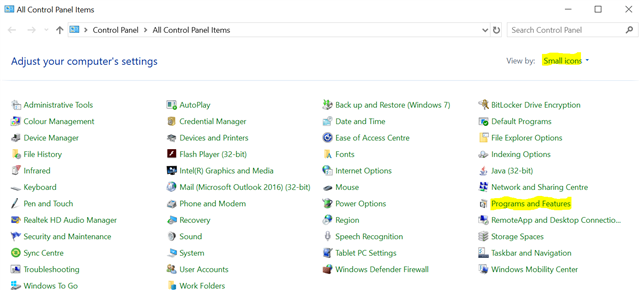
    Then, if 'Small icons' is not set under 'View by', select it then click on 'Programs and Features':

    Control Panel window with 'View by: Small icons' selected, showing various system settings including 'Programs and Features'.

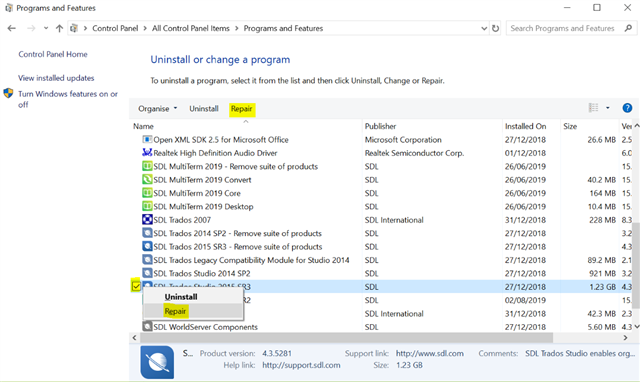
    In the list that appears, highlight 'Studio 2015' and select 'Repair' on the top toolbar OR right-click on 'Studio 2015' and select 'Repair' from the dropdown menu that appears.

    Programs and Features list with 'SDL Trados Studio 2015 SR2' highlighted and 'Repair' option selected on the top toolbar.

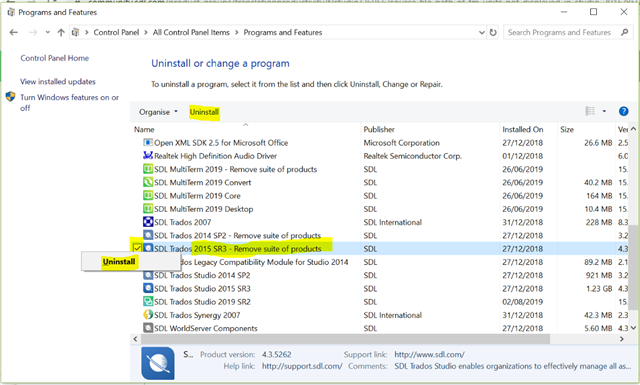
    If that doesn't work then you decide to reinstall, do this by doing the same as above on the 'Remove Suite of Products' entry, not on the program entry you clicked to repair.

    Programs and Features list with 'SDL Trados 2015 SR2 - Remove suite of products' highlighted and 'Uninstall' option selected on the top toolbar.

    If then if that doesn't work you can contact installation and licensing help as I described above.

    All the best,

    Ali Slight smile

    emoji


    Generated Image Alt-Text
    [edited by: Trados AI at 6:31 PM (GMT 0) on 28 Feb 2024]
  • Hi Alison,

    I very much appreciate your help. This time I did find the "repair" option in Windows, but as far as I can see, the repair of the 3 SDL elements that offer this option didn't change anything within Studio.

    Regarding MultiTerm, I am sure it is very useful for many translators, but I am quite happy with the concordance search, and most of the terminology I need can easily be found online. Since I deem it highly unlikely that MultiTerm has anything to do with my issue, I do no see any reason to install it.

    A complete reinstall of Studio might make more sense, but I would lose the customisation. Given the plethora of bugs and issues reported, also on later versions, I am very lucky that the software is running at all and - in very general terms - doing what it is supposed to do.

    What I will probably do is to install the Plug-in "RecordTU" so I can at least see the source of the TUs created from now on.

    Regards,

    Andrés