
 Translate



I am quoting for a job containing well over 500 small HTML files and I would like to be able to identify which of these files contain more new words, which contain more repetitions, which are empty, etc.
The structure of Analyze Files in Reports makes it very difficult to perform an in-depth analysis in Excel (and additionally it is unable to export a report with 500 files)..
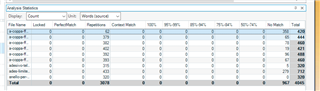
The structure of the Analyze Files in Reports Window instead would be quite ideal. However, it does not allow you to sort on any column other than file name.
I also have not been able to find any way to export it. If I could export it, I could feed it to Excel and be able to study it.
Is it possible? It seems such a basic thing...
Or Is there a plug in that does it?
Thanks!
Lorenzo
Generated Image Alt-Text
[edited by: Trados AI at 6:05 PM (GMT 0) on 28 Feb 2024]


