 Translate



Hello,
I have problems with Autossugest functioning. I use for translation of a segment and when I move to the following segment is not working anymore. Am I doing something wrong? How can I fix this?
Thanks,
Bogdan Aanei
You are currently working on UAT

Hello,
I have problems with Autossugest functioning. I use for translation of a segment and when I move to the following segment is not working anymore. Am I doing something wrong? How can I fix this?
Thanks,
Bogdan Aanei
Hello Bogdan Aanei
Is it possible that the reason why you don't get a result in the next segment is because there are no AutoSuggest matches?
If there are surely matches, so that is not the problem, does this happen with every file you translate - AutoSuggest stopping halfway through?
Could you please try resetting the window layout (View > Reset window layout) and see if that helps?
Best wishes,
Greta

It can't be no existing AutoSuggest matches, since many the words in the mentioned segment were already translated in the previous segment, which has been confirmed, therefore included in the TM. It does not happening with all segments, only with some of them. It happens with all files to be translated

Hello Bogdan Aanei
Depending on your computer it might be that AutoSuggest loads the suggestions slower.
Also, could you please confirm where you are getting your matches from? Is it from the memory and from the termbase, or do you have custom dictionaries as well?
Could you please confirm that if you have a termbase match in your segment, the AutoSuggest offers it to you when you start typing?
If not, does resetting the window layout help?
Which version of Studio are you using? (Help>About SDL Trados Studio)
Best wishes,
Greta
I have Studio 2019. I have just installed the Multiterm now and it seems that I have on every segment termbase matches, so this is a positive sign. If it happens again I will try to reset the window layout help, but first tell, please, what is „window layout help” and how can I reset it.
I have another serious problem with AutoSuggest Dictionary. Although I have generated it already (since I have more than 10000 translation units in my TM) when translating I get no suggestions from AutoSuggest Dictionary at all. How can I fix this problem?
Thanks,
Bogdan

View Reset Window Layout can be found here in the View menu:

All it does is reset the different views and windows in Studio to their default position which can often resolve problems in Studio.
I have another serious problem with AutoSuggest Dictionary. Although I have generated it already (since I have more than 10000 translation units in my TM) when translating I get no suggestions from AutoSuggest Dictionary at all. How can I fix this problem?
Have you activated it here?
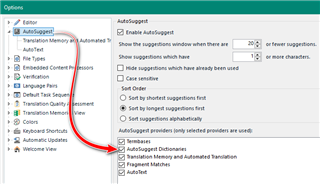
If you have are you sure that the content from your AutoSuggest Dictionary is useful for the content you are translating?
Paul Filkin | RWS
Design your own training!
You've done the courses and still need to go a little further, or still not clear?
Tell us what you need in our Community Solutions Hub

Hi Paul,
I have activated the AutoSuggest Dictionary. How can I be sure that the content from your AutoSuggest Dictionary is useful for the content I am translating? I have generated automatically the AutoSuggest Dictionary and I don't know its content. Is there a possibility to view its content?
Best regards,
Bogdan
Hi Paul,
I have figured it out. I have to add the AutoSuggest Dictionary to the project.
Best regards,
Bogdan