 Translate



I have this error when I open the target file into Word Office 365.
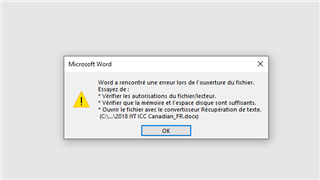
What do I need to do to open it.
Thank you.
Francois
Generated Image Alt-Text
[edited by: Trados AI at 6:19 PM (GMT 0) on 28 Feb 2024]

You are currently working on UAT

I have this error when I open the target file into Word Office 365.
What do I need to do to open it.
Thank you.
Francois
https://gateway.rws.com/csm?id=kb_article_view&sysparm_article=KB0036581
https://gateway.rws.com/csm?id=kb_article_view&sysparm_article=KB0033124
_________________________________________________________
When asking for help here, please be as accurate as possible. Please always remember to give the exact version of product used and all possible error messages received. The better you describe your problem, the better help you will get.
Want to learn more about Trados Studio? Visit the Community Hub. Have a good idea to make Trados Studio better? Publish it here.
Hi Francois
Did you solve your issue? I have the same problem and cannot understand what to do.

Hello I tried your tricks without succes.
I have try to load again the document in SDL Trados 2019 but a new error showed us. 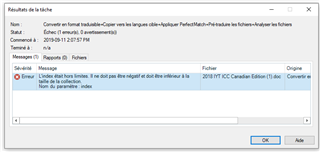
Maybe If I solved this problem first this will help with the target document.

Hello I tried your tricks without succes.
similarly with me

Hi Francois Laplante, hi denis atenov,
It could be bookmarks that are causing your problem... Take a look here:
I hopes this provides you both with a solution 
All the best,
Ali 
Hi Alison. Our problem occurs when trying to open the target (already translated by Trados) file .docx
This work for my source document and the error did not came back thank you.
I'm so glad to hear that this helped!
All the best,
Ali
Hi denis atenov,
OK, then you didn't have precisely the problem that Francois Laplante had.
Could you give me more details on what caused the problem chez toi stp ?
All the best,
Ali
