You are currently working on UAT 

Project folder is renamed and error message (Studio 2019)

Dear all,

We have a problem with the project folder in Studio 2019. The problem occurs just for some customers and for others not, even though our folder structure is the same for all.

We normally use the folder structure "Translation_test\4_CAT" to save the Trados project files.
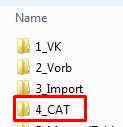
Screenshot showing a folder structure with a folder named '4_CAT' highlighted.

Our steps:

-We start the "New project" dialogue

-We fill in the name of the project, "Translation_test"

-We try to fill in the path with the folder "4_CAT" at the end

-->We get an error message: Am angegebenen Speicherort befinden sich bereits Dateien / There are already files in the folder
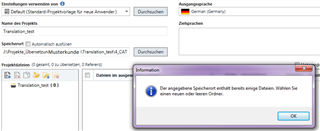
Screenshot of Trados Studio 'New project' dialogue with an error message stating there are already files in the folder.

-->after closing the message, the path has automatically changed to "Translation_test\Translation_test"

-->the original "CAT" folder has disappeared and the folder "Translation_test" is created within the folder "Translation_test"
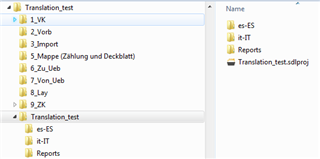
Screenshot showing a nested folder structure where 'Translation_test' folder is created within another 'Translation_test' folder.

So the project is created, but we would prefer to have it in the folder "4_CAT" and not a new folder.

Does anyone have any suggestions?

Thank you in advance.

Sara


Generated Image Alt-Text
[edited by: Trados AI at 6:01 PM (GMT 0) on 28 Feb 2024]

emoji
Parents
  • Thank you for your answer. We checked it again and the folder is really empty.

    However, we noticed that the error only appeared when we changed the source language. This is probably the reason why it happened only with certain customers (with a source language other than German).

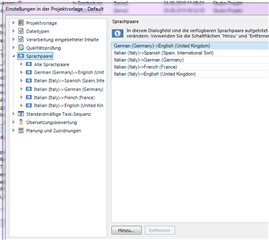
    We are testing the settings of the project template now. After adding e.g Italian>ES, FR, DE, EN it worked for these language pairs.

    Trados Studio project template settings window showing language pairs German>English, Italian>Spanish, French, German, English with no error messages.

    But how does this setting work? Creating a project worked for all projects with German as a source language even though not all language combinations were listed there. And the error message is not related to this.

    emoji


    Generated Image Alt-Text
    [edited by: Trados AI at 6:01 PM (GMT 0) on 28 Feb 2024]
  • Aaaaaha, so the steps are actually different from what you stated originally ;-)
    This nicely demonstrates how important every little piece of information can be...

    Then this might indeed point to a bug in Studio...

    I can imagine that when you start the wizard with a set of language combinations, Studio creates its folder structure in the project folder (which is indeed empty)... and then, when you change the source language, Studio wants to "start over" and create its folder structure again... but fails because it didn't clean up the previously created structure, i.e. the project folder is not empty anymore. And it does the cleanup - unfortunately too thorough, so that even the previously existing "4_CAT" folder is deleted - only after clicking out the error message.

    You can easily verify if my thoughts are correct by observing the content of the "4_CAT" folder e.g. in Windows Explorer in parallel with performing the steps.

  • We had the 4_CAT folder in Explorer open the whole time and it stays empty.

    When testing this we sometimes encountered a slightly different phenomenon:

    Instead of changing the path to "Translation_test\Translation_test" Trados now changed it automatically to the path of the project that was created before (and naturally that folder is not empty). Of course we can change that path again to the desired one.

    But sometimes the other error occurs.

Reply Children