
 Translate



Dear all,
We have a problem with the project folder in Studio 2019. The problem occurs just for some customers and for others not, even though our folder structure is the same for all.
We normally use the folder structure "Translation_test\4_CAT" to save the Trados project files.
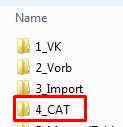
Our steps:
-We start the "New project" dialogue
-We fill in the name of the project, "Translation_test"
-We try to fill in the path with the folder "4_CAT" at the end
-->We get an error message: Am angegebenen Speicherort befinden sich bereits Dateien / There are already files in the folder
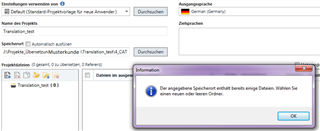
-->after closing the message, the path has automatically changed to "Translation_test\Translation_test"
-->the original "CAT" folder has disappeared and the folder "Translation_test" is created within the folder "Translation_test"
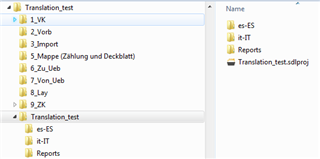
So the project is created, but we would prefer to have it in the folder "4_CAT" and not a new folder.
Does anyone have any suggestions?
Thank you in advance.
Sara
Generated Image Alt-Text
[edited by: Trados AI at 6:01 PM (GMT 0) on 28 Feb 2024]

