You are currently working on UAT 

Separate - Page Numbers from titles - How to

Hello All
I want to translate the table of contents in MS word Document

every title is followed by a page number

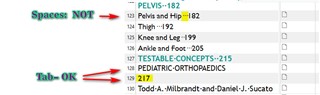
how to separate titles from Numbers to get more matches from TM
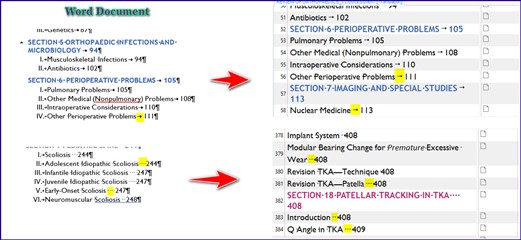

Screenshot showing a Word document with a table of contents. Titles are followed by page numbers, highlighted to indicate the need for separation to improve TM matches.


thank you


Generated Image Alt-Text
[edited by: Trados AI at 5:59 PM (GMT 0) on 28 Feb 2024]

emoji
Parents
  • I want to translate the table of contents in MS word Document

    I'd note that if the word document was properly prepared you should never have to translate the Table of Contents.  This should happen automatically when you refresh the target language document.

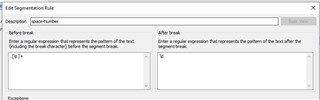
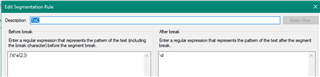
    However, we all know many people don't know how to use Word properly in the first place so it happens, and sometimes people create a fairly complex contents page like this one where I'm not even sure it can be automated.  So when this happens you can solve the problem by creating custom segmentation rules to suit the content.  So in this case you probably want to break before a tab followed by a number.  Simple to do like this:

    Trados Studio Add Segmentation Rule dialog box with 'Before' rule direction and 'Tab' as the break character.

    Resulting in this:

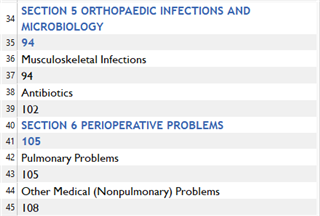
    Table of contents in MS Word with section titles and page numbers not properly segmented for translation.

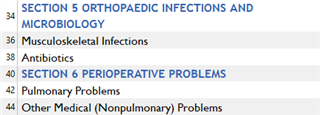
    Further improved by then filtering out the number only segments:

    Table of contents in MS Word with improved segmentation, separating section titles from page numbers for translation.

    Paul Filkin | RWS

    Design your own training!
    You've done the courses and still need to go a little further, or still not clear? 
    Tell us what you need in our Community Solutions Hub

    emoji


    Generated Image Alt-Text
    [edited by: Trados AI at 5:59 PM (GMT 0) on 28 Feb 2024]
Reply
  • I want to translate the table of contents in MS word Document

    I'd note that if the word document was properly prepared you should never have to translate the Table of Contents.  This should happen automatically when you refresh the target language document.

    However, we all know many people don't know how to use Word properly in the first place so it happens, and sometimes people create a fairly complex contents page like this one where I'm not even sure it can be automated.  So when this happens you can solve the problem by creating custom segmentation rules to suit the content.  So in this case you probably want to break before a tab followed by a number.  Simple to do like this:

    Trados Studio Add Segmentation Rule dialog box with 'Before' rule direction and 'Tab' as the break character.

    Resulting in this:

    Table of contents in MS Word with section titles and page numbers not properly segmented for translation.

    Further improved by then filtering out the number only segments:

    Table of contents in MS Word with improved segmentation, separating section titles from page numbers for translation.

    Paul Filkin | RWS

    Design your own training!
    You've done the courses and still need to go a little further, or still not clear? 
    Tell us what you need in our Community Solutions Hub

    emoji


    Generated Image Alt-Text
    [edited by: Trados AI at 5:59 PM (GMT 0) on 28 Feb 2024]

Children