 Translate



Trados Studio 2019ユーザーです。
翻訳メモリ内の翻訳単位を40,000以上削除したいと考えています。
それらの翻訳単位に付されている番号は連番であることがわかっており、ある番号から翻訳メモリ内の最後の翻訳単位までです。
フィルタを利用して、翻訳単位に振られている番号により一括削除する方法はありますか?
フィルタが利用できない場合、他に何か効率的な削除方法はないでしょうか。
You are currently working on UAT

Trados Studio 2019ユーザーです。
翻訳メモリ内の翻訳単位を40,000以上削除したいと考えています。
それらの翻訳単位に付されている番号は連番であることがわかっており、ある番号から翻訳メモリ内の最後の翻訳単位までです。
フィルタを利用して、翻訳単位に振られている番号により一括削除する方法はありますか?
フィルタが利用できない場合、他に何か効率的な削除方法はないでしょうか。

投稿いただきありがとうございます。
翻訳単位の番号をフィルタの対象項目とすることはできないため、作成あるいは更新の細かい日時で限定することは可能でしょうか。
一括削除を効率化するためにはフィルタを使用するしかないため、ご検討をいただければと思います。
for instance
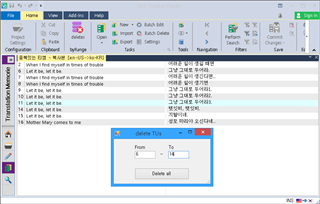


I've allowed this posting but I have to say this is getting a little annoying when you share something you have developed without any explanation at all... as if the user should be able to find this himself.
Like this it seems very childish. A better response might be something like this:
"I have developed a plugin for my own use that can deal with this problem. It's not signed by SDL as I don't wish to put my plugins on the appstore, and I only have this for Studio 2017, but I can make it available to you if you like?"
Or something like that.
Paul Filkin | RWS
Design your own training!
You've done the courses and still need to go a little further, or still not clear?
Tell us what you need in our Community Solutions Hub