 Translate



Hello everybody,
I work on trados 2019. I tried to open big itd file on trados 2019 for translation, but I get this message "no translatable file found". I need help as my client insists on working on itd file.
Thanks
You are currently working on UAT

Hello everybody,
I work on trados 2019. I tried to open big itd file on trados 2019 for translation, but I get this message "no translatable file found". I need help as my client insists on working on itd file.
Thanks
Hello Ahmed Sa'ad ,
It would be helpful if you could post some screen images to show the error message and when this is occuring.
However maybe check that the file type is active and move this to the top of the list and then recreate the project.
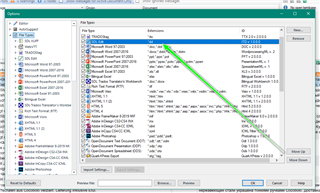
Does this help?
Oana Nagy | QA Engineer | RWS Group


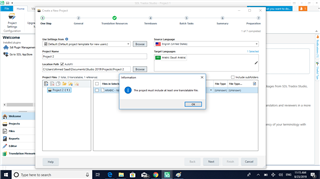
Steven,
Thank you for your help. That's the screenshot. I am using 2019 trados. The screenshot you gave me is not very clear. Could you please tell me the steps to follow.
Regards
Steven,
Thank you for your help. That's the screenshot. I am using 2019 trados. The screenshot you gave me is not very clear. Could you please tell me the steps to follow.
Regards
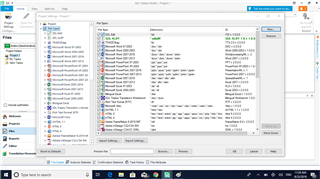
I did that. Can you please show me how to recreate the project.
Thanks a lot.


Hello Ahmed Sa'ad,
Simply go to the projects view- select the project and remove -(e.g.)
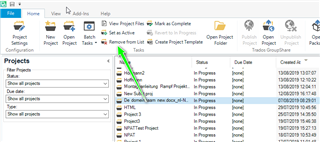
Now you can go to New Project-
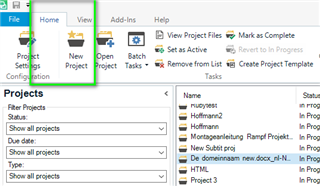
...and create a new project as normal.
Oana Nagy | QA Engineer | RWS Group
