You are currently working on UAT 

CMs not populated

Hello,

This is quite a mystery for us, hence the question Slight smile

We have a source file for translation which starts with the following segment.
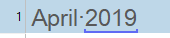
Screenshot showing a segment starting with '1 April:2019' highlighted in blue.

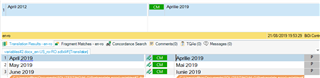
Checking the TM on top of the screen, we can see that as CM:

Screenshot displaying Translation Memory (TM) with 'April 2012' and a Context Match (CM) for 'April 2019'.

Problem is that when we run the Pretranslate batch task, translation is not pulled

When we check at message window we see this:

Screenshot of a message window with an error message partially visible, indicating an issue with the translation provider.

Which seems to be solved with this:

https://community.sdl.com/product-groups/translationproductivity/f/studio/25530/an-error-has-occurred-while-using-the-translation-provider-xxx-an-item-with-the-same-key-has-already-been-added-trados-2019

But, fragment alignment is not enabled:
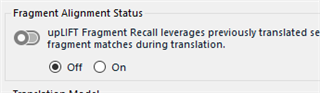
Screenshot of Fragment Alignment Status with the option 'Off' selected, indicating fragment alignment is not enabled.

Why this is happening?

To overcome this, we have tried the following:

1. upgrade the TM

2. disable the fragment alignment that is enabled when we upgrade the TM

Any ideas?


Generated Image Alt-Text
[edited by: Trados AI at 5:54 PM (GMT 0) on 28 Feb 2024]

emoji