Translate



I just updated my Trados Studio 2019 to SR2 (Win 10) and it has a strange behavior.
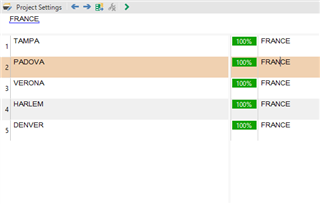
In the source segment I have "France". The result shows different things from
the TM and surprisingly show "France" as their translation. All the results listed
are translated correctly in the TM, so it is not my TM that has errors here.
Only the pane shows confused results. I did an installation Repair and a restart
but it did not help.
Anyone have seen something similar? What is the solution or just go back
for the previous installation for now? See the image of the pane bellow.
UPDATE: I went back to SR1 because it also made a confusing pretranslation
and inserted wrong things as "accepted 100% match". SR1 works just fine for now.
Generated Image Alt-Text
[edited by: Trados AI at 5:45 PM (GMT 0) on 28 Feb 2024]