
 Translate



I have found a tiny quirky behaviour in the listing of Translation Results.
I use several Translation Memories, and they are placed in order of importance, ok? So why is it that when I get two matches for a segment with the same fuzzy percentage, that placement priority is ignored?
Here is what happens.
This is my current segment.

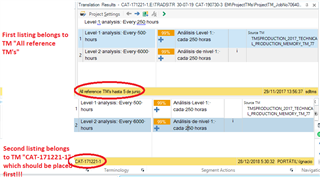
And this is my Translation Results pane (there are two overlapped images, I have clicked first in item 1 and then in item 2 so the relevant TM can be seen
And of courfse, this is my Project Settings TM configuration
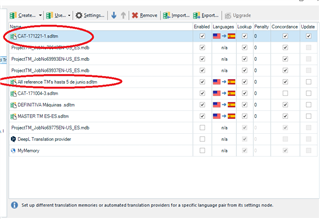
See? Even when CAT-171221-1 is placed first and "All reference TM's…" is placed fifth, the lower priority TM appears first in my translation results pane. I know both percentages are the same, 99%, and it turns out that both Translation Memories use a little number adjustment (the source text is not exactly the same as the one in the translation unit of the TM's) but what the heck, I sorted the tranlation memories in my Project settings page so the best Translation Memory would be appearing FIRST!
So this is a bug, albeit a minor one.
Generated Image Alt-Text
[edited by: Trados AI at 6:02 PM (GMT 0) on 28 Feb 2024]

