

You are currently working on UAT 

Cannot get rid of TM langoffices02.etsdemo.sdlproducts.com

Hi,

The following message shows up every time I open Project Settings:
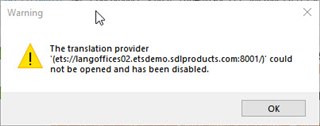
Warning dialog box in Trados Studio showing an error message that the translation provider 'ets:langoffices02.etsdemo.sdlproducts.com:8001' could not be opened and has been disabled.

How can I get rid of the TM causing it (the entry cannot be deleted and even when disabled the warning shows up)?

Trados Studio Project Settings showing an unknown translation memory server 'ets:langoffices02.etsdemo.sdlproducts.com:8001' with a warning icon.

Thanks,

Philippe


Generated Image Alt-Text
[edited by: Trados AI at 5:40 PM (GMT 0) on 28 Feb 2024]

emoji
Parents Reply Children