Translate



Hi all,
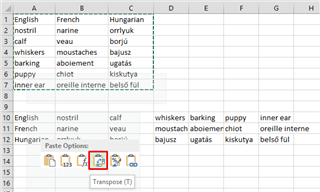
I was wondering if there's some add-on or other quick solution to work on a bilingual Excel file where the source and target contents are not arranged by column but by row (example: English is in Row 2 and Italian is in Row 3). I can see only "Source Column" and "Target Column" in the Bilingual Excel file type settings.
I'm afraid there's no such a solution, but I just want to make sure I'm not wrong.
Thank you!
Daniela