 Translate



Trados Studio 2019 (latest update) does not open the Find screen when more than one file is open.
You are currently working on UAT

RWS Community
You are currently working on UAT
Trados Studio 2019 (latest update) does not open the Find screen when more than one file is open.
Hello Anthony Rudd ,
Are you able to see the following in the task bar?
Its very faint but if you can see the main Studio icon, you might notice there is a second window open as well.
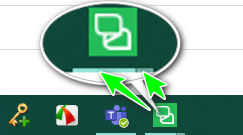
After -playing around a little I was only able to reproduce this if i moved Studio from one screen to another.
Find and Replace was opening on a different screen.
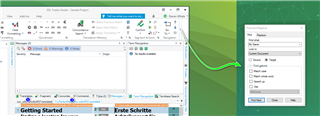
You should be able to get the window back on screen using one of the following options-
Oana Nagy | QA Engineer | RWS Group


Hi Steven
There is certainly no second Studio running - I double-checked in the Task Manager.
I can reproduce the problem very easily by opening a "second" file. As soon as I close the second file, I can open the Find/Replace screen.

Hi Steven
There is certainly no second Studio running - I double-checked in the Task Manager.
I can reproduce the problem very easily by opening a "second" file. As soon as I close the second file, I can open the Find/Replace screen.

Hello Anthony Rudd ,
Could you let me know the exact version number of Studio please-
As you can see from my screen shot I have two files open and cannot replicate the issue unless i move Studio around different screens.
Maybe worth resetting Windows Layout in Studio to see if this helps.
Oana Nagy | QA Engineer | RWS Group
Thanks, the Reset Window Layout solved the problem; I had thought that I had tried that.