You are currently working on UAT 

[2019] - TM not updating

I am using the latest version of 2019 and I have been experiencing this issue for a few weeks now. My main medical TM is no longer updating. It is about 1.3 GB.

I am working with packages sent by my client, to which I append my own local TM. There is no other TM besides mine.

My issues are:

1) Newly translated segments are not being saved in the TM.

2) Segments are not leveraged correctly.

As for 1, I have checked the Update field is selected in the Project Settings. I have also tried to update the TM from Batch Tasks > Update TM (both Main TM and Project TM)

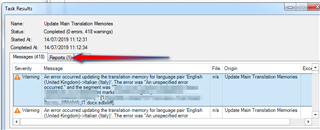
I get 0 errors but a tons of warnings due to 'an unspecified error' for each segment of my file.
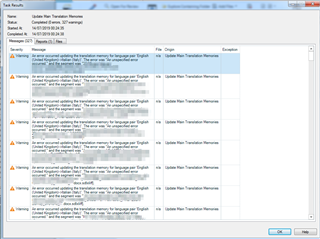
Screenshot of Trados Studio showing a Task Results window with multiple warnings about an unspecified error updating the translation memory for language pair English to Spanish.

I have also tried to use a language-specific TM. I have proof that the segments aren't saved in the TM because I open the TM in the TM Editor directly and it doesn't find the latest segments I have been translating.

I have tried to repair the TM using the TM repair tool and it was correctly 'repaired' and there is no error message whatsoever indicating something might be wrong.

As for 2, I don't understand why identical sentences are not recognized as such, like in the example below.

I am spending more time than due to translate because I have been working without TM. Basically, I filter segments and copy-paste the previous translation earlier in the same document. This is prehistoric! 
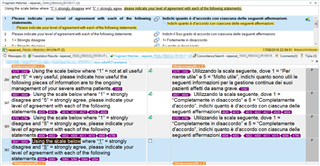
Screenshot of Trados Studio editor with a segment comparison, highlighting that identical sentences are not being recognized as matches, despite being the same.


Generated Image Alt-Text
[edited by: Trados AI at 5:22 PM (GMT 0) on 28 Feb 2024]

emoji
Parents
  • You say "There is no other TM than mine". So for me it seems, like would have the customer configured the TM settings in your project NOT in "Language Pairs -> All Language Pairs", but in "Language Pairs -> Specific Language Pair". When you add a TM to "Language Pairs -> All Language Pairs" while the project is configured to use "Language Pairs -> Specific Language Pair", this TM (or these TMs) will be simply ignored by Studio.

    Here is the setting how it looks like:

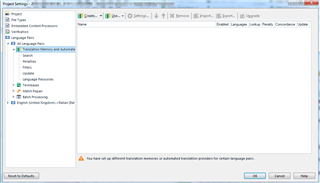
    Trados Studio project settings window showing a warning message 'You have set up different translation memories or automated translation providers for certain language pairs.'

    Trados Studio project settings with 'All Language Pairs' selected, showing no translation memories or automated translation providers added.

    In such situation you should:

    • Either deactivate the TM settings under specific language pair OR
    • Add your own TM under specific language pair

    _________________________________________________________

    When asking for help here, please be as accurate as possible. Please always remember to give the exact version of product used and all possible error messages received. The better you describe your problem, the better help you will get.

    Want to learn more about Trados Studio? Visit the Community Hub. Have a good idea to make Trados Studio better? Publish it here.

    emoji


    Generated Image Alt-Text
    [edited by: Trados AI at 5:22 PM (GMT 0) on 28 Feb 2024]
Reply
  • You say "There is no other TM than mine". So for me it seems, like would have the customer configured the TM settings in your project NOT in "Language Pairs -> All Language Pairs", but in "Language Pairs -> Specific Language Pair". When you add a TM to "Language Pairs -> All Language Pairs" while the project is configured to use "Language Pairs -> Specific Language Pair", this TM (or these TMs) will be simply ignored by Studio.

    Here is the setting how it looks like:

    Trados Studio project settings window showing a warning message 'You have set up different translation memories or automated translation providers for certain language pairs.'

    Trados Studio project settings with 'All Language Pairs' selected, showing no translation memories or automated translation providers added.

    In such situation you should:

    • Either deactivate the TM settings under specific language pair OR
    • Add your own TM under specific language pair

    _________________________________________________________

    When asking for help here, please be as accurate as possible. Please always remember to give the exact version of product used and all possible error messages received. The better you describe your problem, the better help you will get.

    Want to learn more about Trados Studio? Visit the Community Hub. Have a good idea to make Trados Studio better? Publish it here.

    emoji


    Generated Image Alt-Text
    [edited by: Trados AI at 5:22 PM (GMT 0) on 28 Feb 2024]
Children
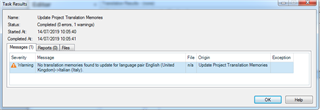
  • Thank you. I have removed the TM from All Language Pair and let it only in the specific English > Italian pair (previously, it was listed in both screens). I have tried to update the Project TM, and I get this error:

    Trados Studio error message stating 'No translation memories found to update for language pair English (United Kingdom) > Italian (Italy).'

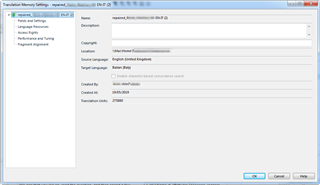
    However, I have checked my TM language pair and it matches English (UK) > Italian (Italy). What is wrong?

    These are also the same language variant of my project/package (hovering with the mouse on the little flags in the bottom right corner, it reads English UK > Italian Italy)

    Trados Studio Translation Memory Settings window showing the language pair English (United Kingdom) > Italian (Italy) with other TM details.

    emoji


    Generated Image Alt-Text
    [edited by: Trados AI at 5:22 PM (GMT 0) on 28 Feb 2024]
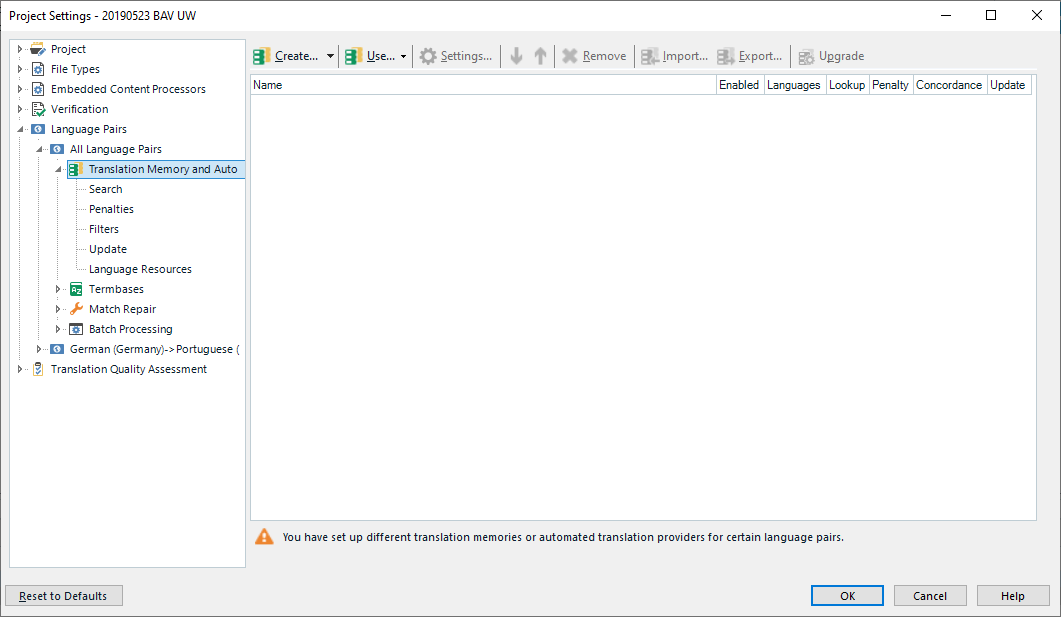
  • Please make a screenshot of the settings for TM in ALL Language Pairs AND in English to Italian and then post here. Thank you.

    _________________________________________________________

    When asking for help here, please be as accurate as possible. Please always remember to give the exact version of product used and all possible error messages received. The better you describe your problem, the better help you will get.

    Want to learn more about Trados Studio? Visit the Community Hub. Have a good idea to make Trados Studio better? Publish it here.

  • , here you are! Thanks for your interest and help! I really appreciate it!

    Trados Studio project settings window showing a warning message about different translation memories or automated translation providers for language pairs.

    Trados Studio project settings window with an error message indicating a required field 'Name' is left empty in the Language Pairs tab.

    emoji


    Generated Image Alt-Text
    [edited by: Trados AI at 5:23 PM (GMT 0) on 28 Feb 2024]
  • Thank you. It looks like everything is setup properly. Please do the following:

    • Go to Projects
    • Remove this very project from the list (right-click and remove, remember project folder location!)
    • Restart Studio
    • Go to Projects
    • Use "Open Project" to reload your project

    Check it again - I hope this will resolve your problem, for which I cannot see any reasons...

    _________________________________________________________

    When asking for help here, please be as accurate as possible. Please always remember to give the exact version of product used and all possible error messages received. The better you describe your problem, the better help you will get.

    Want to learn more about Trados Studio? Visit the Community Hub. Have a good idea to make Trados Studio better? Publish it here.

  • , unfortunately these steps didn't help solve the issue. I am still getting 'No translation memories found to update for the language pair English (UK) > Italian (Italy)' when I run Batch > Updated Project TM. Also confirming segments individually in the Editor window doesn't write them in the TM.

    My TM hasn't been updated since May 2019, which is when I tried to fix it with the TM repair tool and a new TM was created.

  • Well, you do NOT have any Project TMs, this is why the TM is NOT being updated. There is only ONE main TM in your project. So the problem is not the TM or the settings, but the wrong batch you're using. Run "Update Main TM" instead and check then.

    As for the not updating the segments when confirming them, please create a new TM, add this to that very project beside the TM already set up there and make sure, the "Update" check box is also activated for that new TM. Then check confirming segments - are these stored in the new TM at least?

    _________________________________________________________

    When asking for help here, please be as accurate as possible. Please always remember to give the exact version of product used and all possible error messages received. The better you describe your problem, the better help you will get.

    Want to learn more about Trados Studio? Visit the Community Hub. Have a good idea to make Trados Studio better? Publish it here.

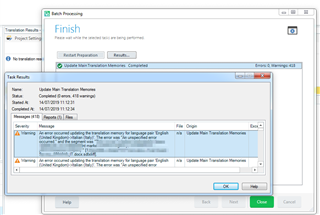
  • I have run the Update Main TM and I am getting 0 errors and a warning for each segment (now 418 segments --> 418 warnings, since I have completed the translation).

    Trados Studio screenshot showing the 'Update Main Translation Memories' task completed with 0 errors and 418 warnings.

    _____________________

    I have also tried this:

    • Export in *.tmx
    • Create a new *.sdltm TM
    • Import back the *.tmx.

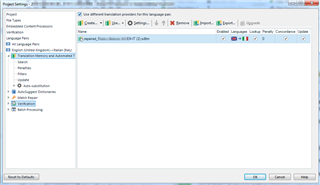
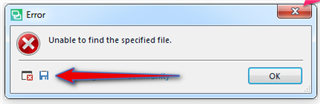
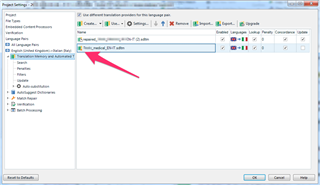
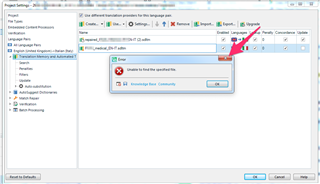
    The task is completed correctly, but when I add the new TM to the project, a small triangle suggests to Upgrade the TM. I click on Upgrade and it says 'Unable to find the specified file'.

    This is the same error I was getting before using the TM Repair Tool in May.

    Also, my original *.sdltm was 1.3 Gb, but after exporting in *.tmx and reimporting it back it is just 400 MB, though only 10k segments over 280k where 'lost' during the conversion.

    Screenshot of Trados Studio project settings with a red arrow pointing to a small triangle warning icon next to a translation memory file.

    Error message in Trados Studio stating 'Unable to find the specified file' after attempting to upgrade the translation memory.

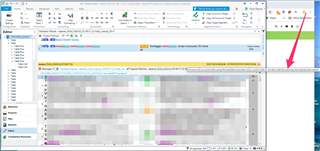
    Anyway, I try to ignore the small triangle and to work with this TM anyway. I check the box 'Update' in the settings, go to the translation Editor and when I confirm a segment (CTRL+enter), a small triangle appear in the Translation Results window. Hovering over it with the mouse it says, in relation to the newly created TM, that  there is already an item with the same key. And it still doesn't update...

    I have disabled Autosuggest and there is no termbase selected. There is no MT engine selected, either. I don't really understand this. Other projects with a different TM are working fine, but this TM is problematic... unfortunately, this is the most previous TM I have and I can't lose it!

    Trados Studio translation editor with a small triangle warning icon in the Translation Results window indicating an item with the same key already exists.

    emoji


    Generated Image Alt-Text
    [edited by: Trados AI at 5:23 PM (GMT 0) on 28 Feb 2024]
  • It looks like would you have a general problem with your Studio. I would suggest the following steps with checking, if it works to stop (so not move to the next step in this list):

    • Go to Editor, View menu and use "Reset window layout"
    • Use the same command for all window parts of Studio
    • Reset your user profile to default and restart Studio
    • Reset Studio as described here: https://gateway.rws.com/csm?id=kb_article_view&sysparm_article=KB0039395
    • Run a repair installation from the Control Panel
    • Uninstall Studio, restart PC and install the latest but fresh download from your SDL account

    If all this does not help, I have no more idea... Sorry.

    _________________________________________________________

    When asking for help here, please be as accurate as possible. Please always remember to give the exact version of product used and all possible error messages received. The better you describe your problem, the better help you will get.

    Want to learn more about Trados Studio? Visit the Community Hub. Have a good idea to make Trados Studio better? Publish it here.

  • please can you provide the proper error details and not just a screenshot?

    Error dialog box in Trados Studio with a red cross icon, stating 'Unable to find the specified file.' and an 'OK' button.

    also here:

    Trados Studio Task Results window showing two warnings. The first says 'An error occurred updating the translation memory for language pair English (United Kingdom)-Italian it-IT.' The second is similar for English (United Kingdom)-Danish da-DK.

    Save them as an xml file to your desktop and then attach the XML to your reply.

    Paul Filkin | RWS

    Design your own training!
    You've done the courses and still need to go a little further, or still not clear? 
    Tell us what you need in our Community Solutions Hub

    emoji


    Generated Image Alt-Text
    [edited by: Trados AI at 5:23 PM (GMT 0) on 28 Feb 2024]
  • Here it is!

    <SDLErrorDetails time="14/07/2019 16:29:14">
      <ErrorMessage>Unable to find the specified file.</ErrorMessage>
      <Exception>
        <Type>System.IO.FileNotFoundException, mscorlib, Version=4.0.0.0, Culture=neutral, PublicKeyToken=b77a5c561934e089</Type>
        <FileName />
        <FusionLog />
        <HelpLink />
        <Source>Sdl.LanguagePlatform.TranslationMemoryApi</Source>
        <HResult>-2147024894</HResult>
        <StackTrace><![CDATA[   at Sdl.LanguagePlatform.TranslationMemoryApi.FileBasedTranslationMemory..ctor(String tmFilePath)
       at Sdl.TranslationStudio.Common.TranslationMemory.TranslationMemoryUtil.OpenAndUnlock(String tmFilePath, ITranslationProviderCredentialStore credentialStore, String permission, Boolean alwaysPrompt, Boolean validate, Boolean setUnlockedPermissions, Boolean throwLogOnException)
       at Sdl.TranslationStudio.Common.TranslationMemory.TranslationMemoriesControl.OpenAndUnlockTM(String tmFilePath)
       at Sdl.TranslationStudio.Common.TranslationMemory.TranslationMemoriesControl._upgradeToolStripButton_Click(Object sender, EventArgs e)
       at System.Windows.Forms.ToolStripItem.RaiseEvent(Object key, EventArgs e)
       at System.Windows.Forms.ToolStripButton.OnClick(EventArgs e)
       at System.Windows.Forms.ToolStripItem.HandleClick(EventArgs e)
       at System.Windows.Forms.ToolStripItem.HandleMouseUp(MouseEventArgs e)
       at System.Windows.Forms.ToolStripItem.FireEventInteractive(EventArgs e, ToolStripItemEventType met)
       at System.Windows.Forms.ToolStripItem.FireEvent(EventArgs e, ToolStripItemEventType met)
       at System.Windows.Forms.ToolStrip.OnMouseUp(MouseEventArgs mea)
       at System.Windows.Forms.Control.WmMouseUp(Message& m, MouseButtons button, Int32 clicks)
       at System.Windows.Forms.Control.WndProc(Message& m)
       at System.Windows.Forms.ScrollableControl.WndProc(Message& m)
       at System.Windows.Forms.ToolStrip.WndProc(Message& m)
       at System.Windows.Forms.Control.ControlNativeWindow.OnMessage(Message& m)
       at System.Windows.Forms.Control.ControlNativeWindow.WndProc(Message& m)
       at System.Windows.Forms.NativeWindow.Callback(IntPtr hWnd, Int32 msg, IntPtr wparam, IntPtr lparam)]]></StackTrace>
      </Exception>
      <Environment>
        <ProductName>SDL Trados Studio</ProductName>
        <ProductVersion>15.0.0.0</ProductVersion>
        <EntryAssemblyFileVersion>15.1.3.55768</EntryAssemblyFileVersion>
        <OperatingSystem>Microsoft Windows 7 Professional </OperatingSystem>
        <ServicePack>Service Pack 1</ServicePack>
        <OperatingSystemLanguage>1040</OperatingSystemLanguage>
        <CodePage>1252</CodePage>
        <LoggedOnUser>Paola-Win7\Paola</LoggedOnUser>
        <DotNetFrameWork>4.0.30319.42000</DotNetFrameWork>
        <ComputerName>PAOLA-WIN7</ComputerName>
        <ConnectedToNetwork>True</ConnectedToNetwork>
        <PhysicalMemory>8388136 MB</PhysicalMemory>
      </Environment>
    </SDLErrorDetails>