 Translate



-Yesterday my laptop was updated and after that every time I open a project in Trados and click on project settings I get this message. Restarting Trados doesn't help. What should I do?
You are currently working on UAT

RWS Community
You are currently working on UAT
-Yesterday my laptop was updated and after that every time I open a project in Trados and click on project settings I get this message. Restarting Trados doesn't help. What should I do?
Hi Maarja Ora,
Usually a restart of your machine would help. Please advise the build that you have when you upgraded Studio, also Multiterm.
You can find this information if you open both Studio and Multiterm and go to Help tab>About SDL Trados Studio/Multiterm.
Could you please give us a bit more details about the issue? Please save the error by clicking on the disc icon and, then saving to your desktop and including this in communications with SDL.
These 'error stacks' helps us locate the issues and provide solutions much quicker generally.
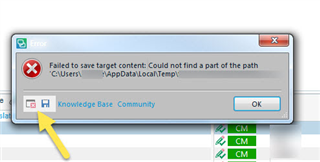
You can also post the full 'error stack':
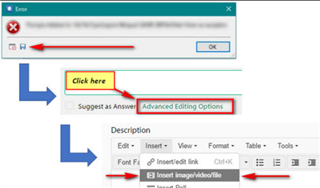
Looking forward to your reply!
Regards,
Oana Nagy | QA Engineer | RWS Group


Thank you Oana!
Restarting the computer solved the problem. :)
Thank you Oana!
Restarting the computer solved the problem. :)
