
 Translate



Here is a apparent tiny bug I'd like to call your attention to.
I have several Translation Memories. Normally, the Translation Results window informs me, when a successful lookup is performed, to WHICH Translation Memory the currently displayed segment belongs.
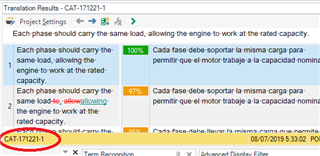
This is a NORMAL Translation Results window. You can see in the red circle that the system tells you whjch TM the displayed segment belongs to.
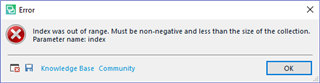
However, after a Index was out of range error (it's quite common in this Trados release, I think it has something to do with tags, and the offending segment is ALWAYS the same (one of several, actually, but always involving tags)
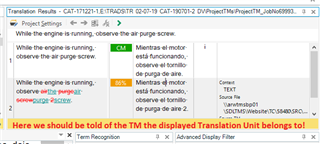
I notice that, while I can keep on working normally, the information about the procedence of the Translation Unit no longer Works, for ALL TM's involved., like this,
If anyone is interested in the detailed error, here it is.
See what I wrote in read, there should be a TM appearing in that yellow stripe, but it does not! The only solution is to restart Trados, as that information will never appear again, no matter the segment or the Translation Memory involved in the next lookup. Closing the Project and reopening it is NOT enough.
Update: After a third restart of Trados, the offending segment stopped offending.The reason was that the segment was correctly updated into my working TM, But I removed the Translation Memory from my But the issue remains. What is this error and its unexpected consequences?
Second Update: After a thorough testing, I have been able to reproduce the problem. FINALLY
<SDLErrorDetails time="10/07/2019 15:36:19">
  <ErrorMessage>Index was out of range. Must be non-negative and less than the size of the collection.
Parameter name: index</ErrorMessage>
  <Exception>
    <Type>System.ArgumentOutOfRangeException, mscorlib, Version=4.0.0.0, Culture=neutral, PublicKeyToken=b77a5c561934e089</Type>
    <ParamName>index</ParamName>
    <HelpLink />
    <Source>mscorlib</Source>
    <HResult>-2146233086</HResult>
    <StackTrace><![CDATA[   at System.ThrowHelper.ThrowArgumentOutOfRangeException(ExceptionArgument argument, ExceptionResource resource)
   at Sdl.TranslationStudio.Editor.TranslationMemory.TranslationMemoryViewPartControl.ShowDocumentSource(List`1 placeables, EditDistance editDistanceInformation, Segment tuSourceSegment, Segment tokenizedDocumentSourceSegment)
   at Sdl.TranslationStudio.Editor.TranslationMemory.TranslationMemoryViewPartControl.ShowDocumentSource()
   at Sdl.TranslationStudio.Editor.TranslationMemory.TranslationMemoryViewPartControl.TranslationMemoryViewPartControl_CurrentSearchResultChanged(Object sender, EventArgs e)
   at System.EventHandler.Invoke(Object sender, EventArgs e)
   at Sdl.TranslationStudio.Editor.TranslationMemory.CompoundTranslationMemorySearchResultsControl._searchResultsControl_CurrentTranslationUnitChanged(Object sender, EventArgs e)
   at Sdl.TranslationStudio.Common.TranslationMemory.AbstractTranslationMemoryControl`1.OnCurrentTranslationUnitChanged()
   at Sdl.TranslationStudio.Common.TranslationMemory.AbstractTranslationMemoryControl`1.HandleActiveRowChanged(ActiveRowChangedEventArgs e)
   at Sdl.TranslationStudio.Common.TranslationMemory.AbstractTranslationMemoryControl`1.Source_ActiveRowChanged(Object sender, ActiveRowChangedEventArgs e)
   at System.EventHandler`1.Invoke(Object sender, TEventArgs e)
   at AbstractFrameworkEditControl.raise_ActiveRowChanged(Object value0, ActiveRowChangedEventArgs value1)
   at AbstractFrameworkEditControl.OnActiveRowChanged(Object sender, ActiveRowChangedEventArgs args)
   at AbstractFrameworkEditControl.set_ActiveRow(IRowInfo activeRow)
   at Sdl.DesktopEditor.Control.Support.RowInfo.set_Active(Boolean value)
   at SideBySideEditor.set_ActiveRowNumber(Int32 rowNumber)
   at Sdl.TranslationStudio.Common.TranslationMemory.AbstractTranslationMemoryControl`1.set_CurrentTranslationUnitIndex(Int32 value)
   at Sdl.TranslationStudio.Common.TranslationMemory.AbstractTranslationMemoryControl`1.SideBySideEditor_AfterInitialUpdate(Object sender, AfterInitialUpdateEventArgs e)
   at SideBySideEditor.raise_AfterInitialUpdate(Object value0, AfterInitialUpdateEventArgs value1)
   at SideBySideEditor.OnAfterInitialUpdate(Object sender, AfterInitialUpdateEventArgs args)
   at SideBySideEditor.Target_AfterInitialUpdate(Object sender, AfterInitialUpdateEventArgs args)
   at AbstractFrameworkEditControl.raise_AfterInitialUpdate(Object value0, AfterInitialUpdateEventArgs value1)
   at AbstractFrameworkEditControl.OnAfterInitialUpdate(Object sender, AfterInitialUpdateEventArgs args)
   at FrameworkEditControlEventSource.AfterInitialUpdate(FrameworkEditControlEventSource* )
   at Tree.DocumentControl.vl_WindowProc(DocumentControl* , HWND__* , UInt32 , UInt32 , Int32 )
   at FrameworkDocumentControl.vl_WindowProc(FrameworkDocumentControl* , HWND__* h_wnd, UInt32 n_msg, UInt32 w_p, Int32 l_p)
   at System.Windows.Forms.UnsafeNativeMethods.CallWindowProc(IntPtr wndProc, IntPtr hWnd, Int32 msg, IntPtr wParam, IntPtr lParam)
   at System.Windows.Forms.NativeWindow.DefWndProc(Message& m)
   at System.Windows.Forms.Control.DefWndProc(Message& m)
   at System.Windows.Forms.Control.WndProc(Message& m)
   at System.Windows.Forms.Control.ControlNativeWindow.OnMessage(Message& m)
   at System.Windows.Forms.Control.ControlNativeWindow.WndProc(Message& m)
   at System.Windows.Forms.NativeWindow.Callback(IntPtr hWnd, Int32 msg, IntPtr wparam, IntPtr lparam)]]></StackTrace>
  </Exception>
  <Environment>
    <ProductName>SDL Trados Studio</ProductName>
    <ProductVersion>15.0.0.0</ProductVersion>
    <EntryAssemblyFileVersion>15.1.3.55768</EntryAssemblyFileVersion>
    <OperatingSystem>Microsoft Windows 10 Pro</OperatingSystem>
    <ServicePack>NULL</ServicePack>
    <OperatingSystemLanguage>3082</OperatingSystemLanguage>
    <CodePage>1252</CodePage>
    <LoggedOnUser>PORTÁTIL\Ignacio</LoggedOnUser>
    <DotNetFrameWork>4.0.30319.42000</DotNetFrameWork>
    <ComputerName>PORTÁTIL</ComputerName>
    <ConnectedToNetwork>True</ConnectedToNetwork>
    <PhysicalMemory>25058832 MB</PhysicalMemory>
  </Environment>
</SDLErrorDetails>
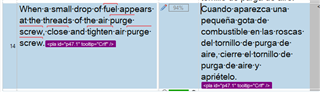
This is the offending segment. As you can see, nothing special, just a tiny tag at the end.
and this is the list of my Translation Memories (all disabled at this point)
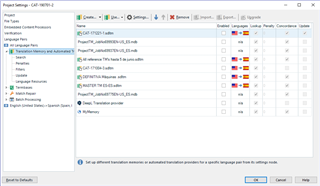 (notice there are SDLTM y MDB there, the latest using the SDLX Translation Memory plugin)
I have done an extensive trial and error testing and I have found that the ONLY way for this error to happen is to have both
CAT-171221-1.sdltm and ProjectTM_JobNo69993EN-US_ES.mdb
ENABLED at the same time.
The rest of the Tm's do not matter, they may be enabled, disabled, or with the Update checkmark ticked or not.
The only relevant things about these TM's is that ProjectTM_JobNo69993EN-US_ES.mdb is the only one that actually has a similar fuzzy match to the offending segment and I have no idea what is special about CAT-171221-1.sdltm.. only that is the largest I have??? I tried to update the offending segment in a different SDLTM translation memory and everything worked flawlessly.
And I reindexed CAT-171221-1.sdltm and it didn't solve a thing,
Andfinally, I have tried to reproduce this same error in very similar segments (same tag, similar match result before updating, both troublesome TM's selected… and no error)
I think I have done enough research and I have to deliver a Project! (more than 1 hour writing this). I hope all this information is useful to some Trados guru who can determine what the heck is going on!!!
Well.. the problem appears in this particular combination of TM. Only if BOTH
Generated Image Alt-Text
[edited by: Trados AI at 5:17 PM (GMT 0) on 28 Feb 2024]

