Translate



I wonder if someone else has this silly but annoying bug. I am not sure if this happens in other Windows, but it DOES happen in Verification, QA Checker 3.0, Regular Expression window.
When I open the Regular expression window in QA Checker 3.0 I INVARIABLY find that , when I scroll downmost in order to reach the latest additions to my regular expressions list, the last entry is left out of the window!
Check this screenshot.
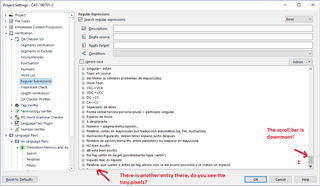
Notice the text in red.. there is something under the entry "Palabras que suelen ir antes de..." but the scroll can't go down any further!
The solution is simple but annoying, I either have to resize the window (being careful before if you are not, you will find that the downmost entry is being left out again even though you can see more entries now!) OR select in the tiny pixels at the bottom. Either action will either let me see or select the the bottommost entry which is,,,
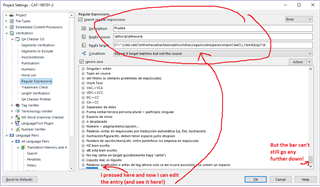
It's not the most important bug in the world, but it's silly and annoying and I use that window A LOT!
Generated Image Alt-Text
[edited by: Trados AI at 5:19 PM (GMT 0) on 28 Feb 2024]