

You are currently working on UAT 

Segments excluded from QA are still checked by Regular Expressions?

Segments excluded from QA Checker are still checked by Regex QA checks. Is that a feature or a bug?
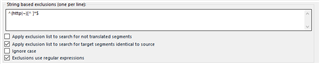
Trados Studio settings showing 'String text exclusion tags per lang' with options to apply exclusions to search for not translated segments, search for target segments identical to source, and exclude tags for regular expressions.

This QA check will still report a warning if a string like ~/link.aspx?_id=FA0AD6FFE1054930BDDEF6DE7DAED110&_z=z is changed in the target:
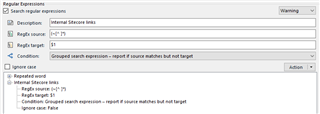
Trados Studio Regex QA check settings with a warning for 'Internal links'. Condition set to 'Grouped search expression - report if source matches but not target'. Ignore case option is checked.

It's actually what I want it to do, but I would have expected it not to work. I'd like to understand better how the exclusion from QA Check works - what exactly are segments excluded from and what not.

Daniel


Generated Image Alt-Text
[edited by: Trados AI at 5:15 PM (GMT 0) on 28 Feb 2024]

emoji
Parents
  • In the help it says this:

    In some cases you need to leave a segment empty or you may have a product name that you do not want to translate. By default, verification runs the following checks, Check for forgotten and empty translations or Check for targets segments that are identical to their source segments, and issues errors for them. However, string-based exclusion will allow you to specify that these checks are overridden in such specific cases. Each case or string must be on a separate line and will then be excluded from the check in cases where the segment solely consists of this string.

    I believe this option is there to manage the default checks mentioned and not specific checks that you have created using regex.

    Paul Filkin | RWS

    Design your own training!
    You've done the courses and still need to go a little further, or still not clear? 
    Tell us what you need in our Community Solutions Hub

  • The help is quite unclear what exactly is excluded from what, e.g.:

    "Use the QA Checker 3.0 > Segments to Exclude settings to specify which segments will not have any QA Checker verifications performed on them. This allows you to skip segments with a certain match type from verification." This is the first line, so one should think it applies to all exclusion forms.

    and:

    "Under String based exclusions (one per line), type the strings you want to exclude from the QA check..."

    I appreciate the way Studio works, but the help file needs some help!

    Daniel

Reply Children