You are currently working on UAT 

The latest Studio update doesn't recognise Icelandic characters as being in the same word, i.e. as forming a word together with the surrounding letters

Since I installed the latest Studio 2019 update, Studio doesn't recognise source language terms which have some of the special Icelandic letters/characters in them (including at least á, é, í, ó and ö). Note that such letters are very common in Icelandic words, but I have been using Trados and later Studio for nearly twenty years without this problem every occurring. Now these characters suddenly aren't perceived right by Term Recognition, so I have to remember and type the whole target word or phrase myself, or even look it up in Multiterm since it doesn't appear in Term Recognition.

This is a huge pain in  the neck and costs a lot of time on each translation. In fact, if I copy such a word out of Studio to text boxes of some other programs, for instance a digital dictionary I use considerably, the characters don't copy properly, so that I for instance get ste´ttarfe´lag instead of the properly spelled word, stéttarfélag.

I myself saw this as an installation problem, since it started with the last Studio update, but when I wrote to SDL, the answer was to say this was not an installation problem. It it's not, it's at least a mistake in the SDL update that needs fixing very quickly, and I don't at all agree that I am supposed to pay SDL to fix a problem that their change in Studio has caused.

Do you have a quick fix? I've already tried repairing the installation and of course restarting and the simple methods!


Parents
  • Hi

    I am also using Studio 2019 SR1 CU3, but I can't reproduce your issue:

    Screenshot of Trados Studio showing the text 'Naturliche Objekte' with the word 'Objekte' partially highlighted.

    Screenshot of Trados Studio with a list of words where the word 'stettarflag' is highlighted in blue.

    Screenshot of Trados Studio showing the text 'Objekte aus stettarflag' with the word 'stettarflag' partially highlighted.

    Screenshot of Trados Studio with the word 'stettarflag' in the search bar and the translation 'spoon' below it.

    Is your Multiterm the latest version? (There was a Multiterm update at the same time as the latest Studio update.)

    I can confirm that Studio does not mark the whole word when you click on it: Close-up screenshot of the word 'stettarflag' highlighted in blue in Trados Studio. .

    Although it does mark whole words containing German umlauts: Screenshot of Trados Studio showing the text 'Spulen, Holzloffel' with the word 'Holzloffel' partially highlighted..

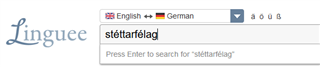
    But when I mark and copy the text, it copies as one word into other applications like Notepad++ and the Linguee site:

     Screenshot of the Linguee website with the word 'stettarflag' entered in the search bar.

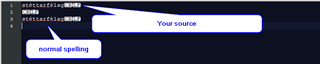
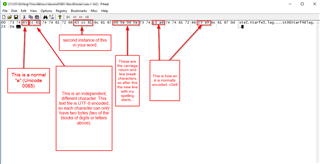
    However, I do notice you used an unusual character to get the accent onto the "e", and I think that's at least part of the problem: The "usual" way is to use the "Latin small letter e with acute", Unicode U+00E9. You used the letter e (U+0065) followed by a combining acute accent (U+0301). It displays the same, but in the file it looks really different:

    Screenshot showing a comparison of two different spellings of the same word, highlighting the use of combining characters.

    If you look at how these two same-looking words are actually represented:

    Screenshot of Notepad++ showing a detailed analysis of two different encoding methods for the same-looking word.

    What's the remedy? I don't speak Icelandic, but is it possible that your source files should not contain the strange "e" plus combining accent acute and that they should contain the normal "e plus acute" instead? (and all the other characters that cause problems - I am sure they are all concatenations of normal letters with some diacritical mark).

    If they are not necessary, you could replace them in the source text? (It works with Notepad++.)

    I think your issue is not caused by Studio, but by your source text.

    Hope this helps.

    Daniel

    emoji


    Generated Image Alt-Text
    [edited by: Trados AI at 5:09 PM (GMT 0) on 28 Feb 2024]
  • I had already checked a few days ago (and confirmed it once more now) that I had the latest version of both Studio and Multiterm.
    I am no longer sure exactly when and into what programs words with these characters weren't copying correctly out of Studio, but these words definitely didn't do so in the digital dictionary Tölvaorðabókin. The trouble is that you have to pay a subscription to get access to it.
    I didn't mention it before, but Find is incapable of locating such words in Studio, unless I take only part of the word outside of such characters. I confirmed that now once more.
    Note that the Icelandic texts I have been translating are from a private party, and I have mostly been working on them since May - and in fact only on them since I performed the update. However, some passages in it are copied from legal acts, so I can show you one of them:

    Kynferðisleg áreitni: Hvers kyns kynferðisleg hegðun sem er í óþökk þess sem fyrir henni verður og hefur þann tilgang eða þau áhrif að misbjóða virðingu viðkomandi, einkum þegar hegðunin leiðir til ógnandi, fjandsamlegra, niðurlægjandi, auðmýkjandi eða móðgandi aðstæðna. Hegðunin getur verið orðbundin, táknræn og/eða líkamleg.

    Considering everything you say above, I now opened some texts from other Icelandic clients and Studio worked right on the characters in all of them, so I suppose you're correct about these current texts being the problem. Note however that it would be lots of trouble to replace all of the troublesome characters formed in this unfortunate way if I had to do it in many brief texts that come in the future. I wouldn't even know it was a problem until I started working on them, and batch texts to analyse (in cases of fixed price offers) and pre-translate wouldn't work entirely right, because Studio doesn't recognise enough of the words in some short passages.

    The Icelandic looks perfectly natural and correct in all the texts in this major project, other than that it doesn't work right in the current Studio update. The same texts were working just fine in Studio until this update. Therefore, I am certainly unwilling to ask any clients to change their programs and send me different texts. 

    The current text is the last one in this project, and I'm nearly finished with it. Hopefully, none processed in this way will arrive from that client (who is one of long and faithful standing) or any other clients in the near future. What I am mainly hoping, therefore, is that Studio technicians will manage to find a way to avoid this problem and can include that repair in the next update from SDL.

  • Hi

    I think there is a simple solution how to solve this from within Studio. I am not at my normal desk right now, so I can't test it, but I will get back to you in the afternoon (GMT).

    Daniel

  • That's nice to hear and just fine. Many thanks. I had looked in File/Options but not found anything that worked.

  • It works you install CleanUp Tasks, a free app from the SDL AppStore: https://appstore.sdl.com/language/app/cleanup-tasks/963/

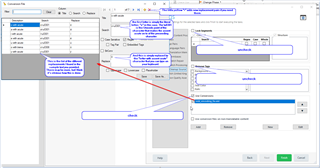
    Then you prepare your project as normal, but before you open the files for translation, you select them in the files view and choose "Batch tasks" -> "Cleanup Source". I always have to enlarge the window a bit to see everything (it does not scroll), but you deselect Lock Segments and Remove Tags and select Use Conversions.

    Now you can create a new file and enter the character conversions you need. I tried this and here is the settings file, which you can load by clicking "Add".

    odd_encoding_fix.zip

    This is how it looks:

    Trados Studio interface showing the 'Cleanup Source' window with options to deselect 'Lock Segments' and 'Remove Tags', and select 'Use Conversions'. A settings file named 'odd_encoding_fix.zip' is being added.

    You an add search/replace pairs as you need them. In future, all you need to do is to run the task, you don't have to touch the settings again once they are complete.

    Daniel

    emoji


    Generated Image Alt-Text
    [edited by: Trados AI at 5:09 PM (GMT 0) on 28 Feb 2024]
Reply Children