You are currently working on UAT 

The latest Studio update doesn't recognise Icelandic characters as being in the same word, i.e. as forming a word together with the surrounding letters

Since I installed the latest Studio 2019 update, Studio doesn't recognise source language terms which have some of the special Icelandic letters/characters in them (including at least á, é, í, ó and ö). Note that such letters are very common in Icelandic words, but I have been using Trados and later Studio for nearly twenty years without this problem every occurring. Now these characters suddenly aren't perceived right by Term Recognition, so I have to remember and type the whole target word or phrase myself, or even look it up in Multiterm since it doesn't appear in Term Recognition.

This is a huge pain in  the neck and costs a lot of time on each translation. In fact, if I copy such a word out of Studio to text boxes of some other programs, for instance a digital dictionary I use considerably, the characters don't copy properly, so that I for instance get ste´ttarfe´lag instead of the properly spelled word, stéttarfélag.

I myself saw this as an installation problem, since it started with the last Studio update, but when I wrote to SDL, the answer was to say this was not an installation problem. It it's not, it's at least a mistake in the SDL update that needs fixing very quickly, and I don't at all agree that I am supposed to pay SDL to fix a problem that their change in Studio has caused.

Do you have a quick fix? I've already tried repairing the installation and of course restarting and the simple methods!


Parents
  • Hi

    I am also using Studio 2019 SR1 CU3, but I can't reproduce your issue:

    Screenshot of Trados Studio showing the text 'Naturliche Objekte' with the word 'Objekte' partially highlighted.

    Screenshot of Trados Studio with a list of words where the word 'stettarflag' is highlighted in blue.

    Screenshot of Trados Studio showing the text 'Objekte aus stettarflag' with the word 'stettarflag' partially highlighted.

    Screenshot of Trados Studio with the word 'stettarflag' in the search bar and the translation 'spoon' below it.

    Is your Multiterm the latest version? (There was a Multiterm update at the same time as the latest Studio update.)

    I can confirm that Studio does not mark the whole word when you click on it: Close-up screenshot of the word 'stettarflag' highlighted in blue in Trados Studio. .

    Although it does mark whole words containing German umlauts: Screenshot of Trados Studio showing the text 'Spulen, Holzloffel' with the word 'Holzloffel' partially highlighted..

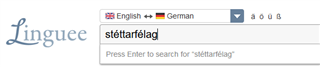
    But when I mark and copy the text, it copies as one word into other applications like Notepad++ and the Linguee site:

     Screenshot of the Linguee website with the word 'stettarflag' entered in the search bar.

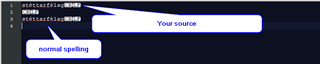
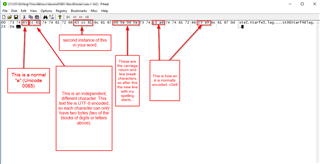
    However, I do notice you used an unusual character to get the accent onto the "e", and I think that's at least part of the problem: The "usual" way is to use the "Latin small letter e with acute", Unicode U+00E9. You used the letter e (U+0065) followed by a combining acute accent (U+0301). It displays the same, but in the file it looks really different:

    Screenshot showing a comparison of two different spellings of the same word, highlighting the use of combining characters.

    If you look at how these two same-looking words are actually represented:

    Screenshot of Notepad++ showing a detailed analysis of two different encoding methods for the same-looking word.

    What's the remedy? I don't speak Icelandic, but is it possible that your source files should not contain the strange "e" plus combining accent acute and that they should contain the normal "e plus acute" instead? (and all the other characters that cause problems - I am sure they are all concatenations of normal letters with some diacritical mark).

    If they are not necessary, you could replace them in the source text? (It works with Notepad++.)

    I think your issue is not caused by Studio, but by your source text.

    Hope this helps.

    Daniel

    emoji


    Generated Image Alt-Text
    [edited by: Trados AI at 5:09 PM (GMT 0) on 28 Feb 2024]
  • Hello  and 

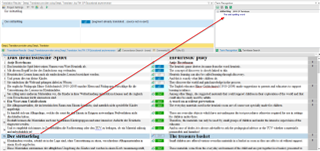
    allow me to add that if your Termbase contains the word stéttarfélag in the spelling with "e plus acute" (U+00E9) and the source text contains the odd way of encoding it, the term will not be recognized.

    Screenshot of Trados Studio showing a term recognition pane with a red arrow pointing to a term not recognized due to different unicode encoding.

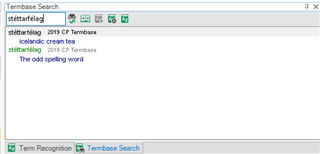
    But ... termbase search does find both. That is really confusing and shows that these two functions treat unicode differently:

    Screenshot of Trados Studio's Termbase Search window displaying results for 'st ttarf lag' with two entries: one with the acute accent and one without.

    If you have the word in Multiterm in one encoding and want to add the other one, you get a duplicate message, so that part of Multiterm equalizes both ways of encoding these characters. The Term Recognition does not. I guess you can argue both ways regarding which is the right way to treat this case. This is such a special case that I find it hard to call this a bug, but it would be less confusing if Studio and Multiterm had one way of treating it throughout, not two different ways.

    Daniel

    PS: Please forgive my total ignorance of Icelandic.

    emoji


    Generated Image Alt-Text
    [edited by: Trados AI at 5:09 PM (GMT 0) on 28 Feb 2024]
  • No problem, but as I just replied to Daniel, not even Find or Replace works right in Studio for these characters in the set of texts I have been working with.

Reply Children
No Data