
 Translate



The update file feature in Trados Studio 2019 to carry out a mid project change seems to be deactivated and I am not sure how to fix it.
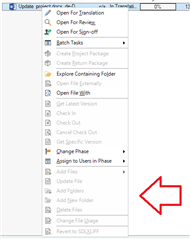
As a freelance translator I always work on quite simple projects: there are only two languages involved (source and target) and settings are always quite basic. I've tried to use the update feature in several projects, with different language combinations and TMs, but all the options of the menu related to the mid project change are greyed out (please see image below).
Could you please help me solve the problem? Thank you very much in advance.
Generated Image Alt-Text
[edited by: Trados AI at 5:01 PM (GMT 0) on 28 Feb 2024]


