You are currently working on UAT 

Number recognition - Custom format settings

Hello,

I am translating a religious text with several quotes from the Bible, followed by the source in parenthesis.

How to do I tell Studio to leave the number as they are and to not use them to leverage each segment? This way, Studio would translate automatically many segment!

Below: #1 is the segment number. I have a segment with the quote, followed by a segment with just the source.  I want segment #6 to be translated automatically by Studio, based on my translation of segment #2.

Example:

#1 Lorem ipsum dolor sit amet 

#2 (John 18:38)

#3 Duis autem vel eum iriure dolor

#4 (Romans 10:3)

#5 Ut wisi enim ad minim

#6  (John 2:11)

Parents
  • Hi 

    Number recognition and substitution is still a bit of an enigma to me! I would have thought that Studio would never use recognized numbers to leverage the segment. Indeed, if the number format is right, this is what happens:

    Trados Studio interface showing no errors or warnings, with focus on the number recognition feature.

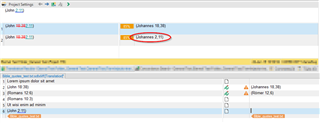
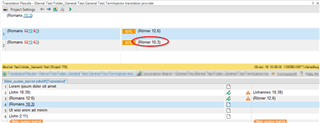
    In my case, 2:11 is ONE token, while 12,6 are TWO tokens - most likely Studio things one is a time or a date or something like that. Studio does not auto-substitute anything. I wonder why.

    I did not try disabling date or time recognition (in TM settings), but you might try.

    I tried TermInjector, and that works fine once you found out that the TermInjector rule does not recognize \d, but requires [0-9] instead...

    Screenshot of Trados Studio with a highlighted segment 'Uhrzeit 2:11' indicating '2:11' as one token.

    Trados Studio display with a selected segment 'Ziffer 12,6' showing '12,6' recognized as two separate tokens.

    Daniel

    emoji


    Generated Image Alt-Text
    [edited by: Trados AI at 4:59 PM (GMT 0) on 28 Feb 2024]
  • Hi Daniel,

    I disabled the date/time recognition to avoid localizing the numbers (I had the same issue as you: the colon became a comma). What I wasn't able to achieve was to tell Studio to treat numbers as untranslatable items and ignore them completely.

    I have tried to turn off Number Recognition (Project Settings / TM / Settings ) and also to add a variable [0-9]:[0-9] but I don't know these advanced functions well enough so nothing changed.


    The quotes are in the following formats, and can have one or two digits, before and/or after the colon:

    simple: (John 7:16)  <<< chapter seven, verse sixteen

    range(John 7:16-18) << chapter seven, verses sixteen to eighteen

    specific(John 7:16,28) << chapter seven, verses sixteen and twenty-eight

Reply
  • Hi Daniel,

    I disabled the date/time recognition to avoid localizing the numbers (I had the same issue as you: the colon became a comma). What I wasn't able to achieve was to tell Studio to treat numbers as untranslatable items and ignore them completely.

    I have tried to turn off Number Recognition (Project Settings / TM / Settings ) and also to add a variable [0-9]:[0-9] but I don't know these advanced functions well enough so nothing changed.


    The quotes are in the following formats, and can have one or two digits, before and/or after the colon:

    simple: (John 7:16)  <<< chapter seven, verse sixteen

    range(John 7:16-18) << chapter seven, verses sixteen to eighteen

    specific(John 7:16,28) << chapter seven, verses sixteen and twenty-eight

Children
  • I want segment #6 to be translated automatically by Studio, based on my translation of segment #2.

    Try turning off number recognition, but leave dates/times.  That format is clearly recognised as a time so that will solve that particular problem.

    and also to add a variable [0-9]:[0-9]

    Unfortunately that will not work.  Pattern recognition is not available for variables so it will be looking for that specific text.

    Dealing with these is trickier:

    range(John 7:16-18) << chapter seven, verses sixteen to eighteen

    specific(John 7:16,28) << chapter seven, verses sixteen and twenty-eight

    I'd try using something like Terminjector as suggested already, or use the Regex AutoSuggest Provider to handle the segments as you translate them.  The danger of using partial time and partial number recognition in the settings, with your text, is that part of the target will be correct and you could easily miss something.  So another solution would be this:

    1. Turn off number recognition, but leave dates/times.
    2. Create QA rules to find all the variants you have and this will find the ones that are not handled correctly so you can manually fix them

    Unfortunately it's not "yet" possible to specify custom patterns for TM recognition unless you use the Terminjector, and this can be a little tricky to set up.  But once working it does a good job.

    Paul Filkin | RWS

    Design your own training!
    You've done the courses and still need to go a little further, or still not clear? 
    Tell us what you need in our Community Solutions Hub

  • Hi

    although seems to have answered your question sufficiently, I would like to point out that the comma in the target is not a product of any auto-localization. With TermInjector, you can determine the target.

    I chose this target format, because this is how Bible verses are formatted in German. As Paul pointed out, setting up TermInjector is a bit on the tricky side of things, at least it took me some effort to figure out how it is all meant to work. This is how my regular expression file rule looks like:

    Screenshot of a regular expression rule in Trados Studio with the text: '(0-9+):(0-9+) =>1,2 0-9+,0-9+'

    (You could make Studio produce the Output "Johannes Kapitel 2, Vers 11" if you wanted.)

    If you want to give TermInjector a try, this might work:

    Screenshot of a regular expression rule in Trados Studio with the text: '(0-9+):(0-9+) =>1,2 0-9+,0-9+' and an error message 'Invalid group'

    I don't think you can use regex with variables, so you would have to enter every conceivable variation as one variable - possible, but very clunky and I am not sure whether it would work.

    Paul's suggestion of RegexAutosuggestProvider is good, but it also needs setting up, like TermInjector.

    I sometimes have similar texts to translate but never got around to defining proper rules to assist me in that - I can share them should I get around to it.

    Daniel

    emoji


    Generated Image Alt-Text
    [edited by: Trados AI at 4:59 PM (GMT 0) on 28 Feb 2024]