You are currently working on UAT 

Parsing XML and HTML files: When is content considered "protected"?

When parsing XML and HTML files, I can choose whether elements are "Always translatable", "Not translatable" or "Translatable, but not in protected content":

Trados Studio screenshot showing a dropdown menu with the option 'Translatable, but not in protected content' highlighted.

When is content considered "protected"? Could somebody give me some examples?

Thank you!

Daniel


Generated Image Alt-Text
[edited by: Trados AI at 5:01 PM (GMT 0) on 28 Feb 2024]

emoji
Parents
  • Hi

    I've always viewed it like this:

    <?xml version="1.0" encoding="UTF-8"?>
    <root>
    	<protected>In this element <translate>don't translate this despite the translate element</translate></protected>
    	<notprotected>In this element <translate>translate this because the parent element is not protected</translate></notprotected>
    </root>

    If I set the rule to translate the <translate> element it will only expose it for translation in the <notprotected> element because the <protected> element is non-translatable:

    Screenshot of Trados Studio showing translation rules with 'notprotected' set to 'Always translatable', 'translate' set to 'Translatable (except in protected context)', and 'protected' set to 'Not translatable'.

    So I get this:

    Screenshot of Trados Studio with XML code, highlighting 'translate' element inside 'notprotected' as translatable.

    If I change the rule and make it always translatable like this:

    Screenshot of Trados Studio showing updated translation rules with 'translate' set to 'Always translatable' and 'protected' still as 'Not translatable'.

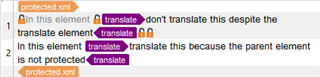
    Then this is what I get:

    Screenshot of Trados Studio with XML code, highlighting 'translate' element inside 'protected' as not translatable with warning icons, and 'translate' inside 'notprotected' as translatable.

    It's another way to filter out content where the inline element names are the same but should only be handled when the parent is also translatable.

    can probably elaborate if I missed something from this explanation.

    Paul Filkin | RWS

    Design your own training!
    You've done the courses and still need to go a little further, or still not clear? 
    Tell us what you need in our Community Solutions Hub

    emoji


    Generated Image Alt-Text
    [edited by: Trados AI at 5:01 PM (GMT 0) on 28 Feb 2024]
Reply
  • Hi

    I've always viewed it like this:

    <?xml version="1.0" encoding="UTF-8"?>
    <root>
    	<protected>In this element <translate>don't translate this despite the translate element</translate></protected>
    	<notprotected>In this element <translate>translate this because the parent element is not protected</translate></notprotected>
    </root>

    If I set the rule to translate the <translate> element it will only expose it for translation in the <notprotected> element because the <protected> element is non-translatable:

    Screenshot of Trados Studio showing translation rules with 'notprotected' set to 'Always translatable', 'translate' set to 'Translatable (except in protected context)', and 'protected' set to 'Not translatable'.

    So I get this:

    Screenshot of Trados Studio with XML code, highlighting 'translate' element inside 'notprotected' as translatable.

    If I change the rule and make it always translatable like this:

    Screenshot of Trados Studio showing updated translation rules with 'translate' set to 'Always translatable' and 'protected' still as 'Not translatable'.

    Then this is what I get:

    Screenshot of Trados Studio with XML code, highlighting 'translate' element inside 'protected' as not translatable with warning icons, and 'translate' inside 'notprotected' as translatable.

    It's another way to filter out content where the inline element names are the same but should only be handled when the parent is also translatable.

    can probably elaborate if I missed something from this explanation.

    Paul Filkin | RWS

    Design your own training!
    You've done the courses and still need to go a little further, or still not clear? 
    Tell us what you need in our Community Solutions Hub

    emoji


    Generated Image Alt-Text
    [edited by: Trados AI at 5:01 PM (GMT 0) on 28 Feb 2024]

Children
No Data