
 Translate



Hi there,
I can not add entries to MultiTerm in Studio 2017. There seems to be an issue with the "Termbase Viewer" window, because the "Term Recognition" and "Termbase Search" windows seem to work just fine.
Software details:
- Studio 2017 SR1 (14.1.6278.0)
- MultiTerm 2017 SR1 (14.2.7.43908)
Steps to reproduce:
- Right-click on a result in the "Term Recognition" list, select "View Term details". Error: See Screenshot 1 below and stack trace 1.
Or:
- Add a term with CTRL-F2. Error: See Screenshot 2 below and stack trace 2.
My actions so far:
- Upgrade Studio to 14.1.10016.54660 (I won't do that again because I've had another major issue with that version, causing total unproductivity.)
- Check for updates in MultiTerm (no updates available)
- Try different termbases (same problem)
- Try exporting the termbase to xml and creating a new from scratch (problem not resolved)
Any help HIGHLY appreciated!
Screenshot 1: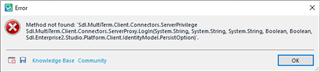
Screenshot 2: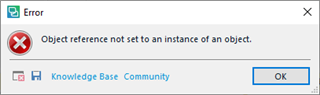
Stacktrace 1:
<SDLErrorDetails time="18.06.2019 12:50:42">
  <ErrorMessage>Method not found: 'Sdl.MultiTerm.Client.Connectors.ServerPrivilege Sdl.MultiTerm.Client.Connectors.ServerProxy.LogIn(System.String, System.String, System.String, Boolean, Boolean, Sdl.Enterprise2.Studio.Platform.Client.IdentityModel.PersistOption)'.</ErrorMessage>
  <Exception>
    <Type>System.MissingMethodException, mscorlib, Version=4.0.0.0, Culture=neutral, PublicKeyToken=b77a5c561934e089</Type>
    <HelpLink />
    <Source>Sdl.MultiTerm.COM</Source>
    <HResult>-2146233069</HResult>
    <StackTrace><![CDATA[   at Sdl.MultiTerm.TMO.Interop.TermbaseRepositoryClass.Connect(String UserId, String Password)
   at Sdl.MultiTerm.Core.Common.DataContainers.TermbaseConnectorEx.Init()
   at Sdl.MultiTerm.Core.Common.DataContainers.TermbaseConnectorEx..ctor()
   at Sdl.TranslationStudio.Editor.Terminology.TermbaseViewer.MultiTermTermAccessLoader.Initialize(IProjectTermbase projectTermbase, String sourceLocale, String targetLocale)
   at Sdl.TranslationStudio.Editor.Terminology.TermbaseViewer.MultiTermViewerWinFormsUI.CreateTermLoader(ITerminologyProvider terminologyProvider)
   at Sdl.TranslationStudio.Editor.Terminology.TermbaseViewer.MultiTermViewerWinFormsUI.GetTermAccessLoader(ITerminologyProvider terminologyProvider)
   at Sdl.TranslationStudio.Editor.Terminology.TermbaseViewer.MultiTermViewerWinFormsUI.JumpToTerm(ITermHit term)
   at Sdl.TranslationStudio.Editor.Terminology.TermbaseViewer.TermBaseViewPartX.TerminologyProviderViewerJumpToTerm(ITermHit term)
   at Sdl.TranslationStudio.Editor.Terminology.TermbaseViewer.TermBaseViewPartX.JumpToTerm(ITermHit term)
   at Sdl.TranslationStudio.Editor.Terminology.Actions.TermRecognitionViewTermDetail.Execute()
   at Sdl.Desktop.Platform.Implementation.CommandBars.ActionService.<>c__DisplayClass3.<ExecuteAction>b__2()
   at Sdl.Desktop.Platform.Implementation.Services.Log.Resources(Object message, Action action)
   at Sdl.Desktop.Platform.Implementation.CommandBars.ActionService.ExecuteAction(IAction action, ActionOrigin origin, Boolean allowToggle)
   at Sdl.Desktop.Platform.WinForms.IgCommandBarAction.Execute()
   at Sdl.Desktop.Platform.WinForms.IgCommandBarAction._lazyButtonTool_ToolClick(Object sender, ToolClickEventArgs e)
   at Infragistics.Win.UltraWinToolbars.ToolBase.OnToolClick(ToolClickEventArgs e)
   at Infragistics.Win.UltraWinToolbars.UltraToolbarsManager.OnToolClick(ToolClickEventArgs e)
   at Infragistics.Win.UltraWinToolbars.UltraToolbarsManager.FireEvent(ToolbarEventIds id, EventArgs e)
   at Infragistics.Win.UltraWinToolbars.ToolBase.OnToolClick()
   at Infragistics.Win.UltraWinToolbars.ToolMenuItem.OnClick()
   at Infragistics.Win.UltraWinToolbars.PopupMenuItemUIElement.DoClickProcessing(MouseEventArgs e)
   at Infragistics.Win.UltraWinToolbars.PopupMenuItemUIElement.OnMouseUp(MouseEventArgs e)
   at Infragistics.Win.TextUIElementBase.OnMouseUp(MouseEventArgs e)
   at Infragistics.Win.ControlUIElementBase.ProcessMouseUpHelper(Object sender, MouseEventArgs e)
   at Infragistics.Win.ControlUIElementBase.ProcessMouseUp(Object sender, MouseEventArgs e)
   at Infragistics.Win.Utilities.ProcessEvent(Control control, ProcessEvent eventToProcess, EventArgs e)
   at Infragistics.Win.UltraWinToolbars.PopupControlBase.OnMouseUp(MouseEventArgs e)
   at System.Windows.Forms.Control.WmMouseUp(Message& m, MouseButtons button, Int32 clicks)
   at System.Windows.Forms.Control.WndProc(Message& m)
   at System.Windows.Forms.Control.ControlNativeWindow.OnMessage(Message& m)
   at System.Windows.Forms.Control.ControlNativeWindow.WndProc(Message& m)
   at System.Windows.Forms.NativeWindow.Callback(IntPtr hWnd, Int32 msg, IntPtr wparam, IntPtr lparam)]]></StackTrace>
  </Exception>
  <Environment>
    <ProductName>SDL Trados Studio</ProductName>
    <ProductVersion>14.0.0.0</ProductVersion>
    <EntryAssemblyFileVersion>14.1.6278.0</EntryAssemblyFileVersion>
    <OperatingSystem>Microsoft Windows 10 Pro N</OperatingSystem>
    <ServicePack>NULL</ServicePack>
    <OperatingSystemLanguage>1031</OperatingSystemLanguage>
    <CodePage>1252</CodePage>
    <LoggedOnUser>MAX\dave</LoggedOnUser>
    <DotNetFrameWork>4.0.30319.42000</DotNetFrameWork>
    <ComputerName>MAX</ComputerName>
    <ConnectedToNetwork>True</ConnectedToNetwork>
    <PhysicalMemory>8278264 MB</PhysicalMemory>
  </Environment>
</SDLErrorDetails>
Stacktrace 2:
<SDLErrorDetails time="18.06.2019 12:51:33">
  <ErrorMessage>Object reference not set to an instance of an object.</ErrorMessage>
  <Exception>
    <Type>System.NullReferenceException, mscorlib, Version=4.0.0.0, Culture=neutral, PublicKeyToken=b77a5c561934e089</Type>
    <HelpLink />
    <Source>Sdl.MultiTerm.Core.Common</Source>
    <HResult>-2147467261</HResult>
    <StackTrace><![CDATA[   at Sdl.MultiTerm.Core.Common.DataContainers.TermbaseStatus..ctor(ITermbaseInfo info)
   at Sdl.MultiTerm.Client.MiniEditor.MiniEditorControl..ctor(ITermbaseInfo activeTermbase, ITermHit activeTerm)
   at Sdl.TranslationStudio.Editor.Terminology.TermbaseViewer.MultiTermViewerWinFormsUI.AddTerm(ITermbaseInfo termbaseInfo, String source, String target)
   at Sdl.TranslationStudio.Editor.Terminology.TermbaseViewer.MultiTermViewerWinFormsUI.AddTerm(String source, String target)
   at Sdl.TranslationStudio.Editor.Terminology.TermbaseViewer.TermBaseViewPartX.TerminologyProviderViewerAddTerm(String source, String target)
   at Sdl.TranslationStudio.Editor.Terminology.TermbaseViewer.TermBaseViewPartX.AddTerm(ITerminologyProvider termbase, String source, String target)
   at Sdl.TranslationStudio.Editor.Terminology.EditorTermbaseUtils.AddTerm(IEditorService editorService, ITranslatableDocument translatableDocument, String sourceText, String targetText)
   at Sdl.TranslationStudio.Editor.Terminology.Actions.AbstractAddNewTermAction.AddTerm()
   at Sdl.TranslationStudio.Editor.Terminology.Actions.AddNewTerm.Execute()
   at Sdl.Desktop.Platform.Implementation.CommandBars.StaticAction.Execute()
   at Sdl.Desktop.Platform.Implementation.CommandBars.ActionService.<>c__DisplayClass3.<ExecuteAction>b__2()
   at Sdl.Desktop.Platform.Implementation.Services.Log.Resources(Object message, Action action)
   at Sdl.Desktop.Platform.Implementation.CommandBars.ActionService.ExecuteAction(IAction action, ActionOrigin origin, Boolean allowToggle)
   at Sdl.Desktop.Platform.Implementation.CommandBars.ActionService.ExecuteActionForShortcut(Keys shortcut)
   at Sdl.Desktop.Platform.WinForms.StudioWindowForm.OnKeyDown(KeyEventArgs e)
   at System.Windows.Forms.Control.ProcessKeyEventArgs(Message& m)
   at System.Windows.Forms.Form.ProcessKeyPreview(Message& m)
   at System.Windows.Forms.Control.ProcessKeyPreview(Message& m)
   at System.Windows.Forms.Control.ProcessKeyPreview(Message& m)
   at System.Windows.Forms.Control.ProcessKeyPreview(Message& m)
   at System.Windows.Forms.Control.ProcessKeyPreview(Message& m)
   at System.Windows.Forms.Control.ProcessKeyPreview(Message& m)
   at System.Windows.Forms.Control.ProcessKeyPreview(Message& m)
   at System.Windows.Forms.Control.ProcessKeyPreview(Message& m)
   at System.Windows.Forms.Control.ProcessKeyPreview(Message& m)
   at System.Windows.Forms.Control.ProcessKeyPreview(Message& m)
   at System.Windows.Forms.Control.ProcessKeyPreview(Message& m)
   at System.Windows.Forms.Control.ProcessKeyPreview(Message& m)
   at System.Windows.Forms.Control.ProcessKeyPreview(Message& m)
   at System.Windows.Forms.Control.ProcessKeyPreview(Message& m)
   at System.Windows.Forms.Control.ProcessKeyPreview(Message& m)
   at System.Windows.Forms.Control.ProcessKeyPreview(Message& m)
   at System.Windows.Forms.Control.ProcessKeyPreview(Message& m)
   at System.Windows.Forms.Control.ProcessKeyMessage(Message& m)
   at System.Windows.Forms.Control.WmKeyChar(Message& m)
   at System.Windows.Forms.Control.WndProc(Message& m)
   at System.Windows.Forms.Control.ControlNativeWindow.OnMessage(Message& m)
   at System.Windows.Forms.Control.ControlNativeWindow.WndProc(Message& m)
   at System.Windows.Forms.NativeWindow.Callback(IntPtr hWnd, Int32 msg, IntPtr wparam, IntPtr lparam)]]></StackTrace>
  </Exception>
  <Environment>
    <ProductName>SDL Trados Studio</ProductName>
    <ProductVersion>14.0.0.0</ProductVersion>
    <EntryAssemblyFileVersion>14.1.6278.0</EntryAssemblyFileVersion>
    <OperatingSystem>Microsoft Windows 10 Pro N</OperatingSystem>
    <ServicePack>NULL</ServicePack>
    <OperatingSystemLanguage>1031</OperatingSystemLanguage>
    <CodePage>1252</CodePage>
    <LoggedOnUser>MAX\dave</LoggedOnUser>
    <DotNetFrameWork>4.0.30319.42000</DotNetFrameWork>
    <ComputerName>MAX</ComputerName>
    <ConnectedToNetwork>True</ConnectedToNetwork>
    <PhysicalMemory>8278264 MB</PhysicalMemory>
  </Environment>
</SDLErrorDetails>
Generated Image Alt-Text
[edited by: Trados AI at 4:56 PM (GMT 0) on 28 Feb 2024]
