Translate



Hi there,
I was wondering if anybody can tell me how I can easily find segments I’ve accidentally forgotten to translate using the QA Checker 3.0 in Studio 2019?
I was expecting the “Empty or forgotten translation” under Segments Verification in QA Checker 3.0 in Studio 2019 to find such instances, as based on the name I would expect this check to find both
- Any completely empty target segments
- regardless of status
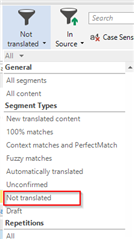
- Any target segments with the status “Not Translated”
- as presumably I ‘forgot’ to translate these
- or if I did leave these Not Translated on purpose, I’d like to double-check all such instances before delivery to make absolutely sure there is nothing in there that does require translation after all
- as presumably I ‘forgot’ to translate these
However, in actual practice the “Empty or forgotten translation” check only seems to find completely empty target segments.
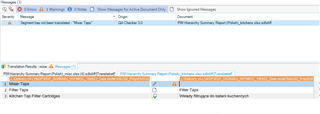
See for instance the screenshot below, where this check correctly identified the empty translation in segment one, but did not flag the forgotten translation in segment 2 at all.
Can somebody confirm if this is expected behaviour, and if so, how I can easily identify forgotten translations instead?
(Note: I’d prefer not to use the “source and target are identical” check, as the file contains hundreds of untranslatable product and model names)
Thanks
Generated Image Alt-Text
[edited by: Trados AI at 4:54 PM (GMT 0) on 28 Feb 2024]