You are currently working on UAT 

Target file (word) partially translated

Hi, I'm using the new Studio 2019 and when I try to save the target file in word, the segments in the word document are not translated (they remain in English instead of being translated in French), even though they are translated in the xliff file (and they also appear translated in the word file created for external review). What is even funnier (kind of!!) is that the problem appeared a few days ago, so the first 120 pages are properly translated in the word file, but then, suddenly, the rest is non translated. My document has 400 pages in total.

ANy idea how to fix this? Tx, Cosimo.

Parents
  • Hello ,

    If I understand correctly, you are translating EN-FR, and up until recently everything was fine.

    Therefore I think the first thing to check, would be your Studio settings as these may have inadvertently been changed-

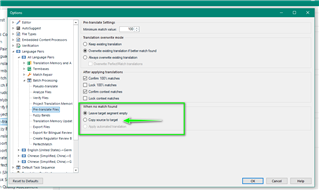
    File-Options-Language Pairs...

    Trados Studio Options window showing Language Pairs settings with 'Leave target segment empty' selected and 'Copy source to target' option highlighted.

    The default setting is 'When no match is found- Leave target segment empty-

    However if you have 'Copy source to target' enabled, this may explain the behaviour.

    Oana Nagy | QA Engineer | RWS Group

    emoji


    Generated Image Alt-Text
    [edited by: Trados AI at 4:51 PM (GMT 0) on 28 Feb 2024]
  • Hello Steven, tx for your anwer. The settings are OK.

    It is a really strange thing. 

    In fact, everything was fine up to a specific segment. Once that segment was over, all the segments which follow, even though translated, are not copied in the target file, EXCEPT FOR the footnotes. The footnotes are correclty copied. 

    As  a workaround, I changed the initial Word file, cancelled the problematic segment, reopened it in Trados, made a simulation and the segments following the previous problematic segment were correctly copied.

    But I don't have time to apply this workaround for the whole file. My file has 10,000 segments, the problem happened at the 2820th segment and I noticed the problem yesterday (so far, I have translated up to the 3850th segment). I would have to go through all the 3850 segments because I have to choose the right translation proposals... I would lose several days.

    I hope to be able to use the initial Trados file.

Reply
  • Hello Steven, tx for your anwer. The settings are OK.

    It is a really strange thing. 

    In fact, everything was fine up to a specific segment. Once that segment was over, all the segments which follow, even though translated, are not copied in the target file, EXCEPT FOR the footnotes. The footnotes are correclty copied. 

    As  a workaround, I changed the initial Word file, cancelled the problematic segment, reopened it in Trados, made a simulation and the segments following the previous problematic segment were correctly copied.

    But I don't have time to apply this workaround for the whole file. My file has 10,000 segments, the problem happened at the 2820th segment and I noticed the problem yesterday (so far, I have translated up to the 3850th segment). I would have to go through all the 3850 segments because I have to choose the right translation proposals... I would lose several days.

    I hope to be able to use the initial Trados file.

Children