You are currently working on UAT 

"Object reference not set to an instance of an object" when accepting all changes in document

Hi,

we've got a return package from the proofreader and after succesful import it seems impossible to accept all changes because of this common "Object..." error:

Screenshot of Trados Studio showing an error message box with the text 'Object reference not set to an instance of an object.' and an 'OK' button.

How can we deal with it? Please advise.


Generated Image Alt-Text
[edited by: Trados AI at 4:51 PM (GMT 0) on 28 Feb 2024]

emoji
Parents
  • Hello ,

    The message 'Object reference...' is very generic and doesnt give us enough information to be able to offer a possible solution.

    Please refer to the following Wiki- which explains what information to provide and how-

    https://community.sdl.com/product-groups/translationproductivity/w/customer-experience/4159/how-to-get-help-quickly-in-the-sdl-community-technical-forums

    Oana Nagy | QA Engineer | RWS Group

  • Hello , we use Trados Studio 2019 and Windows Server 2012 as an operating system.

    The source file is DOCX so I know how to repair it for the succesful export but the problem is that we can't accept all changes in document due the error and therefore update TM (and pre-translation of new source file then).

    Could you please help? It's around 50 000 words so accepting one by one would be horrible.

  • Hello ,

    Thankls for getting back to me.

    Please refer to the Wiki article in my original reply- Its essential we gaet as much information as possible and that you also post the 'Error Stack' as this contains vital informatiojn as to the cause of the error.

    Oana Nagy | QA Engineer | RWS Group

  • Its essential we gaet as much information as possible and that you also post the 'Error Stack' as this contains vital informatiojn as to the cause of the error.

    Ah, I am sorry:

    /resized-image/__size/640x480/__key/communityserver-discussions-components-files/90/pastedimage1560262804224v1.png

  • Hello  

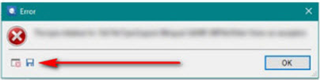
    When you are posting the error- please click on the dick icon- you can then save the whole error stack to your desktop and then attach this to the thread- 

    Error dialog box in Trados Studio with a red cross icon, indicating 'The operation could not be completed' and an arrow pointing to the 'OK' button.

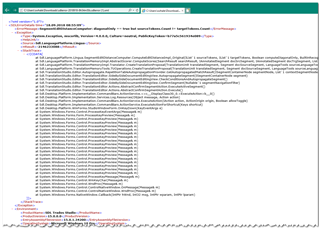
    This will then look something like this- and contains essential data that we need.

    Expanded error stacktrace in Trados Studio showing detailed technical information and code references.

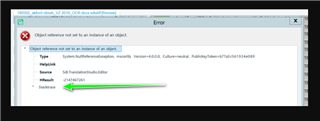
    You can also expand the error message by clicking on 'stacktrace'

    Error dialog box in Trados Studio showing 'Object reference not set to an instance of an object' with an arrow pointing to the 'stacktrace' link.

    Oana Nagy | QA Engineer | RWS Group

    emoji


    Generated Image Alt-Text
    [edited by: Trados AI at 4:52 PM (GMT 0) on 28 Feb 2024]

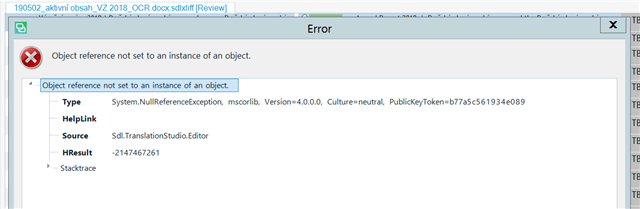
  • <SDLErrorDetails time="12. 6. 2019 10:13:12">
      <ErrorMessage>Object reference not set to an instance of an object.</ErrorMessage>
      <Exception>
        <Type>System.NullReferenceException, mscorlib, Version=4.0.0.0, Culture=neutral, PublicKeyToken=b77a5c561934e089</Type>
        <HelpLink />
        <Source>Sdl.TranslationStudio.Editor</Source>
        <HResult>-2147467261</HResult>
        <StackTrace><![CDATA[   at Sdl.TranslationStudio.Editor.TranslationEditor.Actions.TrackChanges.AbstractTrackChangesCommandAction.CollectRowsWithTrackChanges(List`1 confirmationLevels)
       at Sdl.TranslationStudio.Editor.TranslationEditor.Actions.TrackChanges.AbstractTrackChangesCommandAction.AcceptAllTrackChanges()
       at Sdl.TranslationStudio.Editor.TranslationEditor.Actions.TrackChanges.TrackChangesAcceptAllAction.Execute()
       at Sdl.Desktop.Platform.Implementation.CommandBars.ActionService.<>c__DisplayClass30_0.<ExecuteAction>b__0()
       at Sdl.Desktop.Logger.Log.Resources(Object message, Action action)
       at Sdl.Desktop.Platform.Implementation.CommandBars.ActionService.ExecuteAction(IAction action, ActionOrigin origin, Boolean allowToggle)
       at Sdl.Desktop.Platform.WinForms.IgCommandBarAction.Execute()
       at Sdl.Desktop.Platform.WinForms.IgCommandBarAction._lazyButtonTool_ToolClick(Object sender, ToolClickEventArgs e)
       at Infragistics.Win.UltraWinToolbars.ToolBase.OnToolClick(ToolClickEventArgs e)
       at Infragistics.Win.UltraWinToolbars.UltraToolbarsManager.OnToolClick(ToolClickEventArgs e)
       at Infragistics.Win.UltraWinToolbars.UltraToolbarsManager.FireEvent(ToolbarEventIds id, EventArgs e)
       at Infragistics.Win.UltraWinToolbars.ToolBase.OnToolClick()
       at Infragistics.Win.UltraWinToolbars.ToolMenuItem.OnClick()
       at Infragistics.Win.UltraWinToolbars.PopupMenuItemUIElement.DoClickProcessing(MouseEventArgs e)
       at Infragistics.Win.UltraWinToolbars.PopupMenuItemUIElement.OnMouseUp(MouseEventArgs e)
       at Infragistics.Win.TextUIElementBase.OnMouseUp(MouseEventArgs e)
       at Infragistics.Win.ControlUIElementBase.ProcessMouseUpHelper(Object sender, MouseEventArgs e)
       at Infragistics.Win.ControlUIElementBase.ProcessMouseUp(Object sender, MouseEventArgs e)
       at Infragistics.Win.Utilities.ProcessEvent(Control control, ProcessEvent eventToProcess, EventArgs e)
       at Infragistics.Win.UltraWinToolbars.PopupControlBase.OnMouseUp(MouseEventArgs e)
       at System.Windows.Forms.Control.WmMouseUp(Message& m, MouseButtons button, Int32 clicks)
       at System.Windows.Forms.Control.WndProc(Message& m)
       at System.Windows.Forms.Control.ControlNativeWindow.OnMessage(Message& m)
       at System.Windows.Forms.Control.ControlNativeWindow.WndProc(Message& m)
       at System.Windows.Forms.NativeWindow.Callback(IntPtr hWnd, Int32 msg, IntPtr wparam, IntPtr lparam)]]></StackTrace>
      </Exception>
      <Environment>
        <ProductName>SDL Trados Studio</ProductName>
        <ProductVersion>15.0.0.0</ProductVersion>
        <EntryAssemblyFileVersion>15.1.2.48878</EntryAssemblyFileVersion>
        <OperatingSystem>Microsoft Windows Server 2012 R2 Standard</OperatingSystem>
        <ServicePack>NULL</ServicePack>
        <OperatingSystemLanguage>1033</OperatingSystemLanguage>
        <CodePage>1250</CodePage>
        <LoggedOnUser>SKRIVANEK\patrik.bulak</LoggedOnUser>
        <DotNetFrameWork>4.0.30319.42000</DotNetFrameWork>
        <ComputerName>PRG-RD-SH21</ComputerName>
        <ConnectedToNetwork>True</ConnectedToNetwork>
        <PhysicalMemory>16776756 MB</PhysicalMemory>
      </Environment>
    </SDLErrorDetails>

    Ok, thank you for your patience. Here you go. See the XML attached.

  • Hello ,

    Thanks for this- exactly what we need

    The following would suggest that it is the 'track changes' that is causing the problems 

    <StackTrace><![CDATA[ at Sdl.TranslationStudio.Editor.TranslationEditor.Actions.TrackChanges.AbstractTrackChangesCommandAction.CollectRowsWithTrackChanges(List`1 confirmationLevels)
    at Sdl.TranslationStudio.Editor.TranslationEditor.Actions.TrackChanges.AbstractTrackChangesCommandAction.AcceptAllTrackChanges()

    ..and after a little more research it would seem this is a very rare case scenario and could be caused by 'empty tracked changes'.

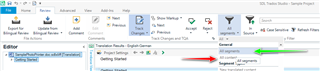
    Make sure that always working with "All segments" and not with "All content" in Studio> Review tab> Display Filter and manually accept the changes.

    Screenshot of Trados Studio interface showing the Review tab with Display Filter set to 'All segments'. A red arrow points to the 'Track Changes' option, and a green arrow indicates the 'Accept All Changes' command.

    If this does not help- then please take a look at the following article for a workaround.

    https://gateway.rws.com/csm?id=kb_article_view&sysparm_article=KB0032866

    Did this help?

    Oana Nagy | QA Engineer | RWS Group

    emoji


    Generated Image Alt-Text
    [edited by: Trados AI at 4:52 PM (GMT 0) on 28 Feb 2024]

  • Hi ,

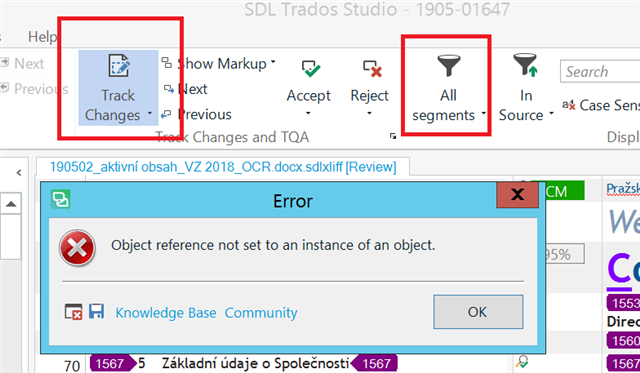
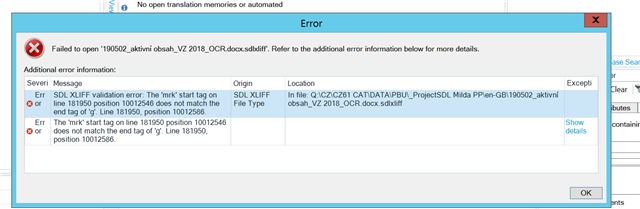
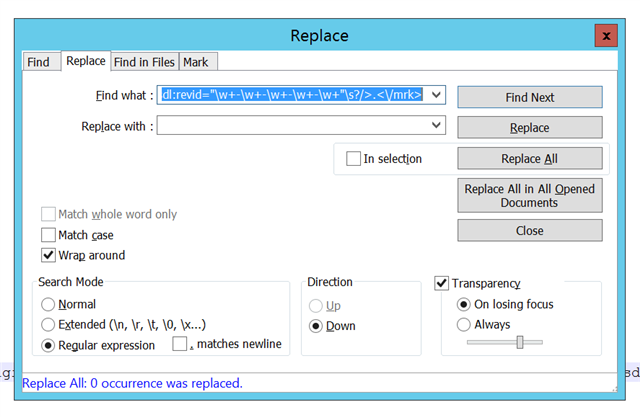
    thank you for your help but this doesn't work. I've made 3 replacements as I read the article and the problem remains the same: after opening sdlxliff there are still unacceptable changes:

    Screenshot of SDL Trados Studio with an 'Error' dialog box stating 'Object reference not set to an instance of an object.' The Track Changes option is highlighted in the toolbar.

    Any other idea?

    emoji


    Generated Image Alt-Text
    [edited by: Trados AI at 4:52 PM (GMT 0) on 28 Feb 2024]
Reply Children