 Translate



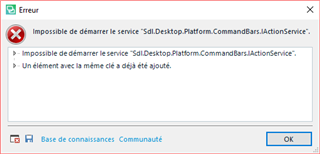
I cannot open SDL Trados Studio since I tried to install various plugins.
I tried to reinstall it but I still have the same error message. Can you help me?
Generated Image Alt-Text
[edited by: Trados AI at 6:24 PM (GMT 0) on 28 Feb 2024]

You are currently working on UAT

I cannot open SDL Trados Studio since I tried to install various plugins.
I tried to reinstall it but I still have the same error message. Can you help me?
Hello Nathalie Moulard ,
When posting in the SDL Community- it is alway best practise to provide us with as much information as possible.
In this case however it sounds as though the plugin folder has become corrupted
If you are running Studio 2019
|
1. Go to: C:\Users\USER_NAME\AppData\Roaming\SDL\SDL Trados Studio\15 |
If yyou are running Studio 2017
|
1. Go to: C:\Users\USER_NAME\AppData\Roaming\SDL\SDL Trados Studio\14 |
To repair your Studio installation-
https://gateway.sdl.com/CommunityKnowledge?articleName=00000141
Oana Nagy | QA Engineer | RWS Group
Hello Nathalie Moulard ,
When posting in the SDL Community- it is alway best practise to provide us with as much information as possible.
In this case however it sounds as though the plugin folder has become corrupted
If you are running Studio 2019
|
1. Go to: C:\Users\USER_NAME\AppData\Roaming\SDL\SDL Trados Studio\15 |
If yyou are running Studio 2017
|
1. Go to: C:\Users\USER_NAME\AppData\Roaming\SDL\SDL Trados Studio\14 |
To repair your Studio installation-
https://gateway.sdl.com/CommunityKnowledge?articleName=00000141
Oana Nagy | QA Engineer | RWS Group

Many thanks for your help Steven. Now...it works. Regards,
Nathalie
Hello, I have exactly the same problem with SDL Trados 2019. I tried to follow the above intructions but I can't find the AppData folder, can you please help me?
Thank you

Hi ANNABELLE MERY ,
If you are unable to find the App data folder, this will be because its hidden by default.
To expose the folder which should be at the following level
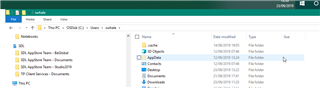
Simply click on VIEW- Hidden Folders
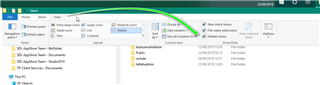
Now you should be able to navigate to the correct folders.
Oana Nagy | QA Engineer | RWS Group

Thank you, I was able to find the folder and go through with the rest of the instructions. I can open the software again.
Regards,
Annabelle