
 Translate



Hello,
I was adding a term to the termbase via the latest SDL Trados 2019.
I pressed Ctr+F2 and this error showed up: 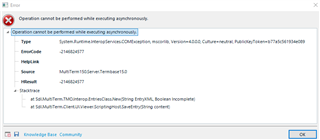 ("Operation cannot be performed while executing asynchronusly.").
After clicking "OK", the term appeared in the Termbase Viewer and Term Recognition windows as normal.
I have attached the error details:
<SDLErrorDetails time="30.05.2019 21:11:42">
  <ErrorMessage>Operation cannot be performed while executing asynchronously.</ErrorMessage>
  <Exception>
    <Type>System.Runtime.InteropServices.COMException, mscorlib, Version=4.0.0.0, Culture=neutral, PublicKeyToken=b77a5c561934e089</Type>
    <ErrorCode>-2146824577</ErrorCode>
    <HelpLink />
    <Source>MultiTerm150.Server.Termbase15.0</Source>
    <HResult>-2146824577</HResult>
    <StackTrace><![CDATA[   at Sdl.MultiTerm.TMO.Interop.EntriesClass.New(String EntryXML, Boolean Incomplete)
   at Sdl.MultiTerm.Client.UI.Viewer.ScriptingHost.SaveEntry(String content)]]></StackTrace>
  </Exception>
  <Environment>
    <ProductName>SDL Trados Studio</ProductName>
    <ProductVersion>15.0.0.0</ProductVersion>
    <EntryAssemblyFileVersion>15.1.3.55768</EntryAssemblyFileVersion>
    <OperatingSystem>Microsoft Windows 10 Pro</OperatingSystem>
    <ServicePack>NULL</ServicePack>
    <OperatingSystemLanguage>1033</OperatingSystemLanguage>
    <CodePage>1257</CodePage>
    <LoggedOnUser>[username]</LoggedOnUser>
    <DotNetFrameWork>4.0.30319.42000</DotNetFrameWork>
    <ComputerName>[username]</ComputerName>
    <ConnectedToNetwork>True</ConnectedToNetwork>
    <PhysicalMemory>7814108 MB</PhysicalMemory>
  </Environment>
</SDLErrorDetails>
Generated Image Alt-Text
[edited by: Trados AI at 4:45 PM (GMT 0) on 28 Feb 2024]
