

You are currently working on UAT 

Unable to open project package downloaded from a FTP Studio 2019

I am unable to open a package a client has sent me via FTP. After unzipping the package, I first receive this message:
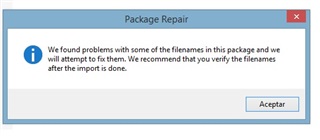
Trados Studio Package Repair dialog box with a message stating 'We found problems with some of the filenames in this package and we will attempt to fix them. We recommend that you verify the filenames after the import is done.' with an Accept button.

I am still able to continue but then receive another message and the package won't open:
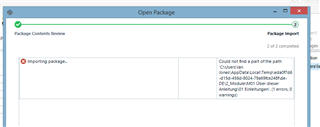
Trados Studio Open Package dialog box showing an error during 'Package Contents Review' step with a message 'Could not find a part of the path' followed by a file path, indicating an issue with importing the package.

The client has resent the package, I have renamed packages and renamed folders but to no avail. She has sent the package to translators of other languages without any problems. Any suggestions?


Generated Image Alt-Text
[edited by: Trados AI at 5:06 PM (GMT 0) on 28 Feb 2024]

emoji
Parents
  • There is a known issue with packages where the filenames contain umlauts and it should be resolvable by using Studio 2019 SR1 CU3 throughout the supply chain.  Alternatively if you recreate the package without using umlauts in the names then it should also be fine.

    You could also unzip the package and use the content manually?

    SDL updated a third party library used for decompressing packages and this provides better support for umlauts in file names.  However that improvement causes problems when using older versions of SDL Trados Studio.

    Paul Filkin | RWS

    Design your own training!
    You've done the courses and still need to go a little further, or still not clear? 
    Tell us what you need in our Community Solutions Hub

  • There is a known issue with packages where the filenames contain umlauts and it should be resolvable by using Studio 2019 SR1 CU3 throughout the supply chain.

    How is this problem thought-through for the most common situations where there is no way to ensure the newest version (2019) and update (SR1 CU3) throughout the supply chain?

    What are the people using older Studio versions supposed to do?

    Is that "improvement" perhaps meant as some way to force these users to upgrade?

  • Well, we don't update components in the technology to force users to upgrade.  That's silly.

    The problem has arisen because we updated many of the compnents in CU3 that were well overdue and needed to be using the latest libraries to ensure we can support our customers efficiently.  So yesterday we also updated 2017 to SR1 CU16 and this also updated the components there.  So this means that all supported versions of Studio are compatible.

    But to come back to your comment, you well know that software is end of lifed and we can't keep providing cumulative updates to old versions so they remain supported.  So instead we ensure the current supported versions are fine and this is 2017 and 2019.  So if users are on older versions than that and come across this problem then yes, they should upgrade.  But this isn't because we're forcing it in the way you are suggesting.  If they want to continue working with versions that are no longer supported then the workarounds will need to become part of their process.

    Paul Filkin | RWS

    Design your own training!
    You've done the courses and still need to go a little further, or still not clear? 
    Tell us what you need in our Community Solutions Hub

  • Hi Evzen, 

             Like Paul said we are updating our components and this might cause issues for older Studio versions. This upgrades are necessary to maintain compatibility with Windows, Word, include bug fixes from other 3rd parties and security upgrades. Take this issue for example it's because of this component https://github.com/icsharpcode/SharpZipLib/wiki/Release-1.0 bullet point 4 that actually fixed an older bug and this is the root cause of the current behavior. We created an algorithm that will fix the broken files. This covers only translation and resource files for normal packages that is in Studio 2019 CU 3 and Studio 2017 CU 16. 

             I hope this answers you questions and concerns.

    Best regards


  • software is end of lifed and we can't keep providing cumulative updates to old versions so they remain supported

    Sure, no one asks for updating old versions forever.
    What I meant here is keeping backward compatibility.

    Backward compatibility is crucial for anyone taking the software asset management seriously.
    There are many companies and also individuals which either cannot afford updating all software every single time the software producers decide to release new update.

    I'm pretty sure you know - since SDL works with big clients - that SW management in companies is pretty complicated and it usually takes considerable time until a new software update is tested by the IT department for compatibility with company environment and deployed to the computers. So the poor users have absolutely no control over the versions they work with.

    Even individuals cannot always update whenever "some developer sets his heart on releasing new update".
    I personally was forced to stay on rather outdated Studio version and CU, simply because all newer CUs and Studio versions had a seriously broken segmentation of plain text files which I needed to work with every day.

    Not mentioning possible conflicts with other software updates and continuous projects - again, I personally have an experience with this... having VERY hard time fighting with SDL pushing us to switch from GS Cloud 2015 to GS Cloud 2017 which not only had serious performance issues, but also required certain Studio updates (which were incompatible with our current processes due to new/changed behaviour without keeping backward compatibility) and required moving to a different GS server, which was absolutely out of a question due to continuous project running around the globe, i.e. without a chance to "finish running tasks, then move everything to new server and then continue with new tasks using new server" as SDL representative naively suggested.

    Anyway...
    Just wanted to publicly remind that updating a software may be pretty complicated thing... and that not everybody is a freelance translator with a single notebook, who can (and does) install anything anytime.
    Unfortunately, too many today's young developers (and their young managers) don't have the big picture of the way more complicated world behind their limited experience...

    We created an algorithm that will fix the broken files.

    What exactly does it mean?
    Is it something what is yet to be included in Studio in some future update and ensure the backward compatibility?
    Or is it something what was already included (and, judging from the reports coming from desperate users having issues opening packages, didn't really help)?

Reply
  • software is end of lifed and we can't keep providing cumulative updates to old versions so they remain supported

    Sure, no one asks for updating old versions forever.
    What I meant here is keeping backward compatibility.

    Backward compatibility is crucial for anyone taking the software asset management seriously.
    There are many companies and also individuals which either cannot afford updating all software every single time the software producers decide to release new update.

    I'm pretty sure you know - since SDL works with big clients - that SW management in companies is pretty complicated and it usually takes considerable time until a new software update is tested by the IT department for compatibility with company environment and deployed to the computers. So the poor users have absolutely no control over the versions they work with.

    Even individuals cannot always update whenever "some developer sets his heart on releasing new update".
    I personally was forced to stay on rather outdated Studio version and CU, simply because all newer CUs and Studio versions had a seriously broken segmentation of plain text files which I needed to work with every day.

    Not mentioning possible conflicts with other software updates and continuous projects - again, I personally have an experience with this... having VERY hard time fighting with SDL pushing us to switch from GS Cloud 2015 to GS Cloud 2017 which not only had serious performance issues, but also required certain Studio updates (which were incompatible with our current processes due to new/changed behaviour without keeping backward compatibility) and required moving to a different GS server, which was absolutely out of a question due to continuous project running around the globe, i.e. without a chance to "finish running tasks, then move everything to new server and then continue with new tasks using new server" as SDL representative naively suggested.

    Anyway...
    Just wanted to publicly remind that updating a software may be pretty complicated thing... and that not everybody is a freelance translator with a single notebook, who can (and does) install anything anytime.
    Unfortunately, too many today's young developers (and their young managers) don't have the big picture of the way more complicated world behind their limited experience...

    We created an algorithm that will fix the broken files.

    What exactly does it mean?
    Is it something what is yet to be included in Studio in some future update and ensure the backward compatibility?
    Or is it something what was already included (and, judging from the reports coming from desperate users having issues opening packages, didn't really help)?

Children
  • Just wanted to publicly remind that updating a software may be pretty complicated thing... and that not everybody is a freelance translator with a single notebook, who can (and does) install anything anytime.

    I absolutley agree with you here Evzen.  My own background prior to SDL was Enterprise financial and project accounting solutions and I'm always surprised at how this industry in general is more accepting of updates to software and upgrading in live with little to no process behind that.  That's not to say nobody has a more rigorous process as you clearly experienced it, but it isn't as controlled, or as widely practiced, as my experience in other industries.

    My main point was in response to what you actually posted before this more reasoned and entirely sensible observation.  But I would still question how far back we ensure backward compatibility as I would also expect an organisation with these sort of processes to have a support contract and to not fall more than three years behind.

    Paul Filkin | RWS

    Design your own training!
    You've done the courses and still need to go a little further, or still not clear? 
    Tell us what you need in our Community Solutions Hub