 Translate



Hello,
- when uploading a file this notification opens (see below)
- editor does not open (see below)
thank youSDL error.pdf
You are currently working on UAT

Hello,
- when uploading a file this notification opens (see below)
- editor does not open (see below)
thank youSDL error.pdf
Hello @Tomáš Kvítek
The first thing I would try is resetting your Windows layout-
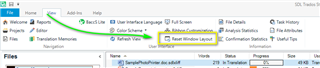
Then restart Studio- Is the problem resolved?
If not then the issue might be caused by an incompatible 'plugin' especially if you have recently updated Studio and the plug in is out of date and needs updating.
Please go to the SDL Plugin management area
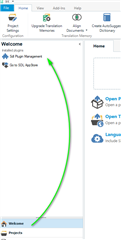
And uninstall the Plugins one by one until the issue is resolved.
If you could let us know which plugin was causing the conflict that would be great.
In reference yto the last screen shot-
Please refer to the following article-
https://gateway.rws.com/csm?id=kb_article_view&sysparm_article=KB0034055
Please let us know which solution resolved the problem.
Oana Nagy | QA Engineer | RWS Group


Hello Steven.
your comment is truly appreciated. Once done the updates, will post about the cause of the SDL crash.
many thanks
Tomas
Hi everyone,
could anyone help? the errors re-occur repeatedly (pls see pdf file below)
What I've done so far:
- uninstalled plug-ins
- turned off UAC
- uninstalled SDL Trados 2019
- restarted PC
- re-installed SDL Trados 2019
Your support would be fully appreciated, as I'm unable to run the Studio.
many thanks
Tomas5023.SDL error.pdf


