You are currently working on UAT 

Problem "Wrong target expression of grouped search" with latest update Trados Studio 2019 (15.1.4.55768)

Ok, I have a problem and the reason for it is quite clear, in my opinion. However, identifying the exact cause and fixing it is another matter (a question of time, really).

Let me explain. Apparently the latest update in Trados Studio 2019 (15.1.4.55768) allows greater flexibility in QA checks as it allows usage of regular expressions in grouped search expressions. Particularly, this is the updated feature which I believe causes the problem.

Enhanced regular expressions in QA Checker to enable regular expressions to be used also in the targets of grouped search expressions checks (CRQ-13254).

While that new feature is all great and neat, it is not 100% compatible with older expressions. For example, if we had before the expression ($1)) to check in target, that might be a valid STRING expression but it is NO LONGER a valid regular expression. So, the expressions you have been working with for ages suddenly DO NOT work with this new update.

And unfortunately, you have no idea which one of the expressions is causing the problem as the error report is useless (that's why I am not attaching it here). When confirming the subject, the parser simply says this.
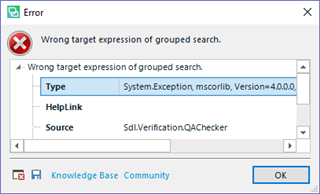
Error dialog box in Trados Studio displaying 'Wrong target expression of grouped search' with an 'X' icon indicating an error. The error type is 'System.Exception, mscorlib, Version=4.0.0.0' and the source is 'Sdl.Verification.QAChecker'.

And the problem is simple. I have a LOT of regular expressions (over 100) and I have NO IDEA which one is causing the problem. I can cut the possibilities because I know that one GROUPED SARTCH EXPRESSION is causing it, so I can skip the other, but I still have over 40. And that is something that should not be allowed. 

In other words, this new update is screwing up backwards compatibility in QA Checker 3.0 and its fixing it falls to the user, it's extremely cumbersome and the error report does not even say which is the expression giving the problem so we have to check all regular expressions ONE BY ONE.

So it would be nice if you considered it and found a fix for this. Perhaps expanding the error report would be enough, since I believe an automatic regex conversion mught be complex or risky.


Generated Image Alt-Text
[edited by: Trados AI at 4:39 PM (GMT 0) on 28 Feb 2024]

emoji
Parents
  •  [UPDATE] After a couple of hours of intensive bug-finding, I found where this particular problem is (this same problem happened with a different regex a couple of days ago but I only decided to write after this new one issue).

    It turns out that if you have the following Regular Expression QA

    Regex Source: ([A-Z]{3}\d{4})(.*?)\.  This expression should match ISO3432 Electromagnetic Radiation.

    Regex Target: $1$2

    Grouped Search Expression - Report if source matches but not target

    The thing is that if the following string appears. 

    ISO3432.

    Then $2 is null. The expression (.*?) allows for zero length groups. Therefore the Regex Target $1$2 gives an error since $2 is a zero-length string.

    I don't think that should be the case. If $2 has zero length, it should be a zero length string and $1$2 should still make perfect sense. I believe this should not give an error. A different thing would be if we had in Regex Target:

    $1$2$3

    This indeed should give an error since there are NOT three groups (there are no 3 expressions enclosed in parentheses).

    But $1$2 should NOT give an error since there are 2 groups here. Only that one turns out to be empty. But empty does not mean non-existent!

    I WANT TO MAKE CLEAR THAT THIS UPDATE REFERS TO A PARTICULAR ISSUE THAT MERITS ITS OWN ANALYSYS (ZERO-LENGTH GROUPS), BUT THIS DOES NOT MEAN THE GENERAL ISSUE (THE DESTRUCTION OF QA REGEX COMPATIBILITY WITH THE PREVIOUS TRADOS VERSION AND THE DIFFICULTY OF FINDING WHERE THE PROBLEM IS) SHOULD BE NOT BE LOOKED UPON EITHER!)

  • I WANT TO MAKE CLEAR THAT THIS UPDATE REFERS TO A PARTICULAR ISSUE THAT MERITS ITS OWN ANALYSYS (ZERO-LENGTH GROUPS)

    I can repro this problem and have reported it.

    BUT THIS DOES NOT MEAN THE GENERAL ISSUE (THE DESTRUCTION OF QA REGEX COMPATIBILITY WITH THE PREVIOUS TRADOS VERSION AND THE DIFFICULTY OF FINDING WHERE THE PROBLEM IS) SHOULD BE NOT BE LOOKED UPON EITHER!)

    This particular issue is not related to the changes.  The changes only provide the ability to use regex in the target of the Grouped Search.

    Paul Filkin | RWS

    Design your own training!
    You've done the courses and still need to go a little further, or still not clear? 
    Tell us what you need in our Community Solutions Hub

  • I believe I disagree, Paul. As I said earlier, I believe that introducing the ability to use regex in the target ot the Grouped Search makes formerly aceptable strings unacceptable now.(and cause errors)

    For example, if you had ($1)) in the target field of a previous Trados release, it would be perfectly Ok, it would simply match strings such as (Name)), or (123)) or whatever $1 was. In order words, strings where there are two closing parentheses.

    However, in the new release, it would give an error due to unpaired parentheses. After the new update, you can't introduce such regex with unpaired segments, but what if you had for the previous release? It would give you an error.

    The user has to locate such string and now change it for \($1\)\) in order to work as before.

    My point is that some strings that were aceptable before are NOT aceptable after the new update. When you have 50, 60 or 100 regex QA strings, fixing such issues is a HUGE pain. And I do have over 100 regular expressions that are causing me a lot of pain.

    And my point is that introducing this feature is very useful and welcome, but is a bigger change than expected since it affects backwards QA compatibility. And since the only solution is either fixing each entry manually or skipping this welcome addition, I am asking that it would be helpful if SOMEWHERE in the bug report appeared what particular regular expression is causing problems.

    I hope I am clearer now. I expect a lot of problems to come up in the following weeks as the parser will only complain when a specific problem is found in a segment,.As in the case above, I might have the now-incorrect ($1)) regex in my QA settings file for ages that I will only notice if and only if such regex is ever applied (therefore failing).

  • I believe I disagree, Paul.

    What exactly did I say that you disagree with?  I acknowledged the bug and just clarified that it is not related to the specific changes that we made for the target in the grouped search.

    I understand your comment on how the target regex now works, and quite honestly I agree with you.  We discussed this at length before the change was made as I didn't think it was a good idea and thought we should have just introduced another option for this usecase.  But the majority wins and when we tested in Beta there was no dissent at all... every user was asked about this and they all agreed it was the right change.  So I was wrong.

    The best thing you can do if you feel strongly about this is to log an idea in the ideas site and suggest we have a option for this or perhaps suggest that we always provide a way to find the things we change so users are able to easily identify where they need to make a change.

    Paul Filkin | RWS

    Design your own training!
    You've done the courses and still need to go a little further, or still not clear? 
    Tell us what you need in our Community Solutions Hub

  • Hi

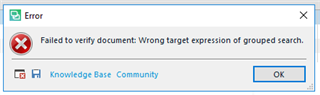
    As I understand , he would like the error message to point to the Regex that is causing it. At the moment it is very generic:

    Error dialog box in Trados Studio with a red cross icon, displaying the message 'Failed to verify document: Wrong target expression of grouped search.' with an OK button.

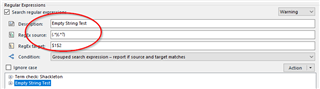
    If it said: "Failed to verify document: Wrong target expression of group search (Empty String Test)" the user would know where in his collection of Regex to look.

    Trados Studio Regular Expressions window showing a warning for 'Empty String Test' with a red circle around the Regex input field containing '(?!$).*'.

    I understood this to be Ignacio's main point of this thread.

    Daniel

    emoji


    Generated Image Alt-Text
    [edited by: Trados AI at 4:39 PM (GMT 0) on 28 Feb 2024]
Reply Children