You are currently working on UAT 

TM behavior very odd - language pair and location issue

I am working on a Studio project from English (UK) to Italian (Italy) and I want to use my TM  from English (UK) to Italian (Italy).

When I select the TM under All language pairs, it says, at the bottom 'You have set up different translation memories or translation providers for certain language pair. 
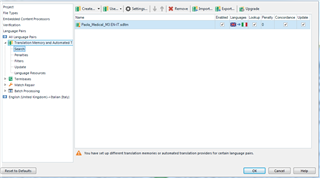
Trados Studio project settings showing an alert symbol next to the TM under All language pairs with a message about different translation memories for certain language pairs.

Then I go to under English (UK) - Italian (Italy) and make sure the checkbox 'Use different translations providers for this language pair' is deselected. I have already restarted the application, so I am sure this is indeed true.

My issue is that

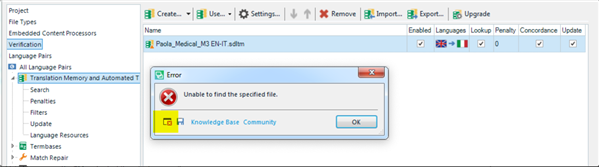
1) under All Languages pair the TM has an alert symbol inviting me to Upgrade the TM, but when I click on the Upgrade TM, appears a popup that reads:
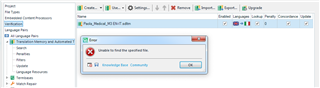
Error popup in Trados Studio stating 'Upgrade TM: Failed to load the specified file.' with an acknowledge button.

I tried to remove the TM and select it again, to no avail.

2) the segments are not written in the TM, not even if I launch the command Batch Task > Update Main TM.

3) The TM lookup works.

I don't understand what's happening here and how to fix this!

I am using Parallels, in case this could have anything to do with it.

Thanks


Generated Image Alt-Text
[edited by: Trados AI at 4:37 PM (GMT 0) on 28 Feb 2024]

emoji
Parents
  • Hello @Paola,

    Can you please send me the error details?

    Trados Studio error dialog box with a red cross icon, displaying the message 'Unable to find the specified file.' with an 'OK' button and a 'Knowledge Base Community' link.

    Best Regards,

    Ana-Maria Matefi

    Ana-Maria Matefi | RWS Group

    _____
    Design your own training!

    You've done the courses and still need to go a little further, or still not clear? 
    Tell us what you need in our Community Solutions Hub

    emoji


    Generated Image Alt-Text
    [edited by: Trados AI at 4:37 PM (GMT 0) on 28 Feb 2024]
  • <SDLErrorDetails time="20/05/2019 07:45:52">
      <ErrorMessage>Unable to find the specified file.</ErrorMessage>
      <Exception>
        <Type>System.IO.FileNotFoundException, mscorlib, Version=4.0.0.0, Culture=neutral, PublicKeyToken=b77a5c561934e089</Type>
        <FileName />
        <FusionLog />
        <HelpLink />
        <Source>Sdl.LanguagePlatform.TranslationMemoryApi</Source>
        <HResult>-2147024894</HResult>
        <StackTrace><![CDATA[   at Sdl.LanguagePlatform.TranslationMemoryApi.FileBasedTranslationMemory..ctor(String tmFilePath)
       at Sdl.TranslationStudio.Common.TranslationMemory.TranslationMemoryUtil.OpenAndUnlock(String tmFilePath, ITranslationProviderCredentialStore credentialStore, String permission, Boolean alwaysPrompt, Boolean validate, Boolean setUnlockedPermissions, Boolean throwLogOnException)
       at Sdl.TranslationStudio.Common.TranslationMemory.TranslationMemoriesControl.OpenAndUnlockTM(String tmFilePath)
       at Sdl.TranslationStudio.Common.TranslationMemory.TranslationMemoriesControl._upgradeToolStripButton_Click(Object sender, EventArgs e)
       at System.Windows.Forms.ToolStripItem.RaiseEvent(Object key, EventArgs e)
       at System.Windows.Forms.ToolStripButton.OnClick(EventArgs e)
       at System.Windows.Forms.ToolStripItem.HandleClick(EventArgs e)
       at System.Windows.Forms.ToolStripItem.HandleMouseUp(MouseEventArgs e)
       at System.Windows.Forms.ToolStripItem.FireEventInteractive(EventArgs e, ToolStripItemEventType met)
       at System.Windows.Forms.ToolStripItem.FireEvent(EventArgs e, ToolStripItemEventType met)
       at System.Windows.Forms.ToolStrip.OnMouseUp(MouseEventArgs mea)
       at System.Windows.Forms.Control.WmMouseUp(Message& m, MouseButtons button, Int32 clicks)
       at System.Windows.Forms.Control.WndProc(Message& m)
       at System.Windows.Forms.ScrollableControl.WndProc(Message& m)
       at System.Windows.Forms.ToolStrip.WndProc(Message& m)
       at System.Windows.Forms.Control.ControlNativeWindow.OnMessage(Message& m)
       at System.Windows.Forms.Control.ControlNativeWindow.WndProc(Message& m)
       at System.Windows.Forms.NativeWindow.Callback(IntPtr hWnd, Int32 msg, IntPtr wparam, IntPtr lparam)]]></StackTrace>
      </Exception>
      <Environment>
        <ProductName>SDL Trados Studio</ProductName>
        <ProductVersion>15.0.0.0</ProductVersion>
        <EntryAssemblyFileVersion>15.1.3.55768</EntryAssemblyFileVersion>
        <OperatingSystem>Microsoft Windows 7 Professional </OperatingSystem>
        <ServicePack>Service Pack 1</ServicePack>
        <OperatingSystemLanguage>1040</OperatingSystemLanguage>
        <CodePage>1252</CodePage>
        <LoggedOnUser>Paola-Win7\Paola</LoggedOnUser>
        <DotNetFrameWork>4.0.30319.42000</DotNetFrameWork>
        <ComputerName>PAOLA-WIN7</ComputerName>
        <ConnectedToNetwork>True</ConnectedToNetwork>
        <PhysicalMemory>8388136 MB</PhysicalMemory>
      </Environment>
    </SDLErrorDetails>

Reply
  • <SDLErrorDetails time="20/05/2019 07:45:52">
      <ErrorMessage>Unable to find the specified file.</ErrorMessage>
      <Exception>
        <Type>System.IO.FileNotFoundException, mscorlib, Version=4.0.0.0, Culture=neutral, PublicKeyToken=b77a5c561934e089</Type>
        <FileName />
        <FusionLog />
        <HelpLink />
        <Source>Sdl.LanguagePlatform.TranslationMemoryApi</Source>
        <HResult>-2147024894</HResult>
        <StackTrace><![CDATA[   at Sdl.LanguagePlatform.TranslationMemoryApi.FileBasedTranslationMemory..ctor(String tmFilePath)
       at Sdl.TranslationStudio.Common.TranslationMemory.TranslationMemoryUtil.OpenAndUnlock(String tmFilePath, ITranslationProviderCredentialStore credentialStore, String permission, Boolean alwaysPrompt, Boolean validate, Boolean setUnlockedPermissions, Boolean throwLogOnException)
       at Sdl.TranslationStudio.Common.TranslationMemory.TranslationMemoriesControl.OpenAndUnlockTM(String tmFilePath)
       at Sdl.TranslationStudio.Common.TranslationMemory.TranslationMemoriesControl._upgradeToolStripButton_Click(Object sender, EventArgs e)
       at System.Windows.Forms.ToolStripItem.RaiseEvent(Object key, EventArgs e)
       at System.Windows.Forms.ToolStripButton.OnClick(EventArgs e)
       at System.Windows.Forms.ToolStripItem.HandleClick(EventArgs e)
       at System.Windows.Forms.ToolStripItem.HandleMouseUp(MouseEventArgs e)
       at System.Windows.Forms.ToolStripItem.FireEventInteractive(EventArgs e, ToolStripItemEventType met)
       at System.Windows.Forms.ToolStripItem.FireEvent(EventArgs e, ToolStripItemEventType met)
       at System.Windows.Forms.ToolStrip.OnMouseUp(MouseEventArgs mea)
       at System.Windows.Forms.Control.WmMouseUp(Message& m, MouseButtons button, Int32 clicks)
       at System.Windows.Forms.Control.WndProc(Message& m)
       at System.Windows.Forms.ScrollableControl.WndProc(Message& m)
       at System.Windows.Forms.ToolStrip.WndProc(Message& m)
       at System.Windows.Forms.Control.ControlNativeWindow.OnMessage(Message& m)
       at System.Windows.Forms.Control.ControlNativeWindow.WndProc(Message& m)
       at System.Windows.Forms.NativeWindow.Callback(IntPtr hWnd, Int32 msg, IntPtr wparam, IntPtr lparam)]]></StackTrace>
      </Exception>
      <Environment>
        <ProductName>SDL Trados Studio</ProductName>
        <ProductVersion>15.0.0.0</ProductVersion>
        <EntryAssemblyFileVersion>15.1.3.55768</EntryAssemblyFileVersion>
        <OperatingSystem>Microsoft Windows 7 Professional </OperatingSystem>
        <ServicePack>Service Pack 1</ServicePack>
        <OperatingSystemLanguage>1040</OperatingSystemLanguage>
        <CodePage>1252</CodePage>
        <LoggedOnUser>Paola-Win7\Paola</LoggedOnUser>
        <DotNetFrameWork>4.0.30319.42000</DotNetFrameWork>
        <ComputerName>PAOLA-WIN7</ComputerName>
        <ConnectedToNetwork>True</ConnectedToNetwork>
        <PhysicalMemory>8388136 MB</PhysicalMemory>
      </Environment>
    </SDLErrorDetails>

Children
No Data