

You are currently working on UAT 

Impossible to open a project package in Studio 2017

Hi,

Yesterday, I deleted an unneeded project in the project list of Studio 2017.

I was working in a different project and when I closed it, I got an error message saying that the project could not be closed because it did not exist, or something of the kind.

The project still appeared properly in the project list.

When I opened Studio this morning, it got stuck for a long time while opening the project view. It finally did, but the project and also some of the last projects I had been working on were no longer in the list.

When I tried to open the .sdlproj file, I got following error message.Error message in Trados Studio stating 'It is impossible to open this project in the Studio edition you use. Only project packages and standalone documents can be opened.'
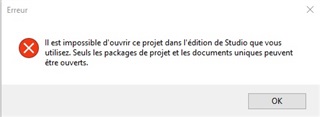
"Impossible to open this project in the Studio version you use. Only project packages and standalone documents can be opened"

When I try to open a project package (any project package), I get this message.
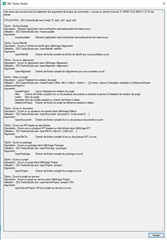
Screenshot of Trados Studio's error log with multiple entries detailing various issues and errors encountered during project operations.

"L'accès au chemin d'accès 'D:\$RECYCLE.BIN\S-1-5-18' est refusé."

Basically, the access to the recycle bin path is refused.

I had to free space on the computer yesterday and I deleted a lot of sdlppx and old project zip files. It went fine for the sdlppx files, but I got a black screen when trying to delete the zip files, which were in many different folders (short black screen, Explorer closed).

The recycle bin seems to work fine now, but the problem in Studio might come from there.

I reinstalled Studio but the problem is still there. I can work in a standalone document, but I cannot open project packages. I do not understand the relation between opening a project package and the recycle bin.

Could you help me with this issue ? 

Thank you very much in advance.


Generated Image Alt-Text
[edited by: Trados AI at 4:34 PM (GMT 0) on 28 Feb 2024]

emoji
Parents
  • Hi there,

    Try renaming the following folders, for example add 'old' (right-click on the folder and select 'Rename' or click in and away then type):
     
    C:\Users\[User_Name]\AppData\Local\SDL Trados Studio
    C:\Users\[User_Name]\AppData\Local\ProjectApi
     
    C:\Users\[User_Name]\AppData\Roaming\SDL Trados Studio
    C:\Users\[User_Name]\AppData\Roaming\ProjectApi
     
    C:\Users\[User_Name]\Documents\Studio 2017
    They'll be recreated next time you open and close Studio.
    For double measure, than run a Windows Repair on Studio:
    1. Close all SDL applications.
    2. Open the Control Panel:
      • Windows Vista/7: Start > Control Panel > Programs > Programs and Features.
      • Windows 8: Right-click on the screen at bottom-left corner and choose Control Panel > Uninstall a Program.
      • Windows 10: Right-click on Start > Control Panel > Select View by: Small Icons > Programs and Features
      • - or type 'Control Panel' in the search line on your bottom Windows toolbar.
    3. Click/highlight the relevant SDL product from the list (e.g. SDL Trados Studio 2017 etc) and click 'Repair' either on the top toolbar or on the right-click dropdown menu.
    4. Restart Studio.
    If that doesn't help, because you've already tried reinstalling, you have the right to contact Installation Help free of charge, here:

    installation and licensing help

    Select 'Installation' from the 'Case type' dropdown menu.

    Someone will help in the next day or two if you give your correct email address.

    All the best,

    Ali Slight smile

  • Hi Alison,

    Thank you I will try this when I have some time and will keep you posted !

    Have a nice day !

Reply Children