

You are currently working on UAT 

A modest 16.6 MB termbase, containing 2,900 terms, inexplicably grows 16+ times to 271 MB

Dear all,

The name of this thread says it all:

a comparatively modest termbase of 16 MB:
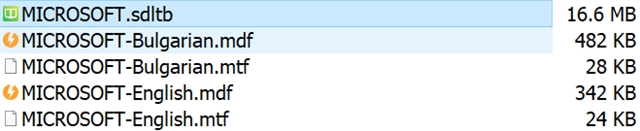
File list showing MICROSOFT.sdltb at 16.6 MB, MICROSOFT-Bulgarian.mdf at 482 KB, MICROSOFT-Bulgarian.mtf at 28 KB, MICROSOFT-English.mdf at 342 KB, and MICROSOFT-English.mtf at 24 KB.

...containing some 2,800 terms, has inexplicably grown to the humongous 271 MB:
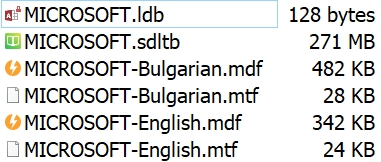
File list with a warning icon on MICROSOFT.ldb at 128 bytes, and MICROSOFT.sdltb at an increased size of 271 MB, other files remain the same size as in the first screenshot.

I suspect that this is the result of MultTerm crashing and then not fixing its own mess

Reorganizing the termbase has no effect on its size, so, please, do not offer it. These ever-growing termbases then simply stop working and Studio no longer recognizes terms from them.

As far as I am concerned (and I have been a paying customer since 2007, using Trados on an almost daily basis) Multiterm remains the over-engineered and unreliable mess it has always been to the detriment of its users.

I apologize if I am hurting anyone's feelings, not my intent.

Best regards,

Pavel Tsvetkov


Generated Image Alt-Text
[edited by: Trados AI at 4:32 PM (GMT 0) on 28 Feb 2024]

emoji
Parents
  • Hi 

    If the growth in size of your sdltb has grown due to MultiTerm crashing and 'leaving behind unfixed data' maybe exporting to Glossary Converter and reimporting might solve the situation... at least, it's worth a try.

    Glossary Converter

    I use Glossary Converter a lot and it is very good...

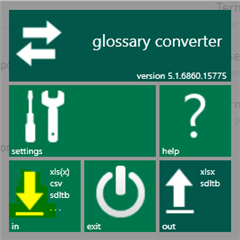
    It might well be the way to eradicate any unnecessary data... Basically, you drag the termbase .sdltb file from Windows Explorer to the Glossary Converter icon's 'in' pane:

    Screenshot of Glossary Converter version 5.1.6860.15775 showing options for settings, help, import and export of files with supported formats xls(x), csv, sdltb.

    You may have to clarify properties before it proceeds, which are fairly logical to understand.

    Then once the import is completed, you rename and drag the finished Excel file (after checking it is as you wish) back to the 'in' side and it creates a new .sdltb with the new name. Hopefully a lot smaller and easier to use.

    Give it a go, you have nothing to lose!

    All the best,

    Ali Slight smile

    emoji


    Generated Image Alt-Text
    [edited by: Trados AI at 4:32 PM (GMT 0) on 28 Feb 2024]
Reply
  • Hi 

    If the growth in size of your sdltb has grown due to MultiTerm crashing and 'leaving behind unfixed data' maybe exporting to Glossary Converter and reimporting might solve the situation... at least, it's worth a try.

    Glossary Converter

    I use Glossary Converter a lot and it is very good...

    It might well be the way to eradicate any unnecessary data... Basically, you drag the termbase .sdltb file from Windows Explorer to the Glossary Converter icon's 'in' pane:

    Screenshot of Glossary Converter version 5.1.6860.15775 showing options for settings, help, import and export of files with supported formats xls(x), csv, sdltb.

    You may have to clarify properties before it proceeds, which are fairly logical to understand.

    Then once the import is completed, you rename and drag the finished Excel file (after checking it is as you wish) back to the 'in' side and it creates a new .sdltb with the new name. Hopefully a lot smaller and easier to use.

    Give it a go, you have nothing to lose!

    All the best,

    Ali Slight smile

    emoji


    Generated Image Alt-Text
    [edited by: Trados AI at 4:32 PM (GMT 0) on 28 Feb 2024]
Children
  • Hi Ali,

    This is exactly the approach I took and it works.

    However, I would rather see SDL fix their rather expensive MultiTerm product than to encourage paying customers to locate, install and use a third-party app, which is provided via SDL AppStore, but whose quality is not verified by SDL.

    Recently, a popular app downloaded from SDL AppStore broke my Studio and even SDL support found it quite difficult to fix.

    So, why not create more reliable software products in the first place than rely on third-party developers to provide roundabout fixes?

    Best regards,

    Pavel Tsvetkov

  • Hi 

    I may be wrong but if an app is on the SDL AppStore, it has been verified by SDL. Otherwise they wouldn't allow it on their AppStore.

    The reason these Apps are created by third parties is because different users have different needs and, thankfully, some of them have the skills needed to meet those needs in the form of an app/plug-in that will extend the functionality of the main software. 

    Frequently with other software produced by a software company itself, these extensions have to be paid for. With SDL's AppStore, the majority of apps are free of charge.

    If SDL created Studio with the hundreds of extra functions supplied on the AppStore, it would be too huge to handle. Thus, being able to add Apps suited to your own needs is a better option, in my opinion.

    There actually is already a termbase converter tool that you can download with MultiTerm when you install it, MultiTerm Convert but I know nothing about it at all as I've never used it. I seem to recall it converts Excel to termbase but have no recollection how/if the opposite is achieved. I prefer Glossary Converter because it's only open when I want to use it so doesn't slow down my PC by running when I don't need it.

    Finally, Glossary Converter isn't a 'roundabout fix', it's an 'added extra', I believe.

    All the best,

    Ali Smiley
