You are currently working on UAT 

Why new created TM doesn’t show in TM pane and need to open it to appear in the ‎pane?‎

Hi,‎

(The question is about SDL Trados Studio 2019 SR1 Professional)‎

I created three TMs, but “Translation Memories” pane just show the first TM I created ‎and doesn’t show the second and third ones! While all of them exist when I check out ‎‎“Project Settings”. All TMs set to “Enabled” as well.‎ From “Home” tab > “Tasks” group, choose “Open” > “Open Translation Memory” ‎submenu, I can import the second and third TMs and now they appear in the ‎‎“Translation Memories” pane. But why they didn’t show when I created them for the ‎first time and need to open and import? While the first TM I created show in TM pane ‎immediately?‎

Best,‎

Masoud

  • Hi 

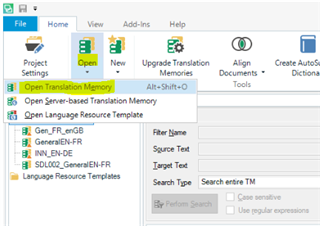
    That's quite normal. The TMs you add to your project don't automatically appear in the Translation Memories pane. If you want to open one then you need to navigate to it via 'Open' as below:

    Trados Studio screenshot showing the 'Open Translation Memory' dialog with a list of translation memories including 'General_FR-EN', 'EN_EN_GB', and 'SDL002_GeneralEN-FR'. 

    If every TM created were automatically listed in the Translation Memories view it would get rather crowded very quickly. Also, the only reasons to have them in the list is if you wish to work on them, export them, import to them, etc. They're not listed just so you can see what TMs you have.

    Another thing to note is that if you move a TM to a different folder after opening it in the Translation Memories view, it will disappear from the above list. Also, you can manually remove a TM from the list once you have finished working on it via 'right-click>Remove...'

    I hope this helps...

    All the best,

    Alison Slight smile

    emoji


    Generated Image Alt-Text
    [edited by: Trados AI at 4:30 PM (GMT 0) on 28 Feb 2024]