 Translate



This is not related to the Microsoft spell checker as suggested elsewhere, as I have Hunspell enabled. Any other suggested solutions to prevent this from crashing my PC every morning???
You are currently working on UAT

RWS Community
You are currently working on UAT
This is not related to the Microsoft spell checker as suggested elsewhere, as I have Hunspell enabled. Any other suggested solutions to prevent this from crashing my PC every morning???

Hello Julie Ben Taieb ,
Could you provide more information as to what is happening?
What exactly do you mean by-
"Invisible MS Word documents created after preview"
As you say this happening each morning- are you leaving the PC on overnight and not shutting down Studio?
Where are you storing the files?
Oana Nagy | QA Engineer | RWS Group
Hi Steven
I fully close down both Studio and my PC every night. Basically, whenever I've previewed a word document in Studio, I have problems starting my PC the following day....other people on here appear to have the same issue (please see the other related threads). One of them suggested this is caused by invisible documents being automatically created (they are not visible to me and I do not knowingly store them anywhere) every time a spell check is performed and suggested switching to Hunspell instead. I have done this and the problem persists. I really need a solution to this. I hope I've explained this satisfactorily.

Hello Julie Ben Taieb ,
I chave only seen one similar posting and even here it is not agreed whether this a Word or Studio related issue-
If you can point me to these other threads you mention,
other people on here appear to have the same issue (please see the other related threads).
...I might be able to draw some similarities and get to the root of the problem.
Yesterday I previewed Word files in 2015/2017 and 2019 and Studio works fine today so im unable to replicate the issue.
Maybe you could send me one of these Word files and I will run another check.
In the meantime I would suggest you ensure everything is completely up to date (parts 1 and 2) (you should be running at least Windows 7 latest updates installed- preferably Windows 10 and MS Office 2013
Also you can please provide the Windows log Files- this should shed light on to the cause of the crashes
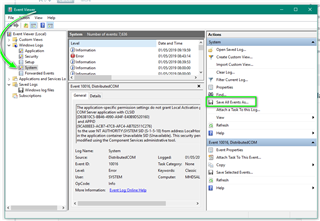
Please send this file to me directly (swhale@sdl.com) and i will take a look.
Oana Nagy | QA Engineer | RWS Group

Hello Julie Ben Taieb ,
I chave only seen one similar posting and even here it is not agreed whether this a Word or Studio related issue-
If you can point me to these other threads you mention,
other people on here appear to have the same issue (please see the other related threads).
...I might be able to draw some similarities and get to the root of the problem.
Yesterday I previewed Word files in 2015/2017 and 2019 and Studio works fine today so im unable to replicate the issue.
Maybe you could send me one of these Word files and I will run another check.
In the meantime I would suggest you ensure everything is completely up to date (parts 1 and 2) (you should be running at least Windows 7 latest updates installed- preferably Windows 10 and MS Office 2013
Also you can please provide the Windows log Files- this should shed light on to the cause of the crashes
Please send this file to me directly (swhale@sdl.com) and i will take a look.
Oana Nagy | QA Engineer | RWS Group
Hi Steven
I have sent you an email
Hello Julie Ben Taieb ,
Just a quick followup on our call yesterday-
Did the solution work for you?
Oana Nagy | QA Engineer | RWS Group
Hi Steven
Too early to say for sure yet - I've yet to complete and preview a suitable Trados project. I'll keep you updated. But I'm away next week, so it might not be for a while.
Thanks for all your help.
Hi Steven
Just to let you know that your solution solved the problem.
Thanks very much for all your help.