You are currently working on UAT 

TM window disappears after one second???

Former Member
Former Member

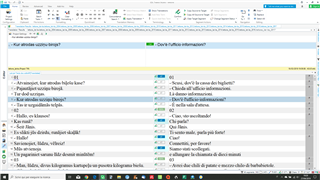
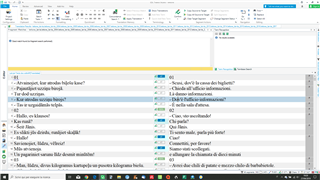
I see this Trados Studio interface with Translation Memory (TM) visible on the right side, showing source and target language segments. and after one second the TM disappears, like this Trados Studio interface with the Translation Memory (TM) section missing, only the source language segments are visible..
Tried to fix it the usual way, repairing, renaming the 15.0.0 etc. 

No success.

Where might the problem be?

yours

Luca


Generated Image Alt-Text
[edited by: Trados AI at 4:21 PM (GMT 0) on 28 Feb 2024]

emoji
  • This is a part of your screenshot, showing your TM window being set to auto-hide. You must "pin" it there to stay in its place.

    BTW; any reinstallation will not help here, as this is a setting in your user profile. First try to use View -> Reset window layout and, if that does not help, reset your user profile.

    _________________________________________________________

    When asking for help here, please be as accurate as possible. Please always remember to give the exact version of product used and all possible error messages received. The better you describe your problem, the better help you will get.

    Want to learn more about Trados Studio? Visit the Community Hub. Have a good idea to make Trados Studio better? Publish it here.